1
2
3
11
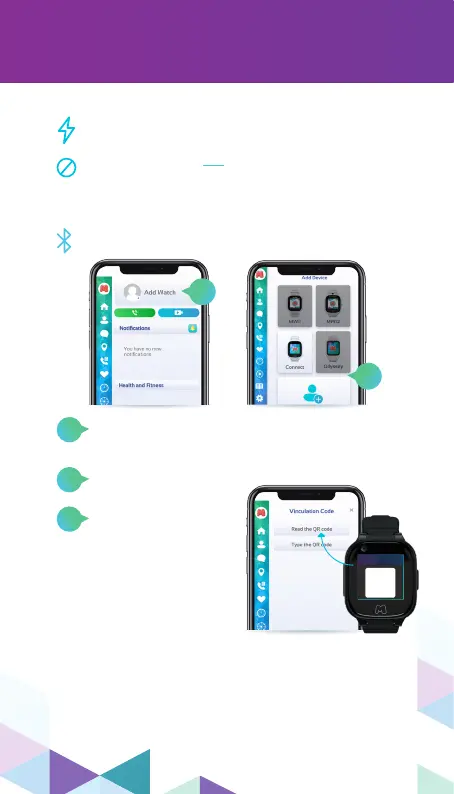
To bind your Moochies, please kindly do the following:
At your smartphone, open your MyMoochies App and
login using your new account details.
On your MyMoochies App, tap on “Add Watch”.
(Swipe the top menu to the left until the option
show up).
Choose the option “Connect” and then
click on “Next”.
Enter the 16 digit code,
showing on your
Moochies’ display and
click on “Next”.
(If the code does not
work, click on the blue
arrow icon to refresh
the code).
On the next page, please locate your WiFi network and
enter the password and click on “Connect”. Make sure
that it is a 2.4 GHz network.
If the system shows you the SIM plan registration after
you already registered your SIM plan, you can skip it,
by clicking on the “X” button on the top left corner of
the screen.
Turn on the Bluetooth on your smartphone.
Registering & Binding Your Watch
1
2
Plug your Moochies Phone Watch into the
charger and wait until it reaches 100% battery.
Please, we advise not to use a fast charger as it
might damage your Moochies.
SCAN WITH
MOOCHIES APP
SCAN WITH
MOOCHIES APP
THE QR CODE
SHOWED IN
YOUR WATCH


 To Next Page