EasyManua.ls Logo

Connect Moochies - Set Up Safe Zones (Geofencing)

Connect Moochies
59 pages
Print Icon
To Next Page IconTo Next Page
To Previous Page IconTo Previous Page
Loading...
23
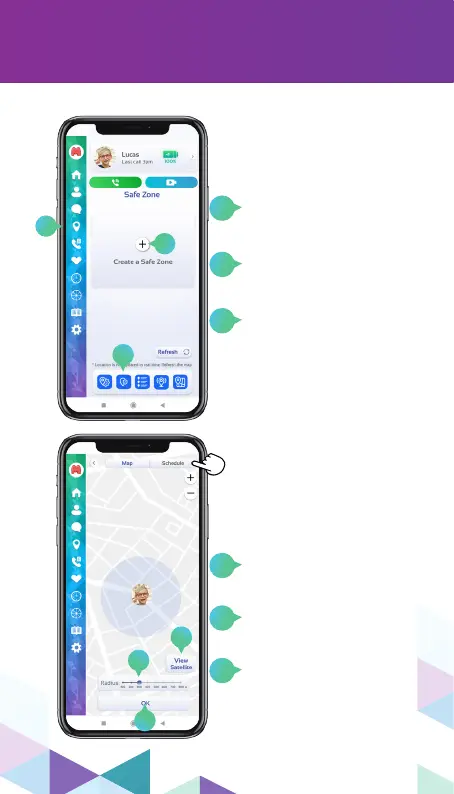
SETTING A SAFE ZONE
To congure a Safe
Zone, click on the GPS
menu.
Then click on the Safe
Zone icon in the bottom
menu.
You can add as many
Safe Zones as you like
by clicking on the “+”
sign.
Safe Zones are for you to
be warned when your child
comes out of a pre-dened
area.
Navigate through the
“Map” tabs to dene
the watch circulation
area and “Schedule” to
congure the date and
time of this Safe Zone.
4
1
2
3
5
6
Choose the satellite or
simplied map view by
clicking on this button.
Drag right or left to
increase or decrease the
Safe Zone.
Click OK to complete
the conguration and
go to the “Schedule” tab
at the top of the window
to select Date and Time.
4
2
3
1
5
6