22
GPS TRACKING
Make sure your SIM PLAN subscription is
active, to get the real-time location of your
Moochies Phone Watch via 4G network.
1
2
3
4
5
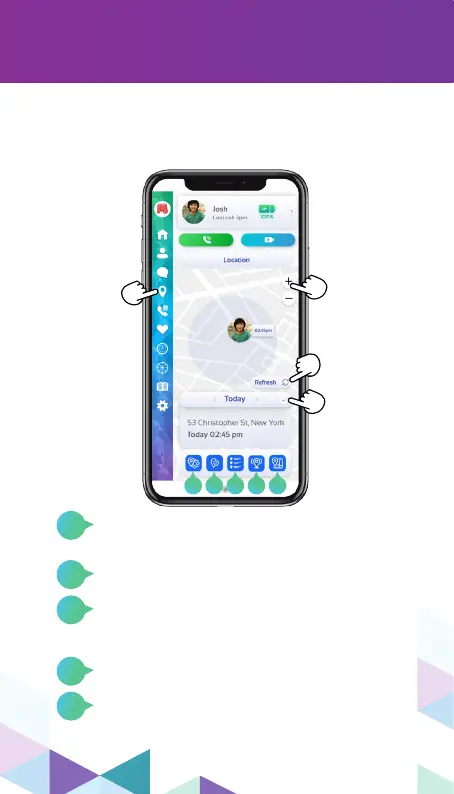
The GPS icon
accesses
the watch’s
location map.
The “+” and
“–” signs are
for zooming
in and out of
the map.
Navigate the
menu arrows
to get a quick
watch location
history.
Update the
map in real
time
In this icon, you can congure the tracking
frequency of your watch See more about it on
page 25.
Here you can congure a “Safe Zone”. See
details about how to set it on page 23 and 24.
This icon will give you access to the detailed
location history, where you can browse the
calendar menu and nd more information
about it.
Switch between map and satellite view.
Open the watch last reported position in
Google Maps/ Apple Maps.
1 2 3 4 5


 To Next Page