Home
Connect
Watch
Moochies
Page 44
Connect Moochies - Page 44
59 pages
Manual
Save Page as PDF
To Next Page
To Next Page
To Previous Page
To Previous Page
Loading...
44
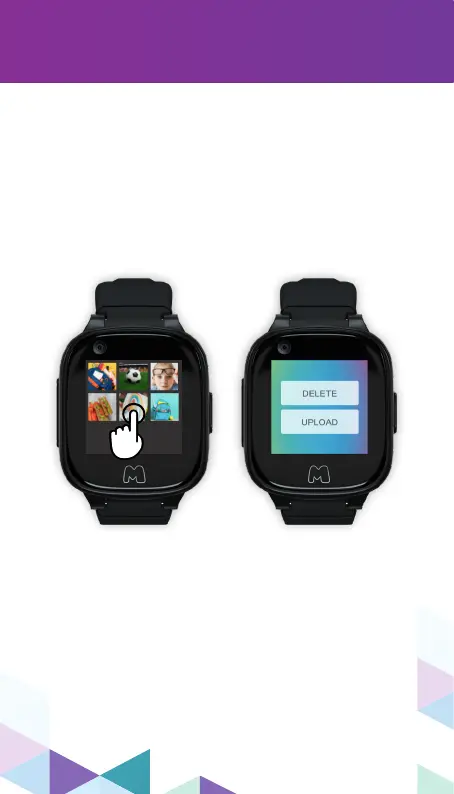
Uploading/Deleting Photos
T
o upload or delete photos from your
Moochies watch gallery to your app, simply
hold your nger on top of a specic photo for a
few seconds, and a menu will pop up, showing
the options:
DELETE
and
UPL
OAD.
43
45
Table of Contents
Main Page
Table of Contents
3
Layout
5
Setting up Your Moochies
6
Setting up a Sim Plan
7
Downloading the Mymoochies App
8
Registering & Binding Your Watch
9
Set a Wi-Fi Network
12
Set Kid's Profile
13
Pairing Subsequent Devices
14
Switching between Devices
15
Adding Contacts
16
By Phone Number
16
By Mymoochies App
17
Editing Contacts
18
Editing Admin Profile
19
Making Calls
20
Sending Messages
21
Gps Tracking
22
Setting a Safe Zone
23
Tracking Frequency
25
Step Tracker
26
Class Mode
27
Sos
28
Moochies Watch
30
Setting up Your Moochies
32
Customizing Wallpaper
33
Calls and Messages
34
Notifications
36
Messaging
37
Adding Friends
40
Step Tracker
41
Photo and Video
42
Gallery
43
Alarms
45
Moochies Watch Settings
48
Wi-Fi
49
Volume
50
Display
51
Software Updates
53
Sos
54
Troubleshooting
56
Can't Connect to Phone Network
57
Battery Drain
58


 To Next Page