GB
20
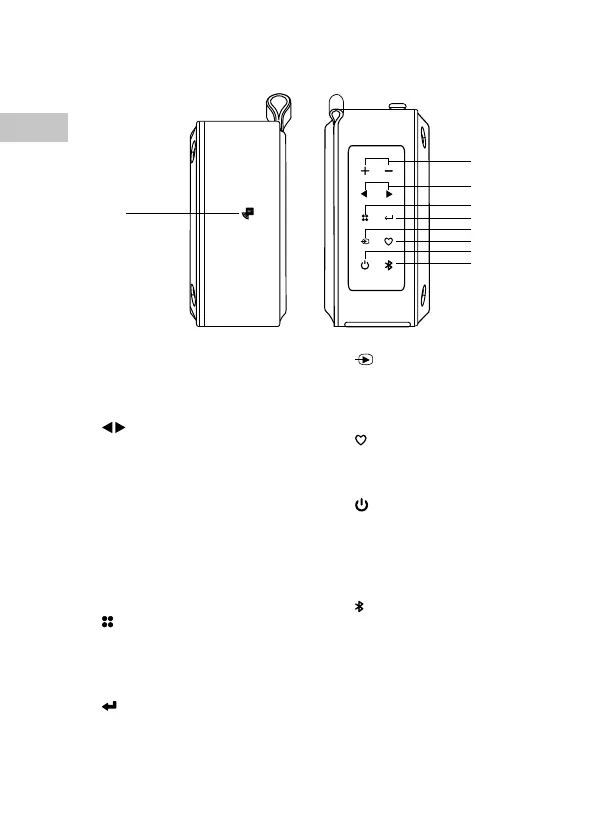
Left & Right Side View
1. NFC Sensor
2. VOLUME +/– Button
Increase or decrease the volume.
3.
Button
• Search for a radio station going
forwards/backwards through
accessible radio frequencies in
FM mode.
• Skip forwards/backwards to the
next track in Bluetooth mode.
• Press to upwards or downwards
browse options in the user
menu.
4.
Menu Button
• Press to display information.
• Press and hold to display system
menu.
5.
Enter Button
Press to conrm selection.
1
2
3
4
6
8
5
7
9
6. Mode Button
Switch between DAB, FM,
Bluetooth and Auxiliary
Input mode.
7.
Preset Button
• Preset a radio station.
• Select a preset station.
8.
ON/OFF Button
• Press and hold to switch the
unit on/o.
• Press to mute/resume
playback.
9.
Button
• Press to pause/resume
playback in the Bluetooth
mode.
• Press and hold to activate
the pairing function in
Bluetooth mode, or
disconnect the paired
Bluetooth device.


 To Next Page