GB
35
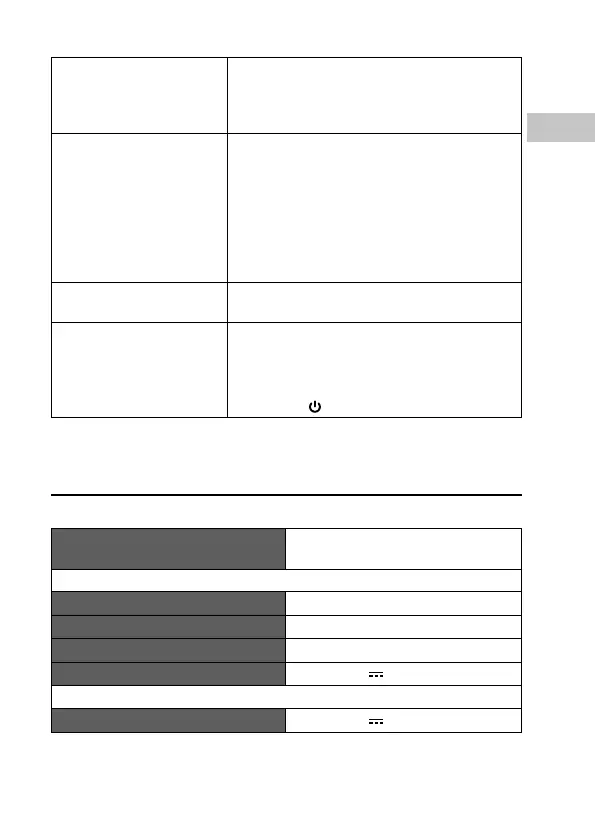
Voice interrupted in
Bluetooth® mode.
• Ensure that the unit and Bluetooth®
device is connected within 10 metres.
• Ensure that no obstruction between the
unit and the Bluetooth® device.
NFC Pairing failed. • Ensure that the Bluetooth® device
supports NFC function.
• Ensure that the unit is in pairing mode.
• For first time pairing, ensure that the
Bluetooth® device touches NFC sensor of
the unit.
• Remove mobile® phone protection shell
for NFC pairing.
No Sound in AUX IN
mode.
Ensure the audio cable is properly
connected.
The unit does not
respond when pressing
any buttons.
• The unit may freeze up during use. Switch
the unit off and then on again at the
mains socket to reset the unit.
• Press the RESET button, and then press
and hold
to switch the unit on.
Specication
Model SCARIABK16E / SCARIASI16E/
SCARIARG16E / SCARIACG16E
Power Adapter (Use only power adapter listed below)
Power Adapter Manufacturer GME Technology Co., Ltd
Power Adapter Model GME12B-120100FGR
Input AC 100-240~, 50/60 Hz, 0.4 A
Output DC 12 V, 1 A
Main Unit
Power Input DC 12 V, 1 A


 To Next Page