102 103
Hiding Albums
1. Press and hold an album to select it.
2. Tap more albums that you want to hide. The default Camera and Video
albums cannot be hidden.
3. Tap
> OK.
NOTE: To show the hidden albums again, tap
> Settings > Manage hidden
albums. Tap the albums you would like to restore and then tap Show.
Moving/Copying Pictures or Videos
1. Open an album and press and hold a picture or a video to select it.
2. Tap more items that you want to move or copy.
3. Tap
> Copy to / Move to.
4. Tap a destination album or tap New Album to name and create a new
album as the destination.
WORKING WITH PICTURES
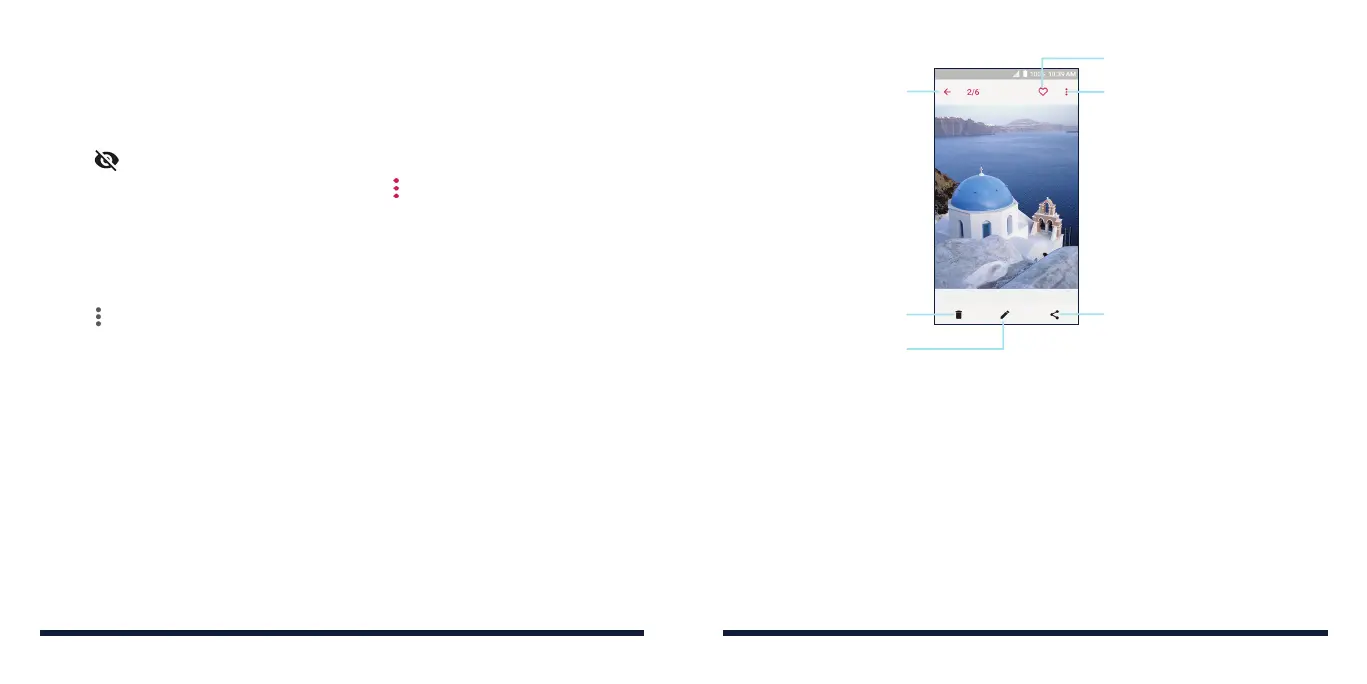
Tap a picture in an album to view the picture in full screen. Double-tap the
picture, or pinch two fingers together or spread them apart to zoom out or in.
Slide left or right to view other pictures/videos.
Exit the full screen
Delete the picture
Edit the picture
Share the picture
View more options, such
as rotate and rename
Add to Favorites
NOTES:
• Pinch a picture or video to make it smaller. You'll then see a filmstrip-style
view of all your pictures and videos in a row. Swipe left or right to scan
through them all.
• You can delete a picture or video by swiping it up in the filmstrip view. If
you accidentally delete one by swiping it up, tap UNDO to retrieve it.
• Not all options may be available for certain albums or pictures.
GALLERY GALLERY



 To Next Page