2. Setup
8
COM-1PD(USB)H
Step 1 Setting the Hardware
This section describes how to setup the converter and connect it to your PC.
There are switches and jumpers on the product that need to be set in advance.
The converter can be set up even with the factory defaults untouched. You can change board settings
later.
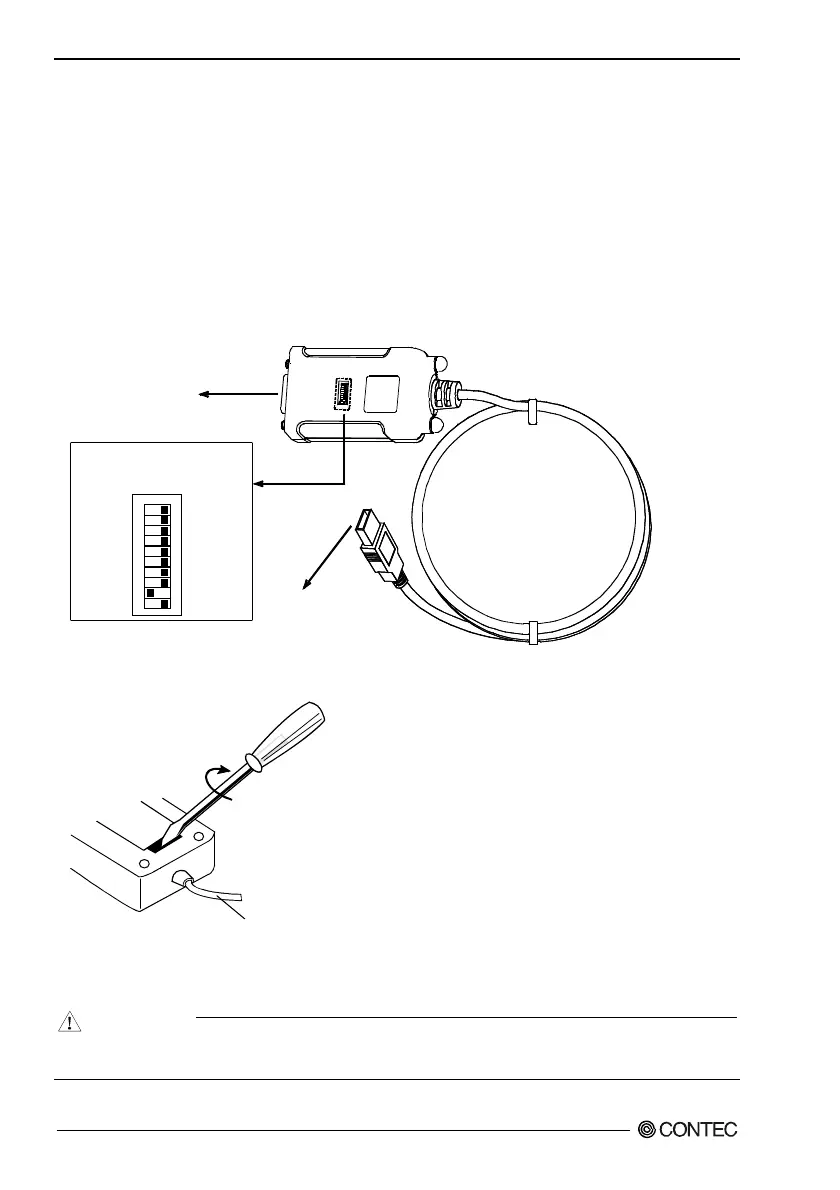
Name of each parts and Factory setting
Note that the switch setting shown below is the factory default.
COM-1PD(USB)H
12
345678
91
0
ON
Interface connector
D-SUB 9 pin (Male)
- Data transmission mode,
terminator setting SW
Interface connector
USB TypeA
Figure 2.1. Name of each parts and Factory setting
Connection cable
Turn the screwdriver to the right.
Figure 2.2. How to open the cover
Insert a standard screwdriver into the groove in the cover and turn the screwdriver.
CAUTION
Pushing the screwdriver in too far may damage the inside of the connector. Take care not to apply
any force to the inside when turning the screwdriver.


 To Next Page