2. Setup
10
COM-1PD(USB)H
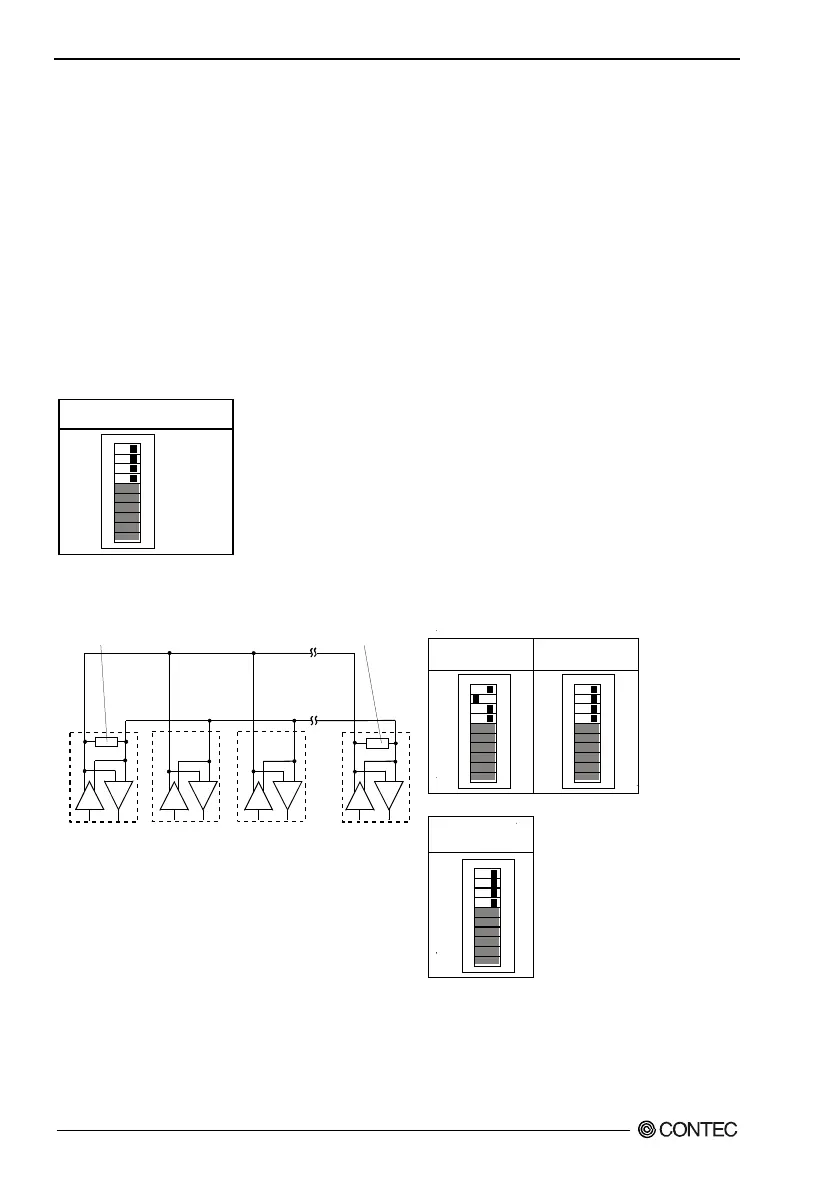
Setting the Terminating Resistors
When inserting a terminator, use the terminator setting switch. Set the terminator depending on the
remote device to which to connect the converter. The converter contains a 100Ω resistor as a
terminator.
The bits correspond to individual signal conductors. Bits 7, 8, 9, and 10 are for RxD, CTS, TxD, and
RTS, respectively.
Setup method
To set the terminal to a resistor other than 100
Ω
, set the terminator setting switch to OFF and insert an
external terminator. Given below are examples of inserting the terminator for half-duplex or
full-duplex setup.
Table 2.2. Setting the Terminator
Not insert the terminator
109
87
6
5
4
321
ON
RTS
TxD
CTS
RxD
Factory
setting
- Half-duplex
(A)
(B)
(C) (D)
109
87654321
ON
109
87654321
ON
109
87654321
ON
RTS
TxD
CTS
RxD
RTS
TxD
CTS
RxD
RTS
TxD
CTS
RxD
[B or C]
[A or D]
Terminator
(bit9)
Terminator
(bit9)
Insert the
Terminator
Not insert
the Terminator
Not insert
the Terminator
Figure 2.3. Party Line Connection


 To Next Page