2. Setup
COM-1PD(USB)H
9
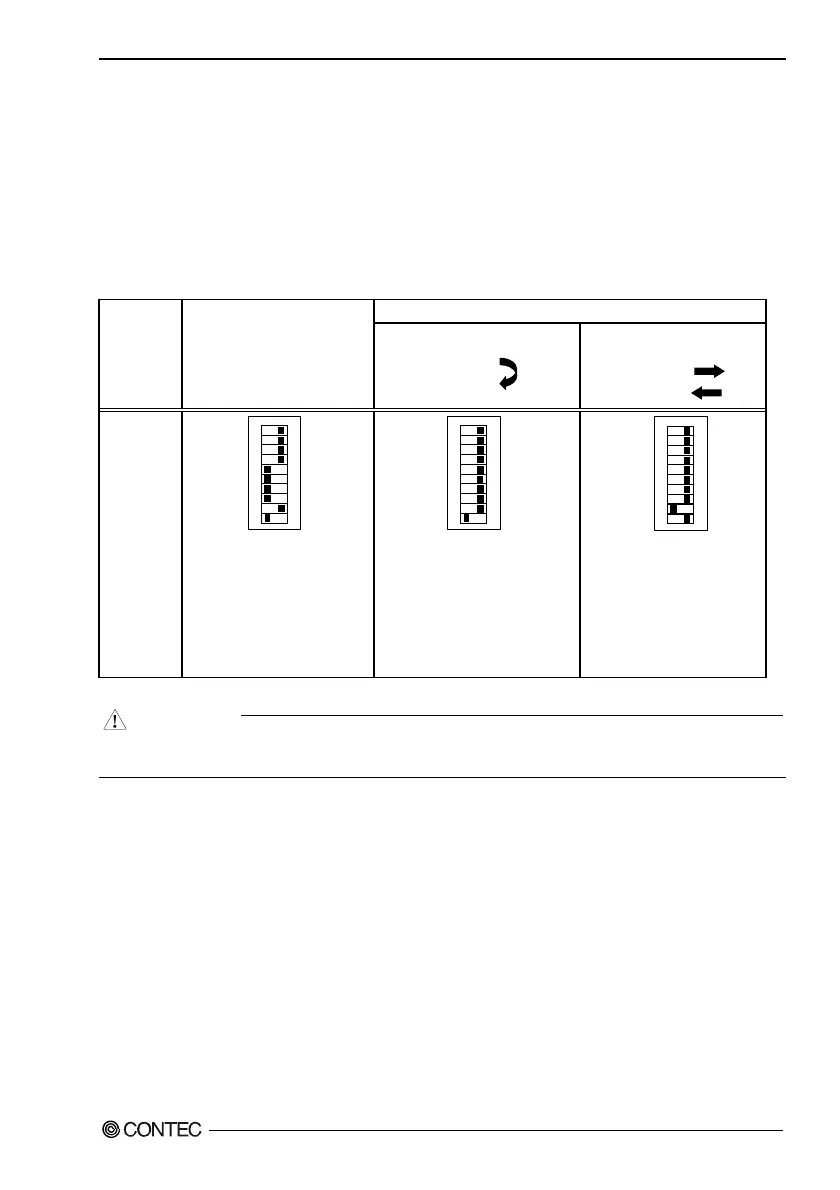
Setting the Data Transmission Mode
The data transmission mode setting switch can be used to switch between half-duplex and full-duplex
and between RTS and CTS in full-duplex mode. Set the appropriate data transmission mode
depending on the remote device to which to connect this converter. Set the transmission mode using
from the bit 1 to bit 6.
Setup method
Table 2.1. Setting the Data Transmission Mode
Full-duplex [Full]
Data
Transmission
Mode
Half-duplex [Half]
Loopback RTS and CTS
RTS
CTS
Connect RTS and CTS to
external device
RTS
CTS
Setup
method
109
8
7
654321
ON
This sets TxD as the only data
line and uses the RTS signal on
the converter to switch between
send and receive.
109
8
7
654321
ON
If the device you are
communicating with does not use
the RTS and CTS signals, you can
use this setting to make CTS
active
when the RTS signal on the
converter is set to active.
109
87
6
5
4
321
ON
Connecting to the RTS and
CTS
signals from the external
device.
CAUTION
Do not set bits 1 and 2 of each switch to both ON. Doing so may cause the Converter to
malfunction.


 To Next Page