(Note 1) For AMD Ryzen
™
5000 G-Series/4000 G-SeriesProcessors only.
(Note 2) To enable the Q-Flash Plus unction please visit the "Unique Features" webpage o GIGABYTE's
website.
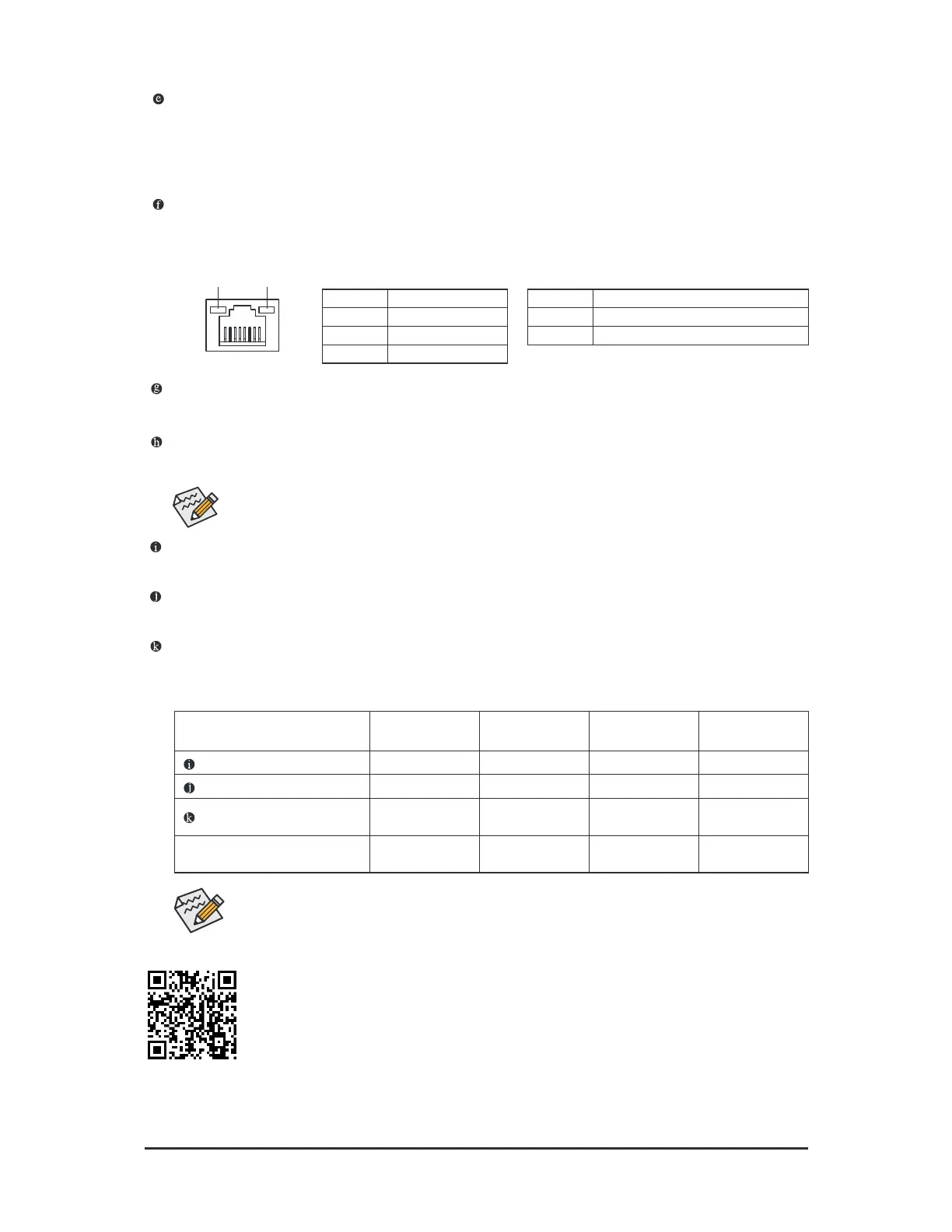
You can change the unctionality o an audio jack using the audio sotware. To congure 7.1-channel
audio, access the audio sotware or audio settings.
Audio Jack Congurations:
Jack
Headphone/
2-channel
4-channel 5.1-channel 7.1-channel
Line In/Rear Speaker Out
a a a
Line Out/Front Speaker Out
a a a a
Mic In/Center/Subwooer
Speaker Out
a a
Front Panel Line Out/Side
Speaker Out
a
Please visit GIGABYTE's website or details on conguring the audio sotware.
USB 2.0/1.1 Port
The USB port supports the USB 2.0/1.1 specication. Use this port or USB devices.
SMA Antenna Connectors (1T1R)
Use this connector to connect an antenna.
Line In/Rear Speaker Out (Blue)
The line in jack. Use this audio jack or line in devices such as an optical drive, walkman, etc.
Line Out/Front Speaker Out (Green)
The line out jack.
Mic In/Center/Subwoofer Speaker Out (Pink)
The Mic in jack.
Tighten the antennas to the antenna connectors and then aim the antennas correctly or better
signal reception.
Q-Flash Plus Button
(Note 2)
Q-Flash Plus allows you to update the BIOS when your system is o (S5 shutdown state). Save the latest
BIOS on a USB thumb drive and plug it into the Q-Flash Plus port, and then you can now fash the BIOS
automatically by simply pressing the Q-Flash Plus button. The QFLED will fash when the BIOS matching
and fashing activities start and will stop fashing when the main BIOS fashing is complete.
RJ-45 LAN Port
The Gigabit Ethernet LAN port provides Internet connection at up to 1 Gbps data rate. The ollowing
describes the states o the LAN port LEDs.
Activity LED
Speed LED
LAN Port
Activity LED:Speed LED:
State Description
Orange 1 Gbps data rate
Green 100 Mbps data rate
Off 10 Mbps data rate
State Description
Blinking Data transmission or receiving is occurring
Off No data transmission or receiving is occurring
- 11 -



 To Next Page