2-6 System Info.
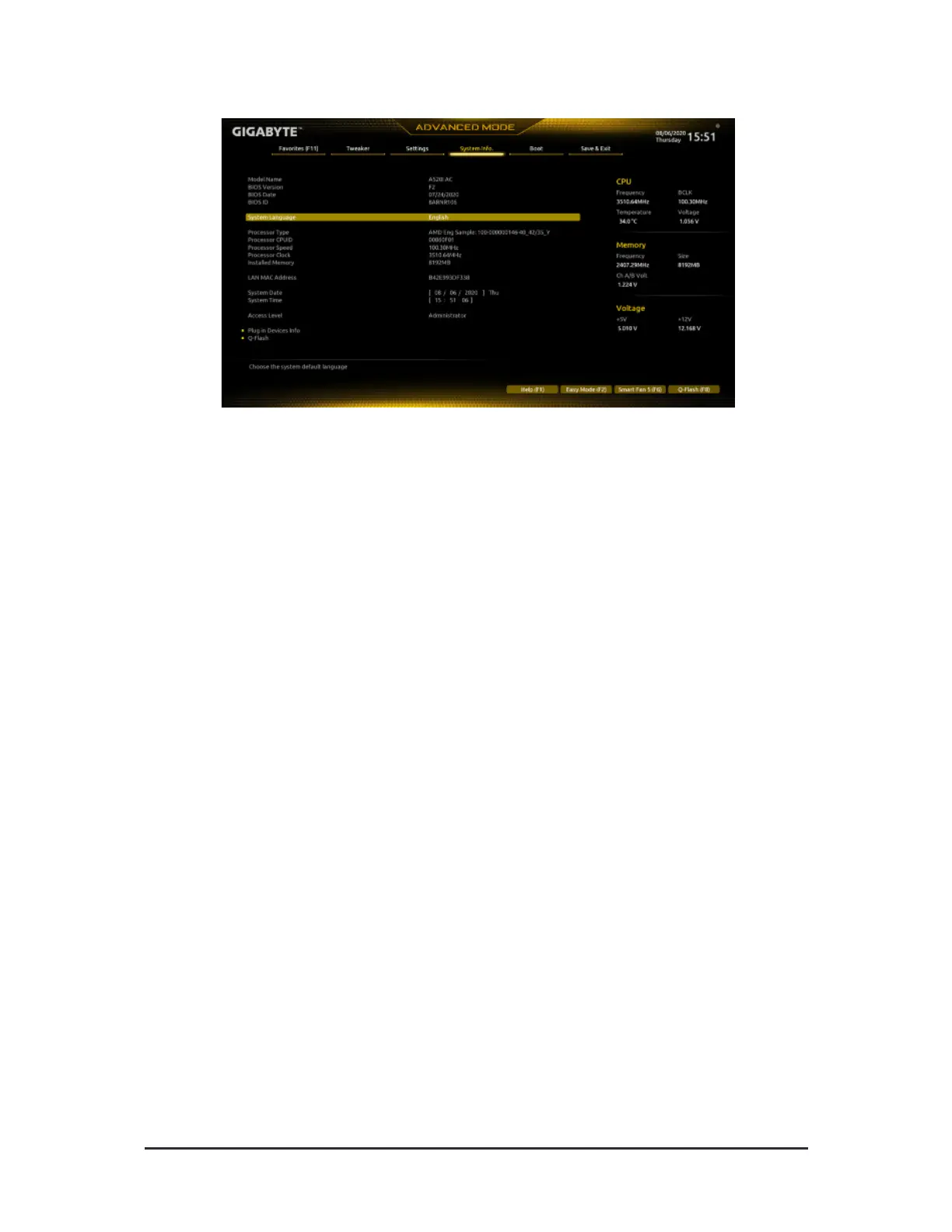
This section provides inormation on your motherboard model and BIOS version. You can also select the deault
language used by the BIOS and manually set the system time.
& System Language
Selects the deault language used by the BIOS.
& System Date
Sets the system date. The date ormat is week (read-only), month, date, and year. Use <Enter> to switch
between the Month, Date, and Year elds and use the <Page Up> or <Page Down> key to set the desired
value.
& System Time
Sets the system time. The time ormat is hour, minute, and second. For example, 1 p.m. is 13:00:00. Use
<Enter> to switch between the Hour, Minute, and Second elds and use the <Page Up> or <Page Down>
key to set the desired value.
& Access Level
Displays the current access level depending on the type o password protection used. (I no password is
set, the deault will display as Administrator.) The Administrator level allows you to make changes to all
BIOS settings; the User level only allows you to make changes to certain BIOS settings but not all.
Plug in Devices Info
Displays inormation on your SATA, PCI Express, and M.2 devices i installed.
Q-Flash
Allows you to access the Q-Flash utility to update the BIOS or back up the current BIOS conguration.
- 30 -












 To Next Page