English
Operating instructions
11
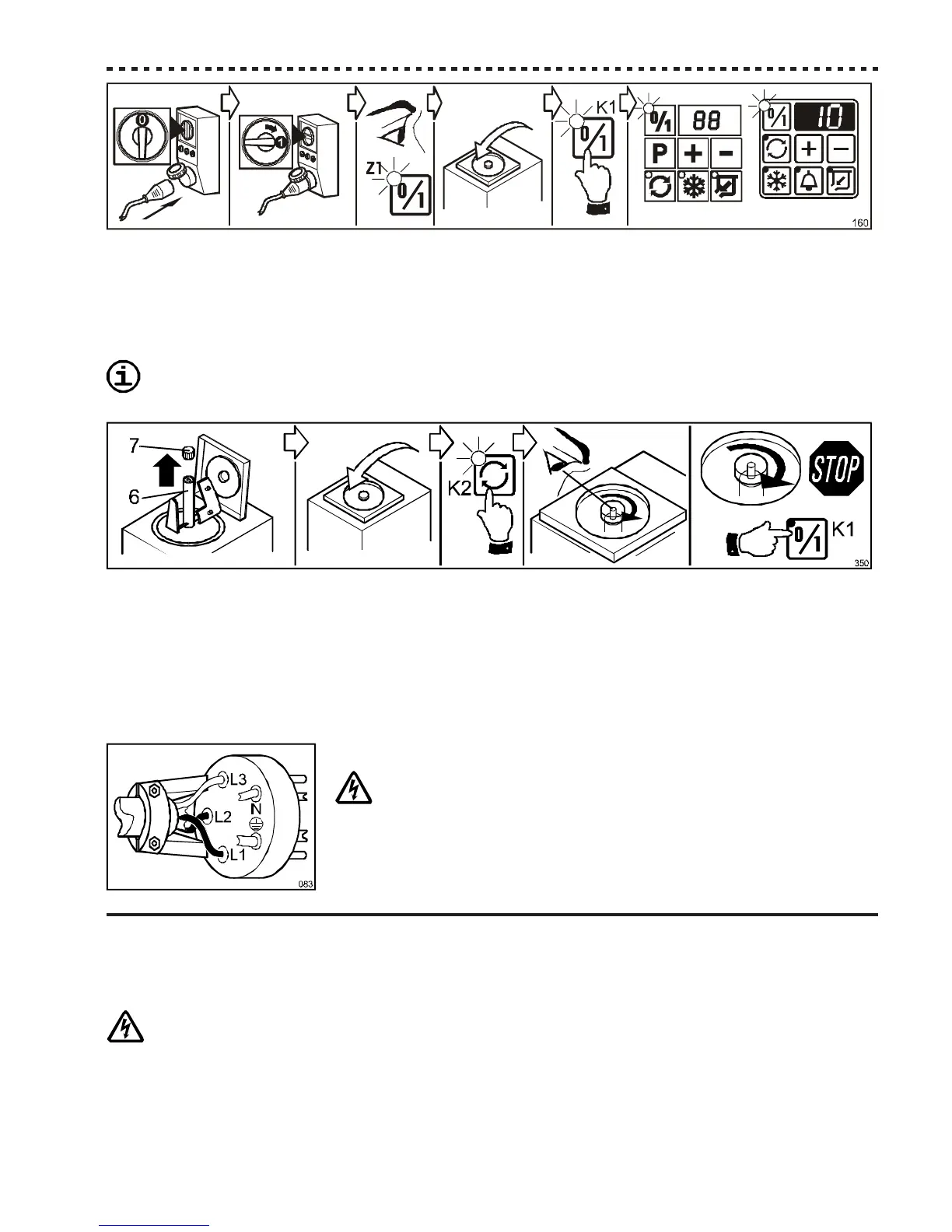
- Before starting, check that the socket's breaker is in the position “0”;
- Insert the plug in the socket, and put the general Breaker in position “1”;
- only the green indicator on the ON/OFF Pushbutton [Z1] on the control panel must turn on;
- close the cover and press the ON/OFF Pushbutton [K1]. The device predisposes itself for functioning and the display
shows the total whipping time previously set (in prime minutes);
Remove the beater from the cylinder before carrying on the check, to avoid letting it function dry.
ATTENTION: Follow the directions reported on Par. 7.2 - Disassembly of parts.
- Open the lid, unscrew the fixing knob [7], pull out the beater [6] from the cylinder, then close the lid.
Note: The device will not operate when the lid is open.
- Press the BEATING Pushbutton [K2] and check that beater’s shaft turns CLOCKWISE (as shown in the picture). In
this case, the device is correctly connected and ready to be used;
Note: do not unnecessarily start the refrigerator.
- If the rotation is COUNTERCLOCKWISE, the connection to the three-phase electrical supply is wrong, and
must be changed proceeding as follows:
- Turn off the device by pressing the ON/OFF Pushbutton [K1];
TURN THE SOCKET'S BREAKER TO THE “0” POSITION, THEN UN-
PLUG MACHINE;
- Open the plug’s shell and invert TWO of the THREE conductors connected at the
phases (R-S, R-T or S-T);
- Close the plug’s shell, plug in the device and repeat the check.
6MACHINE’S OPERATION
6.1 Warnings
WHEN USING THE DEVICE, AS WITH ALL ELECTRICAL APPARATUS, ESSENTIAL RULES MUST BE
COMPLIED WITH, PARTICULARLY:
- never touch it if your feet or hands are wet;
- never operate it while barefoot;
- never pull the supply cable to disconnect it from the mains network;
- avoid liquids to penetrate in the device, for example during its cleaning;
- forbid children and unable people to operate it.



 To Next Page