Using the IFC Software
April 2019CXX-UM-03060-EN-01Page 20
USING THE IFC SOFTWARE
OTE:N When you first run the program, if any error messages display, close them
out. The IFC configuration has not been initialized yet.
Password Initialization
The Password feature allows only users with permission to access or manipulate
the data in the configuration profile and flow processor.
If multiple users are interfacing with the software, set a default User Name
and Password that is easily remembered. For example: User Name=admin;
Password=admin
Un-installing or re-installing does not erase any set users.
To set the password for the first time, or to add a user name later:
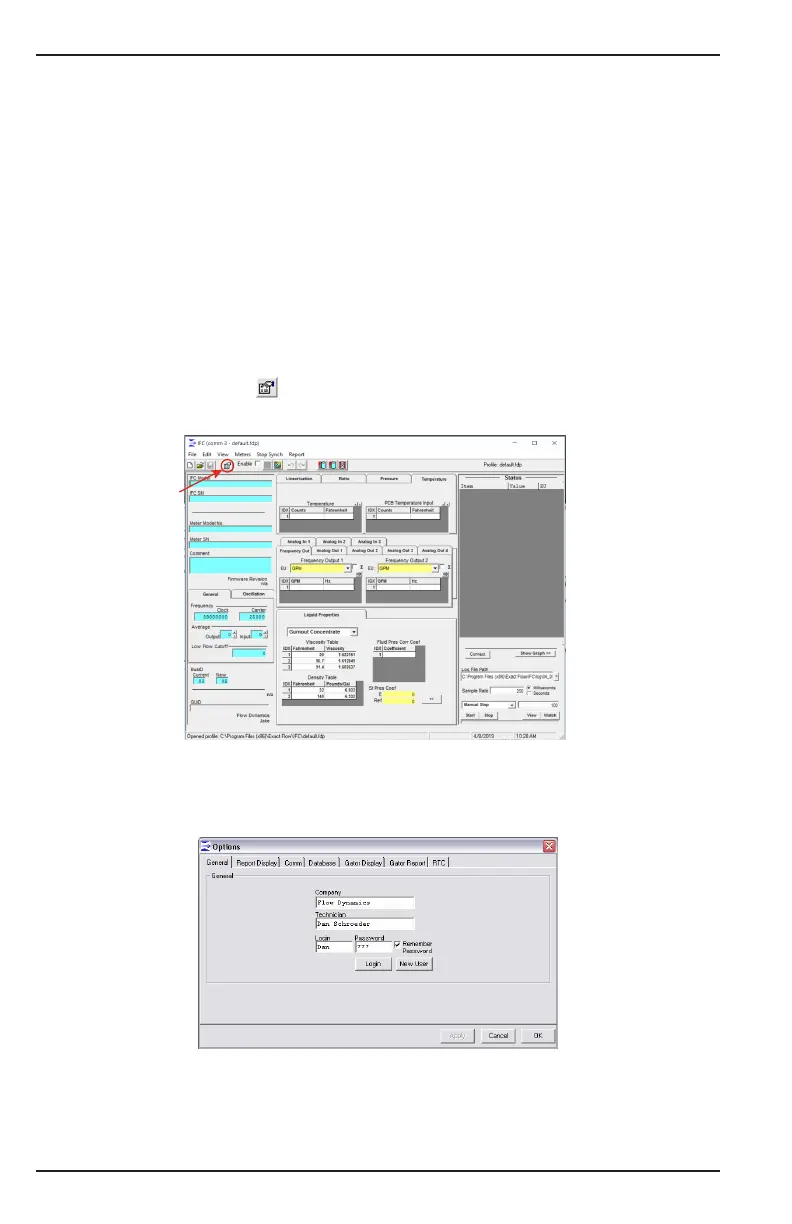
1. Click the Options icon in the upper left portion of the toolbar of the main
GUI screen.
Options Icon
Options Icon
Figure 7: Options icon
2. Select the General tab to view the password options.
OTE:N The General options are also available from File > Options > General.
Figure 8: General options
3. Enter a Company name and Technician name. These two elds remain the same
when opening the Options window, and are not protected.
4. Enter a Login name and Password to be associated with a specic prole.


 To Next Page