C-SMART
-I
Pro
Uaer
Manual
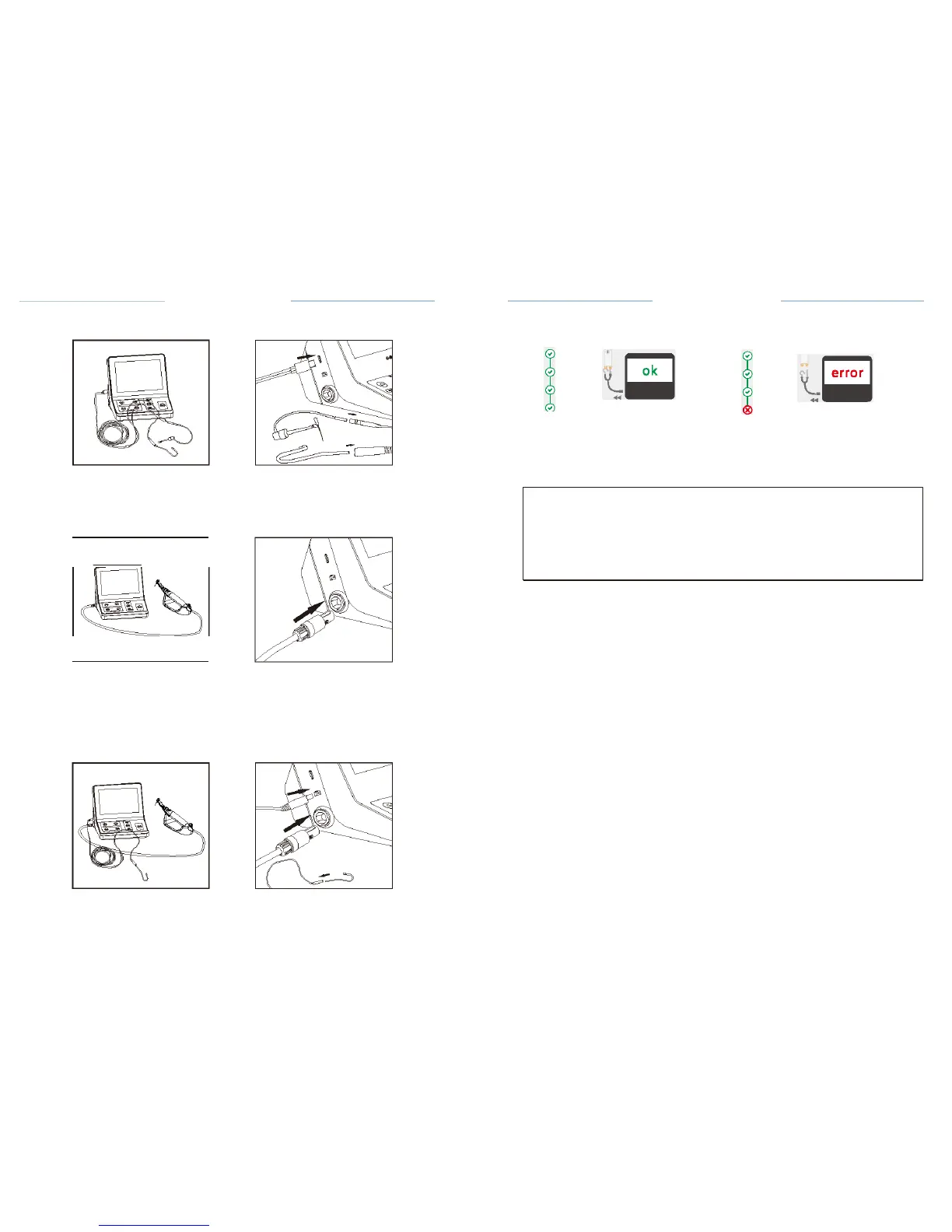
7.3.5 M1 mode
connection (only
apex
locator function)
C-SMART-1
Pro Uoer
Manual
Fig. 35 Accessories are OK
Fig.36 Accessories are ERROR
Fig.6
Fig.7
Connect the test wire with lip hook and the File clip to the Control unit,
test
wire's plug must be fully inserted into the test wire
socket.
Lt.
CAUTION
7.3.6 M2mode
connection (only motor function
)
Fig.B
Fig.9
• Connect the motor cable to the
Controlunit's
motor handpiece
socket.
• Connect the contra angle to motor
handpiece.
•Install
the lighting
device.
•Insert
the
file.
7.3.7 M3 mode
connection(Dual
mode
Motor&Apex
locator)
Fig.10
Fig.11
ERROR message indicates that the accessories are not functioning
properly
(wire breakage) or the contact area is
dirty.
Please contact your local dealer or contact the factory directly for
assistance
CHECK mode will exit automatically after 3s
.


 To Next Page