all interfaces with these rules at a similar percentage utilization of data (e.g. 10%, 50%, 90%) as the cycle progresses, rather than
quickly using 100% of a fast 1GB capped interface while using only a fraction of a slow 10GB capped interface, thus leaving the rest
of the cycle with only the slow interface. The Data Usage algorithm on the Load Balancing page must be selected or this checkbox
has no effect.
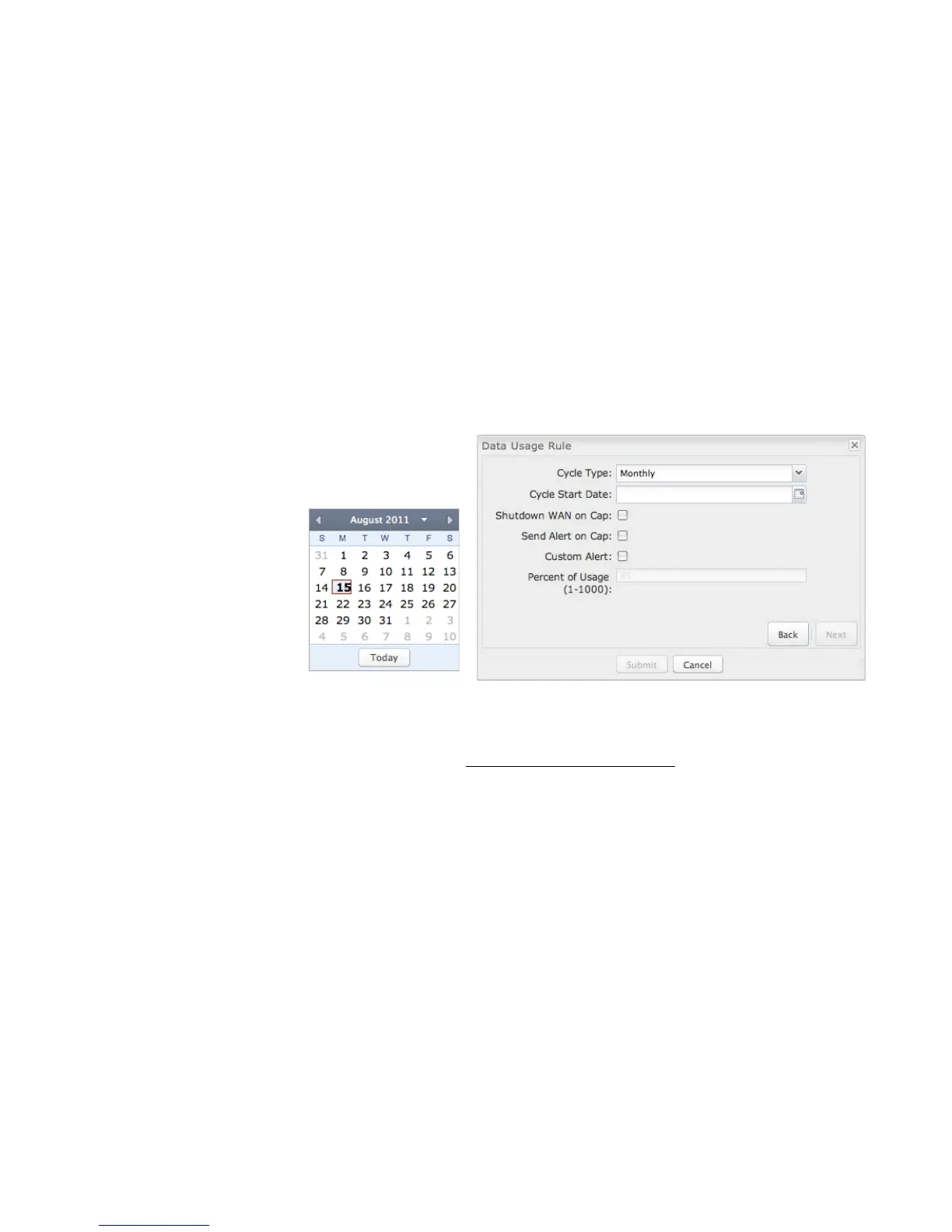
DATA USAGE RULE – PAGE 2
Cycle Type: How often the rule will reset. The data usage
amount will be reset at the end of each cycle. Select the
length of a cycle from a
dropdown menu with the
following choices:
• Daily
• Weekly
• Monthly
Cycle Start Date: Select the
date you wish the rule to begin.
This date will be used to track
when the rule will reset.
Shutdown WAN on Cap: If selected, the WAN device will shut down when the assigned usage is reached. A cycle reset or a rule
deletion will re-enable the device.
Send Alert on Cap: An email alert will be generated and sent when the assigned usage is reached.
WARNING: The SMTP mail server must be configured in System Settings → Device Alerts.
Custom Alert: When checked you enable a second email to be configured for a percentage of the assigned usage.
Percent of Usage (1-1000): If selected, a custom alert will be sent when your data usage reaches this percentage of your usage
cap. For example, you could set this at 90 percent so that you know when your usage is nearing 100 percent of the cap.















 To Next Page