USER MANUAL V1.0
WWW.CRAFTBOT.COM
3.3. Assembling the Craftbot Printer
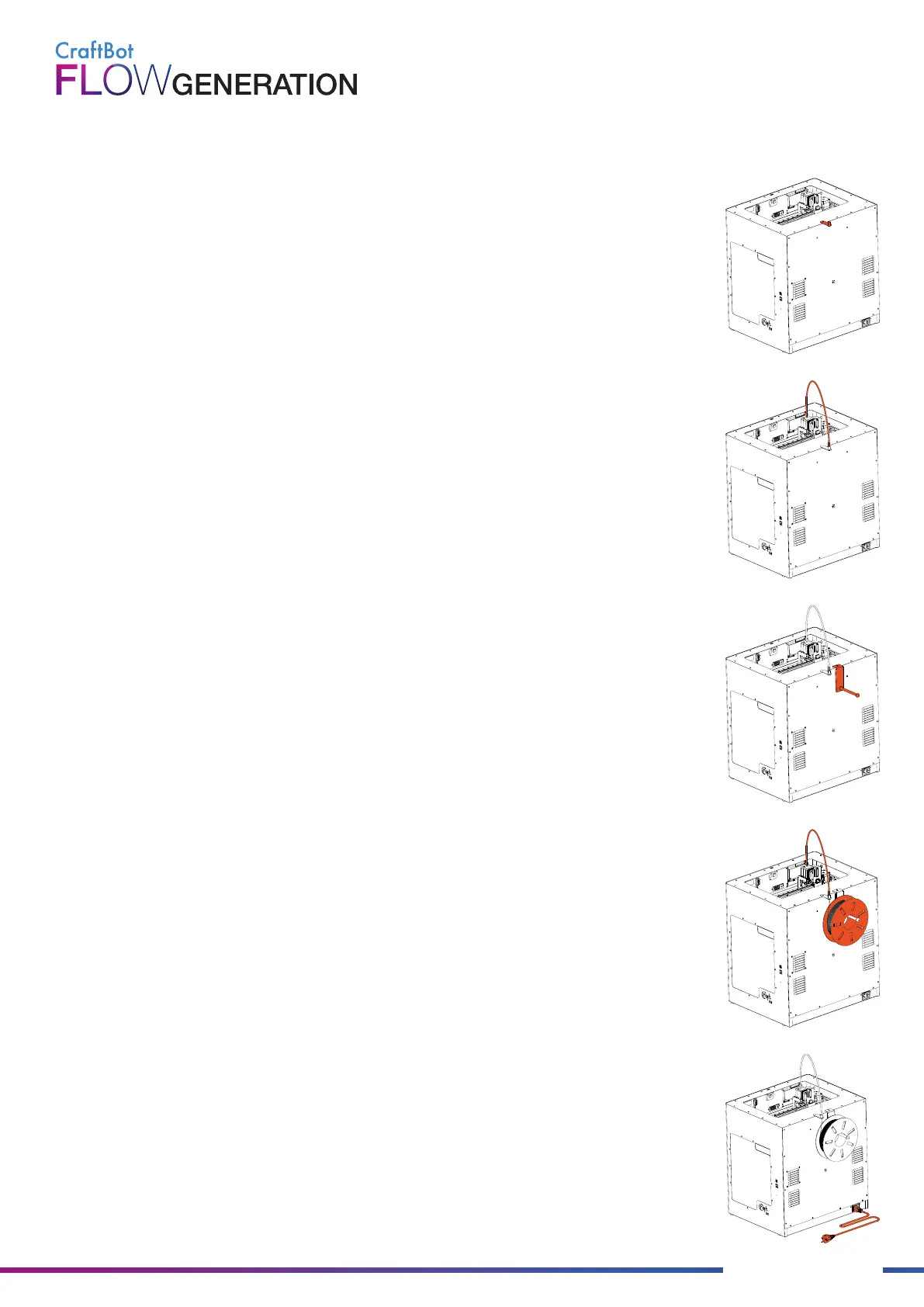
• Install the filament guide tube holder
- Select the desired position for filament guide holder. Choose its position so that the
filament spool holder fits beside it.
• Install the filament guide tube
- Locate the filament guide tube.
- Insert one end of the filament guide tube into the filament guide tube holder on top
of the CraftBot appliance.
- Push the other end into the hole on the top of the extruder.
• Install the filament spool holder
- Locate the filament spool holder.
- Using a hex wrench, install the filament spool holder next to the filament guide tube
holder.
• Mount the filament spool
- Fit the filament spool onto the filament spool holder so that the lead end keeps its
course when the filament is fed into the filament guide tube holder.
• Attach the power cord
- Ensure that the power switch on the CraftBot is set to the OFF position.
- Find and then insert the AC power cord into the power input on the back of the
CraftBot.
- Plug the power cord into a wall socket.


 To Next Page