USER GUIDE
10
4.5. Connecting the CraBot printer to wireless network
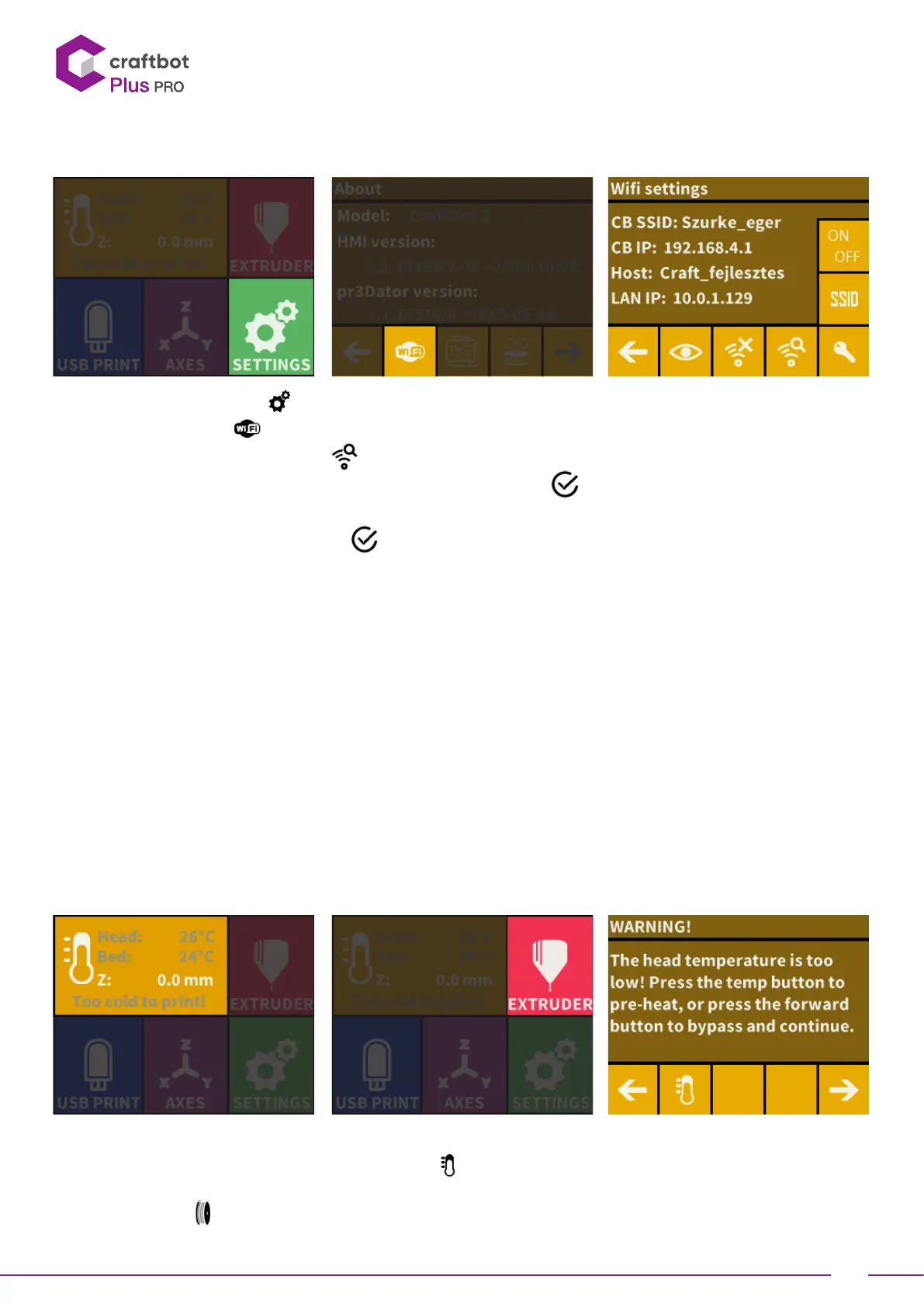
• Select the Seings menu
on the LCD screen and go to the page 4 with right arrow icon.
• Select the Wi-Fi icon .
• Select „search Wi-Fi network” icon
–in the boom row..
• Use up-down arrows and select desired network with the tick mark .
• Enter password.
• Confirm password with the tick mark in right boom corner.
• The selected Wi-Fi network is displayed indicating host name and LAN IP.
• By pressing the “eye” icon you can toggle the wifi’s visibility.
• SSID: You can modify the printer’s unique identifier name.
• Key icon: The printer’s password can be set if the printer is the host.
5. PREPARING THE PRINTER
5.1. Heating up the printer
For printing or loading/unloading the filament, you will need to heat up the printer according to the type of the
filament you are using.
• On the main menu press the thermometer buon
or press the same icon inside the Extruder menu.
• To Scroll through the pre-installed heat seing for other Filaments like PLA, ABS, and PET. Just press the
Filament spool
icon.


 To Next Page