Operators Manual 19
A FR ES H AP PR OA CH TO V EN DI NG
6.3 Accessing the Programming Mode
1. Open the front door of the machine. The LCD will automatically display The Operatorʼs
Programming Mode.
2. To access the Operatorʼs Root Menu, press the Program Entry key (1) on the service
keypad, located inside the door (see Section 5 - Service Keypad Functions for
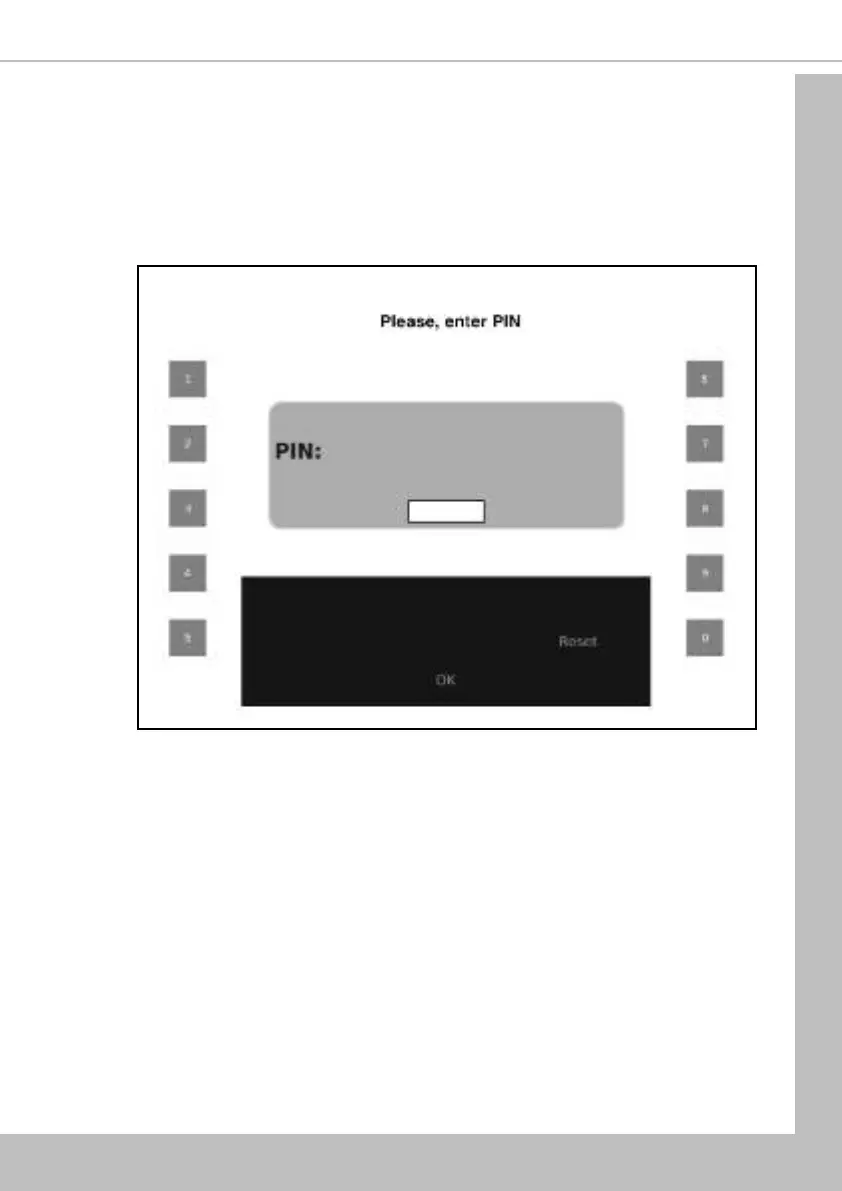
details). The LCD will display the screen as shown. Enter the 4 digit operatorʼs entry
pin code using the touch-keys.
N.B. The factory default operatorʼs code is entered by pressing the sequence 3-3-3-3.
You may be issued with your own personalised code.
3. Press Save. Providing the operator has entered the code correctly, the LCD will display
the operatorʼs top level programming menu - Main Menu. From here the operator can
easily navigate through all of the menus contained within the Operatorʼs Program (see
6.2 Navigating through the Menu Display for details).
6.4 Entering or Updating Parameters
To enter or update parameters, key in the actual digits of the number required using the touch-
keys 0-9. Once the correct parameter has been entered, press Save to overwrite the previous
value and save the new parameter in the machines memory. To return to the previous screen
press Up One Level.
Certain programming functions require that the operator choose either one or multiple parameters
within a sub program. These can take the form of either check boxes or radio buttons.
Section 6 - Programming Mode


 To Next Page