Stringer Trailer Owner’s/Parts Manual
22
PN:90806-00 R090114
OPERATION
5.14 RESET TRANSMITTER
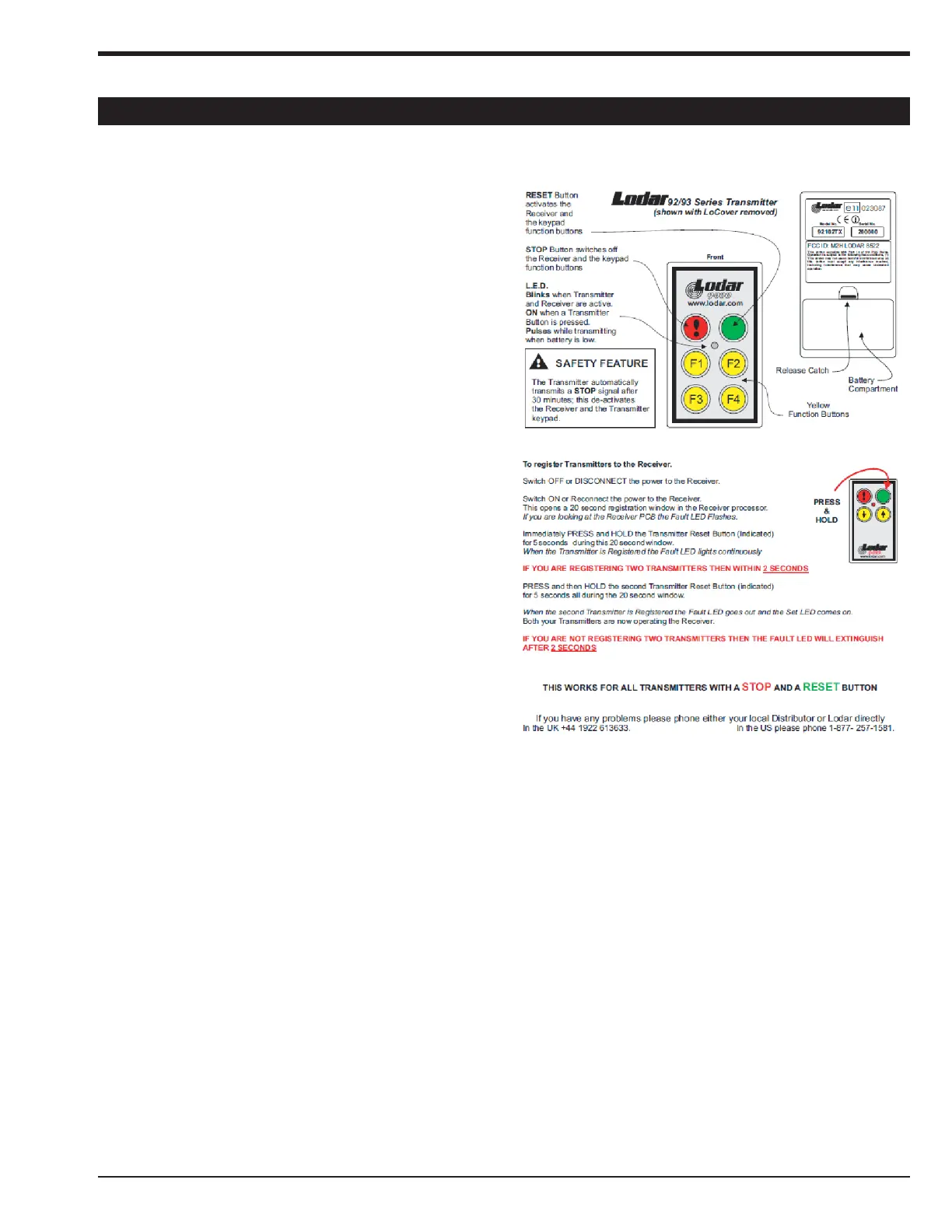
How to reset the Lodar Transmitter (Handheld) unit.
This procedure should correct any communication issues
that arise with your remote control unit.
**Reset may be required anytime power is lost to transmit-
ter or receiver unit.
1. Remove the battery from the handheld transmitter.
2. Remove power from the receiver unit.
3. Depress and hold “F1 = Down” and “F2 = Up” on the
transmitter as you reinstall the 9VDC battery.
4. Hold and then release both “F1” and “F2” after 3 to 5
seconds, the red LED will light up.
5. Look for a flash pattern from 1 to 4 flashes separated
by a pause on the red LED.
6. If the # of flashes counted was 2, then depress “F2”
button below the green button 3 time (5 -2 = 3)
7. After you pressed the “F2” button (5 - #flashes = X
times needed to press “F2”) you should see the red
LED flash 5 times.
8. If you see the 5 flash sequence followed by a pause, you
have correctly entered the correct # of missing flashes.
Press the “Red” button to accept the reset.
9. If you did not end up with 5 flashes, repeat steps 1
thru 8 again.
10. Uses care to see that the 9VDC battery stays installed
once you start the reset process.
11. The transmitter and receiver now need to be re-regis-
tered. Follow the Transmitter below



 To Next Page