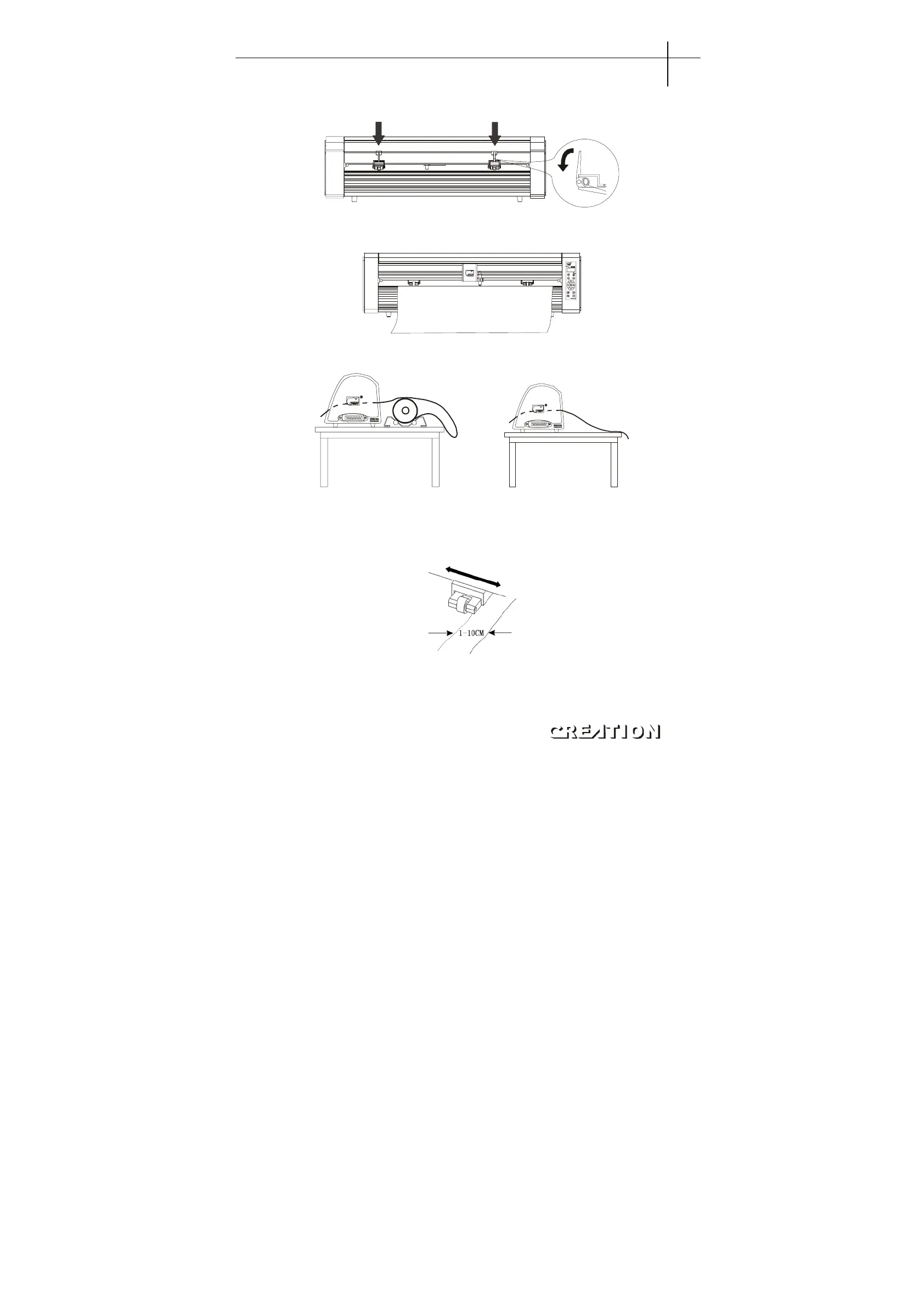
6.2.2.1 Press down the handle of paperweight wheel behind the machine to raise the
paperweight wheel。
6.2.2.2 Insert the media into the space between paper-weight wheel and main shaft, and pull
out the media to appropriate length from the front of the host。
Using a roll of media Using single sheet of media
Pulling it out to required length Cutting required length from paper roll
6.2.2.3 Adjust horizontal position of paperweight wheel according to width of paper. A
distance of mini mum 1-10CM is set between paper-weight wheel and paper edge to
ensure good running of paper.(note: the paper-weight wheel can not press on bearing)。
6.2.2.4 Raise two handles of paper-weight wheel, to make paper-weight wheel down to
press paper.。
6.2.2.5 Press“ONLINE”button, make the host in Y+0.00 x+0.00 (offline) state。
PCUT SERIES USER
‘
S MANUAL Plotting servo machine PCUT S operating instructions
25



 To Next Page