Page 31
1.5 Freediving Mode and Settings
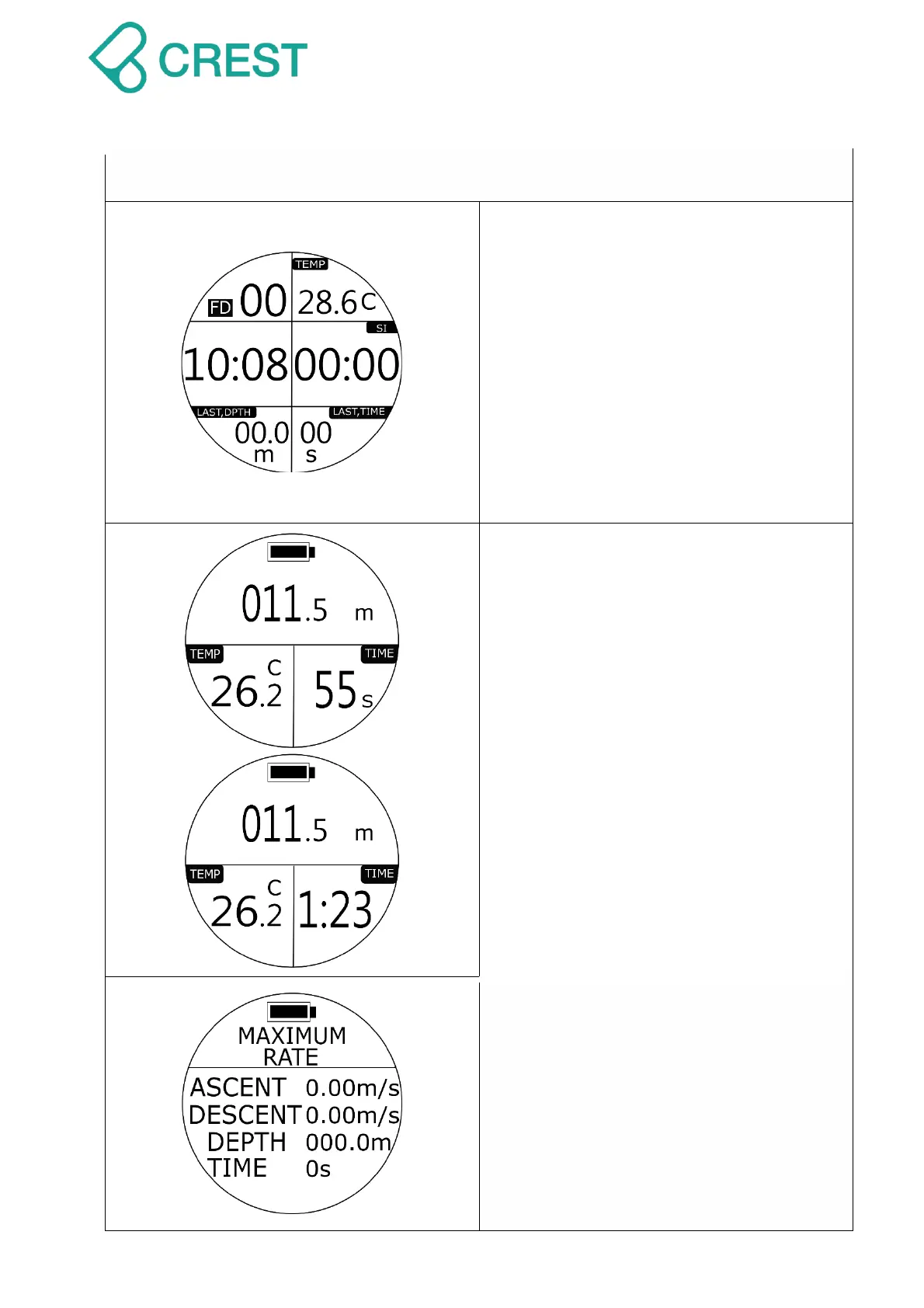
Description: Freediving Preview Mode
FD: Freediving Mode
00: Total freediving counts within 11 hours
TEMP:Water temperature
10:08: Surface time
SI:Surface Interval
LAST DPTH:Max Depth of previous dive
LAST TIME: Dive Time of previous dive
Description: Freediving Underwater
Mode
011.5m: Current depth
TEMP:Water temperature
TIME: Dive time
First minute will be shown in: seconds.
When exceed time passes over 1 minutes,
it will show in: minutes: seconds.
Description: Freediving Mode -
Maximum History
(Maximum History calculation are based on
total freediving history executed with this
dive computer within 11 hours.)
To Access: Press DOWN Button under
Freediving Mode.
ASCENT:MAX Ascent Speed
DESCENT:MAX Descent Speed


 To Next Page