Product Manual — Doc. 9020C AirMedia® Series 3 Receivers • 52
Digital Signage
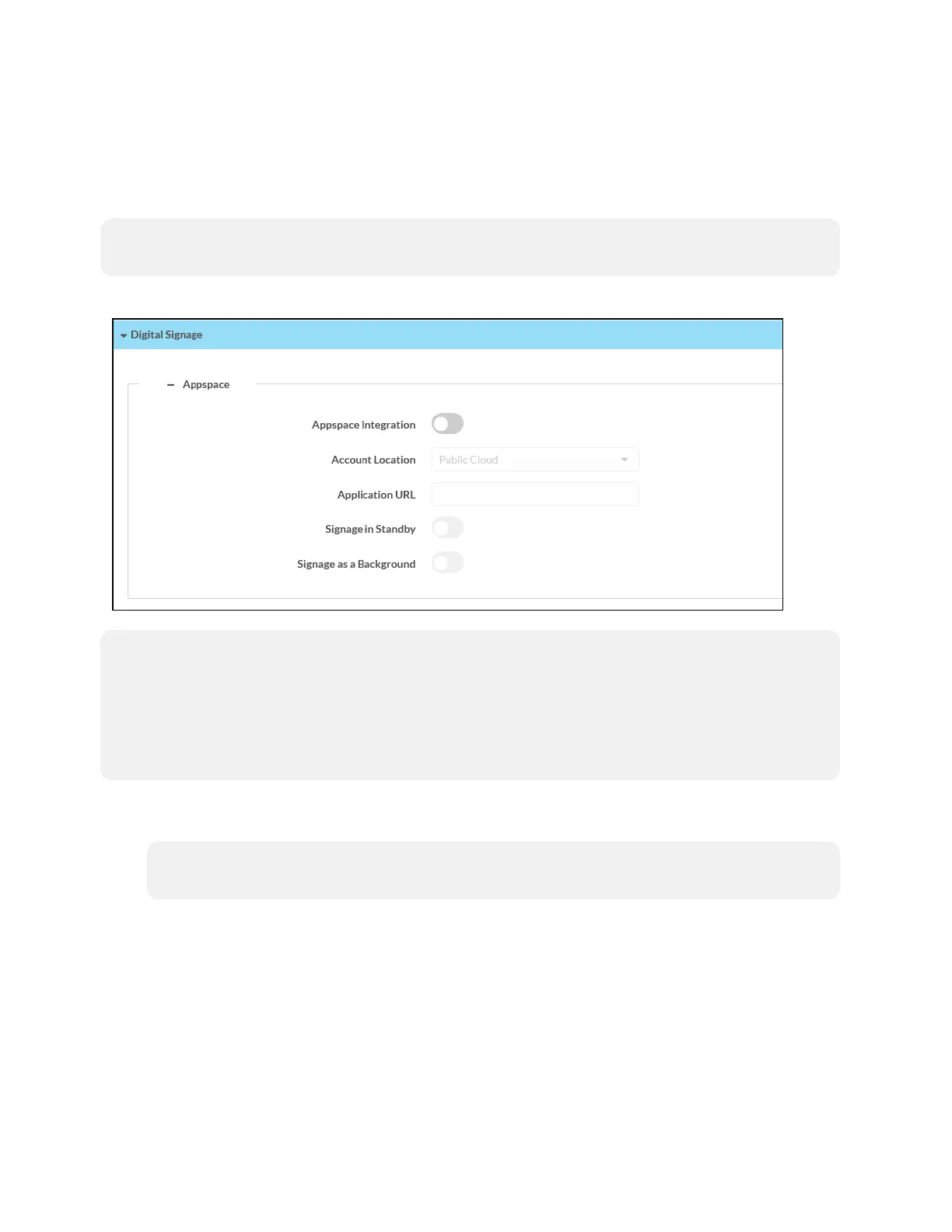
Select Digital Signage to configure the device’s operation with the Appspace platform. The
AirMedia receiver can display content from an Appspace digital signage channel when no
presentation is being made, or the room is not occupied.
NOTE: This is an early-preview feature and should not be deployed at the enterprise level. A full
release of the feature is planned for the future.
Settings Screen – Digital Signage (Appspace)
NOTES:
l
An active Appspace account is required.
l
The Appspace video service is not supported.
l
MicroSD card storage and touch screen support is not yet supported.
l
Maximum resolution for all content should be 3840x2160 for optimal performance.
l
Appspace Integration: Use the toggle button to enable the feature. The feature is used to
integrate the Appspace digital signage application with AirMedia® Series 3 Receivers.
NOTE: To use Appspace, the receiver's Power Settings must be set to Signage Only as
described in Power Settings (on page28).
l
Account Location: Select the location of the Appspace account from the drop-down list.
o
Select Public Cloud to use the Appspace public web app.
o
Select Private Instance to use a privately hosted instance of the Appspace web app
l
Application URL: Enter the location of the privately hosted instance of the Appspace web
app. Leave this field unfilled if Public Cloud is selected from the Account Location
drop-down list.















 To Next Page