15
E
N
GL
ISH
Cutting on Lightweight or Heavyweight Materials
Your Cricut™ machine can cut a variety of papers. For an optimal cut on
lightweight papers such as vellum or heavy papers such as thick cardstock, you
may need to adjust the blade depth, the speed of the cut, and/or the cut pressure
(all discussed below).
Adjusting Blade Depth
You will need to remove the cutting blade assembly from the Cricut™ machine before
you change the setting on the Adjustment Knob.
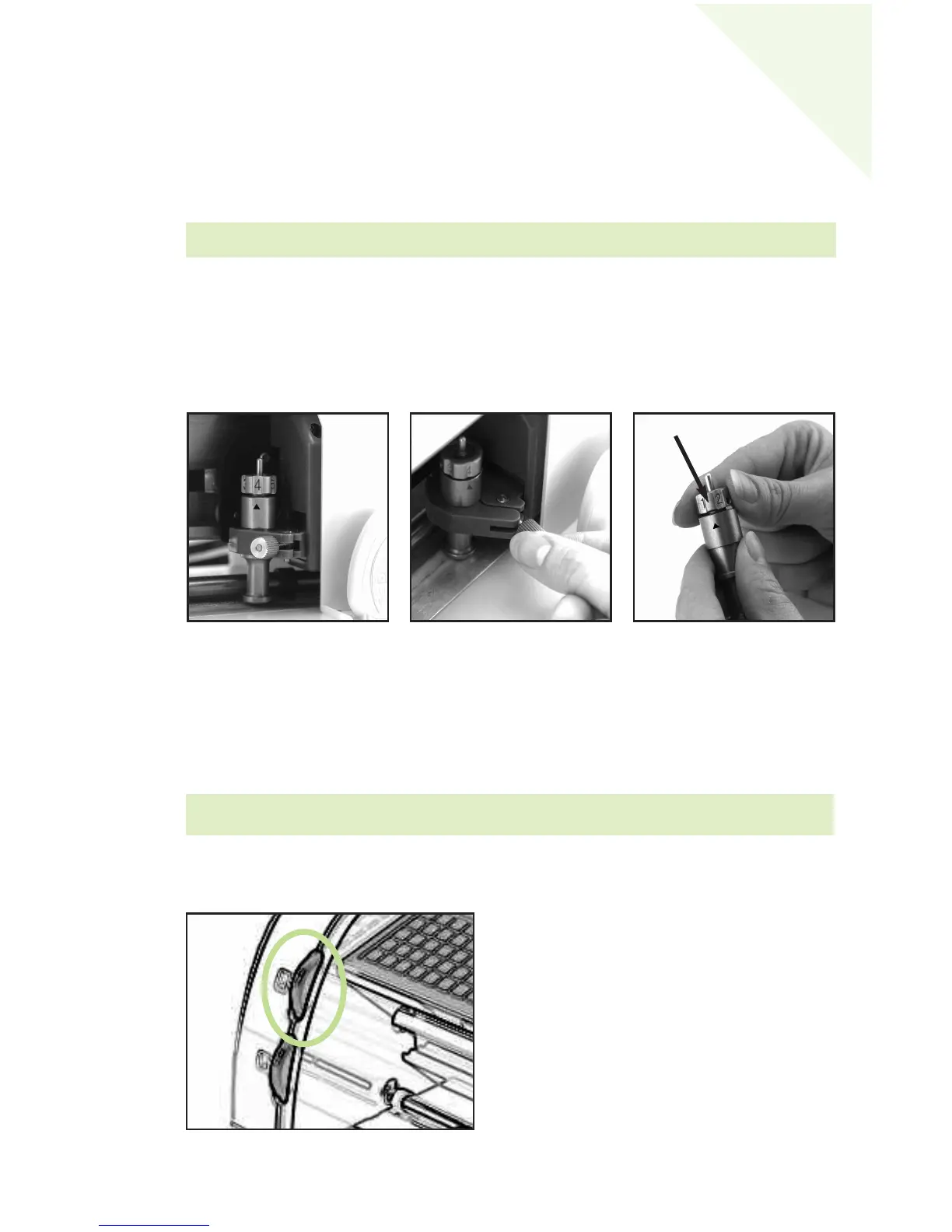
To remove the cutting blade assembly (Figure 1), locate the thumbscrew and turn it
counterclockwise until it loosens enough that you can swing the thumbscrew to the
right (Figure 2). Be careful not to loosen the screw too much, or it will fall out. Remove
the cutting blade assembly from the machine. Next, locate the Adjustment Knob (Figure 3)
on the top of the cutting blade assembly, and turn it to your desired setting (see the
paragraph below).
The smaller the number, the shorter the blade depth. Shorter blade depths are recom-
mended for lighter weight materials such as vellum, longer blade lengths for heavier
materials such as heavy cardstock. Reinstall the cutting blade assembly into the Cricut™
machine by reversing the procedure to remove the cutting blade assembly. Test the set-
ting on a scrap piece of paper and make adjustments as necessary.
Speed Dial
The Speed Dial allows you to control the cutting
speed for an optimal cut on a variety of papers.
If you regularly cut on thicker papers or card-
stock, you may want to turn the dial up to
increase the cutting speed. For lighter papers
such as vellum, or for smaller, more detailed
cuts, you may want to turn the dial down to
decrease the cutting speed. After each adjust-
ment, we recommend that you test the setting
with a scrap piece of paper, readjusting as nec-
essary until you achieve the desired results.
TIP: Cutting on cardstock and other heavy materials will reduce the life of your blade,
but it will produce the best cuts.
Figure 1
Figure 3
Figure 2
Adjustment Knob
WARNING! Always unplug your Cricut™ machine before removing the cutting blade
assembly!


 To Next Page