Replacing the Cutting Blade
To change the cutting blade, you must first remove the cutting blade assembly.
Refer to page 15 in this manual for instructions.
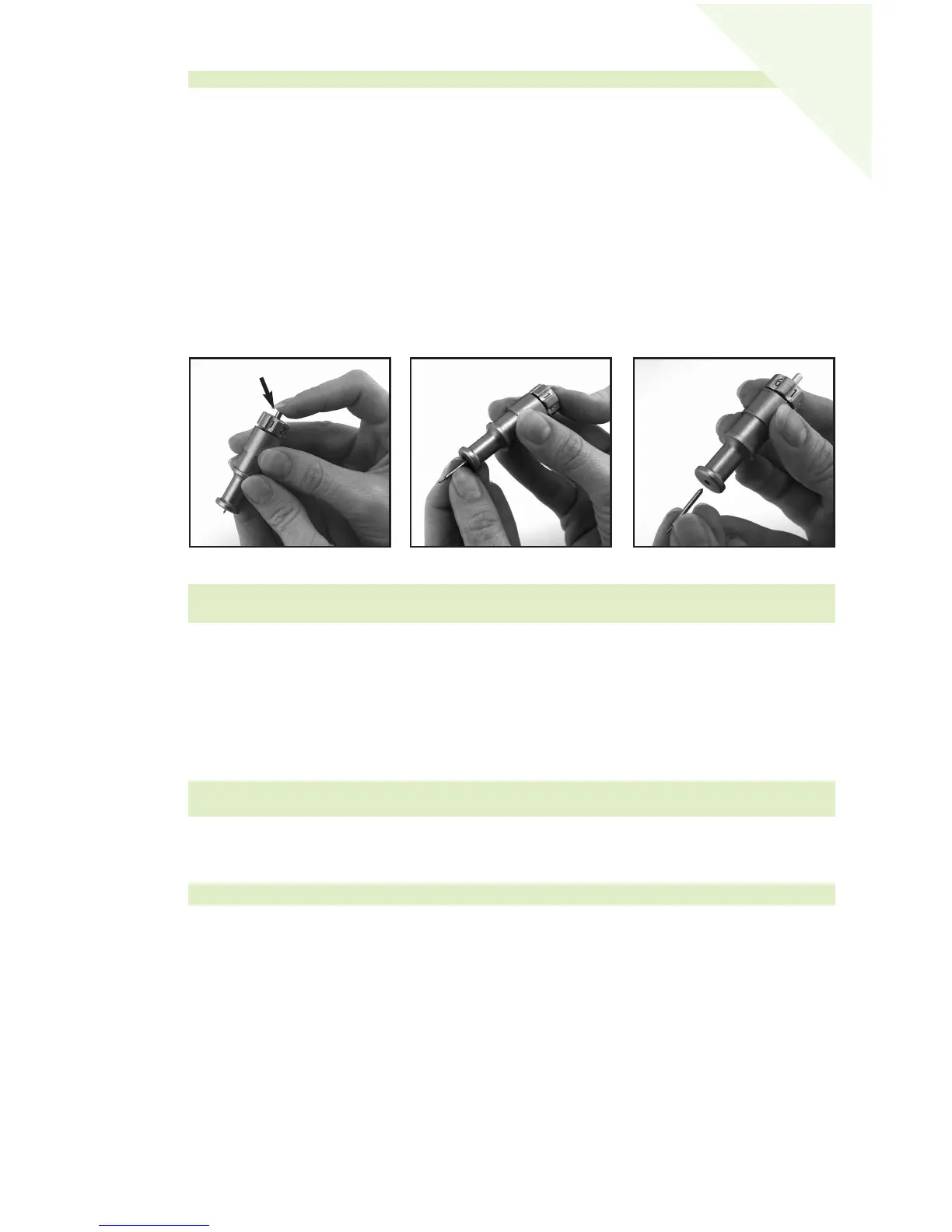
After removing the cutting blade assembly, locate the blade release at the top of the
cutting blade assembly and push it in (Figure 1). The blade will emerge from the cutting
blade assembly. You will need to gently pull the blade away from the magnet holding it
in place (Figure 2).
To install the new blade, let go of the blade release and carefully insert the shaft of the
blade into the hole in the bottom of the cutting blade assembly. The blade should be
“sucked” up inside the shaft if properly installed (Figure 3). The replacement cutting
blade is now installed. Reinstall the cutting blade assembly into the Cricut™ machine by
reversing the procedure to remove the cutting blade assembly.
Caring for the Cutting Mat
You can expect anywhere from 25-40 full mat cuts from your Cricut™ Cutting Mat
before it requires replacement. Your actual Cutting Mat life will vary, depending on
the settings you use and the papers you cut. When your paper no longer sticks to the
Cutting Mat, it’s time to replace the mat. Use only genuine Cricut™ Replacement Cutting
Mats, available at retailers everywhere (Part #29-0003).
Cleaning Your Cricut
™
Machine
To clean the Cricut™ machine, gently wipe exterior panels with a damp cloth.
Immediately dry any excess moisture with a chamois or other soft cloth. Do not use
chemicals or alcohol-based cleaners (including, but not limited to, acetone, benzene,
and carbon tetrachloride) on the machine. Abrasive cleansers and cleaning tools should
also be avoided. Do not immerse the machine or any component of it in water.
Additional Basic Care Tips:
• Keep away from food and liquids
• Keep in dry, dust-free location
• Avoid excessive heat or cold
• Do not leave in car, where excessive heat may melt or damage plastic components
• Do not expose to direct sunlight for any extended period of time
WARNING! Always unplug your Cricut™ machine before cleaning!
WARNING! Cutting blades are extremely sharp and should be handled with the utmost
care. They are also potential choking hazards; they should be kept away from children.
TIP: We recommend that you use several mats, rotating them often. This will extend the
overall life of each mat.
Figure 1
Figure 2
Figure 3
WARNING! Always unplug your Cricut™ machine before replacing cutting blades!
Blade Release
17
E
N
GL
ISH


 To Next Page