15
CroozerCargo14-ENG-2-14
Converting the Croozer Cargo to a Handcart
1
3
4
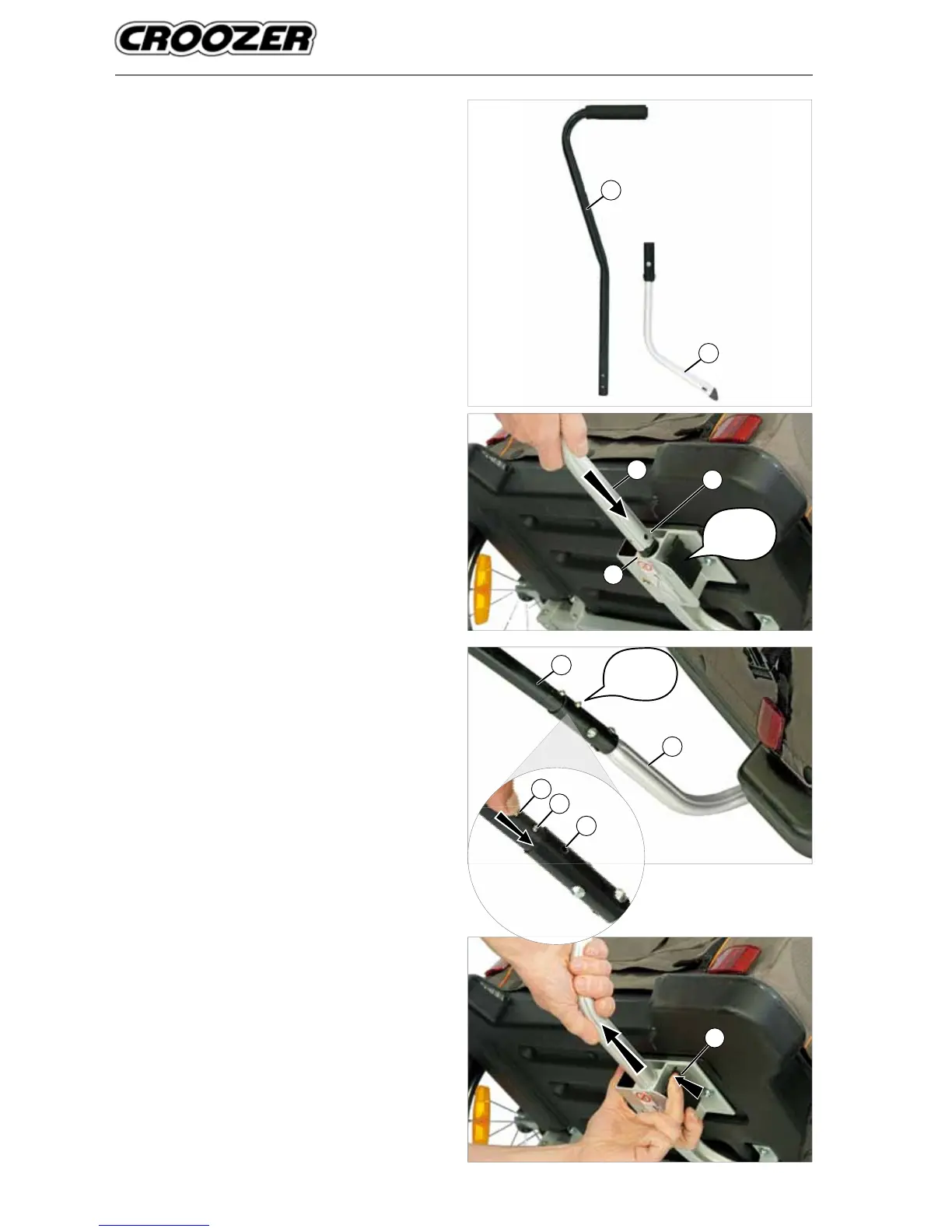
Attaching and removing the handlebar
The handlebar consists of two parts: a curved lower tube
(1) and the push bar (2). The push bar ts into the lower
tube. The handlebar is installed on the rear right side of the
Croozer Cargo (relative to the direction of travel). The rear
of the Trailer has red re ectors.
1. Lift the rear of the Croozer Cargo.
2. Hold the curved lower tube (1) with the tube curving
upwards and the hole (3) facing outwards, and slide
the end into the handlebar attachment bracket (4)
(marked with the warning label) until you hear and feel
it snap into place.
3. After the curved lower tube has been securely mount-
ed, press the push button (5) on the push bar (2) and
slide it into the upper end of the curved lower tube (1).
When the push bar is fully inserted, you will be able to
hear and see the second button (6) snap into the hole
(7) in the curved lower tube.
4. Pull the handlebar upwards to check whether it is
securely attached.
5. To remove the handlebar, follow these instructions in
the reverse order. Press the release mechanism (8)
and pull the curved lower tube out of the bracket.
1
2
6
7
5
Click!
8
Click!
1
2



 To Next Page