www.SteamPoweredRadio.Com
20
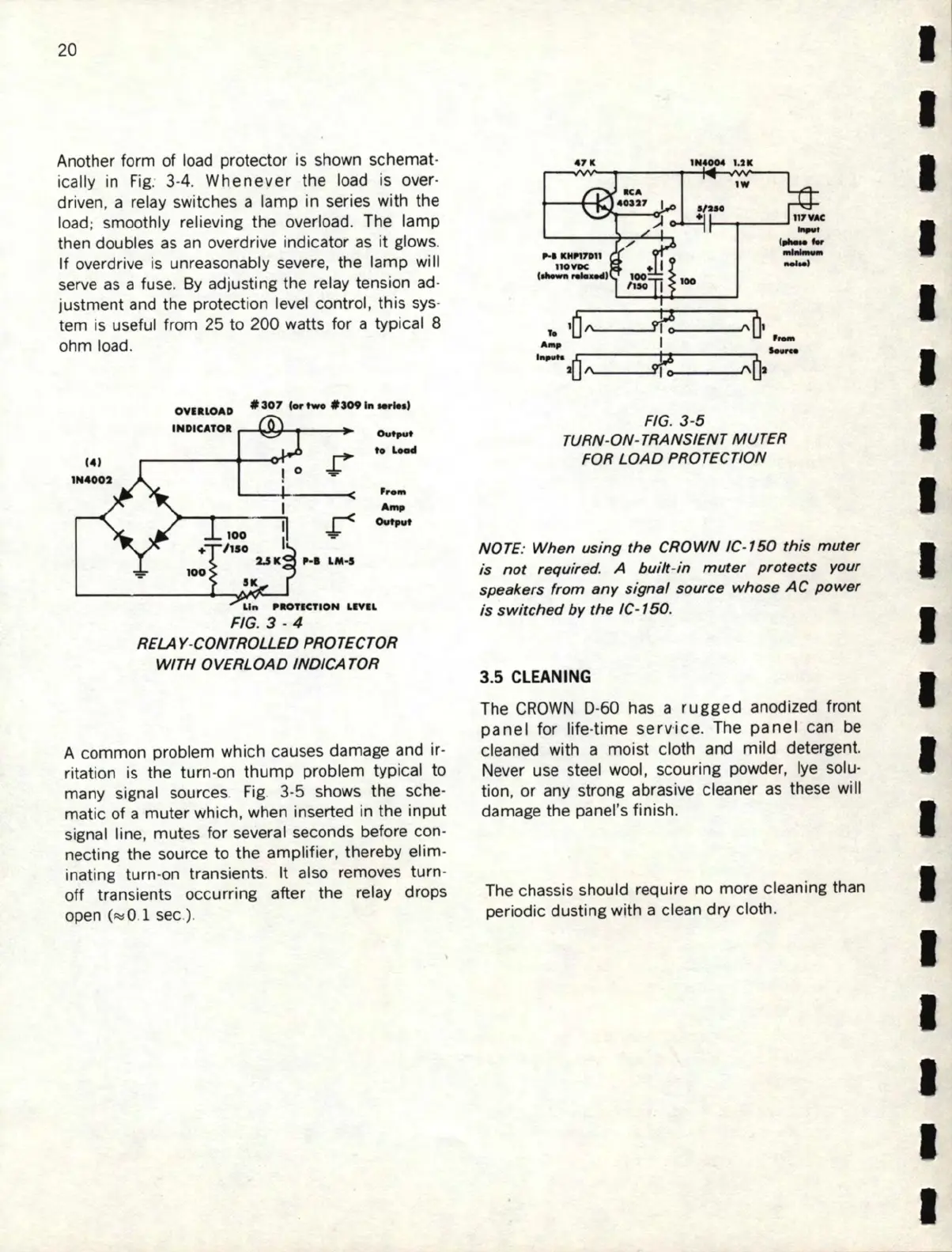
Another form of load protector
is
shown schemat-
ically in
Fig
. 3-4.
Whenever
the load is over-
dr
i
ven
, a relay switches a lamp in series with the
l
oad
; smoothly relieving the overload. The lamp
then doubles
as
an overdrive indicator as
it
glows.
If
overdr
ive
is unreasonably severe, the lamp
wi
ll
serve
as
a fuse.
By
adjusting the relay tension ad-
justment and the protection level control, this sys-
tem
is
useful from 25 to 200 watts for a typical 8
ohm load.
O
VH
LOAD
#3
D7
(or
two
#
S09
111
Mrte•l
INDICAT
OR
,--~ti---!~-
♦
! 0
100
♦
/150
2.SK
P.I
LM
•S
SK
...
...
....
Ovtpvt
Lift
,aonCTION
LIVIL
FIG.
3 - 4
RELAY
-
CONTRO
L
LED
PRO
TE
CTOR
WITH
OVERLOAD
IND/CA
TOR
A common problem which causes damage and
ir
-
ritation is the
tu
rn-on th
ump
problem typical to
many signal sources. Fig. 3-5 shows
th
e sche-
matic of a muter which, when inse
rt
ed in the
input
signal line, mutes for several seconds before con-
necting the source to the amplifier, thereby elim-
inating turn-on transients. It also removes
tu
rn-
off transients occu
rr
ing after the relay drops
open
c~o.1
sec)
.
4
7K
1N
4004
1,2 K
FIG. 3-5
TURN
-
ON
-TRANSIENT M U
TER
FOR LO
AD
PR
O
TEC
TIO
N
NOTE: Wh
en
usi
ng
the
CROWN IC
-1
50
th
is
muter
is
not require
d.
A
bu
i
lt
-i
n muter p
rot
ects your
speakers from a
ny
si
gnal
sou
rc
e whose
AC
power
is
swi
tched
by
the
IC-
150
.
3.5
CLEANING
The
CROW
N D-
60
has a
rugged
anodized front
panel
for life-time ser
vice.
The
panel
can
be
cleaned with a moist cloth and mild detergent.
Never use steel
woo
l, scouring powder,
lye
so
l
u•
tion,
or
any strong abrasive
cl
eaner
as
these will
dam
age
the panel's finish.
The chassis should require no more cleaning than
periodic dusting with a clean dry cloth.
I
I
I
I
I
I
I
I
I
I
I
I
I
I
I
I
I
I
I


 To Next Page