RV50 Sierra Wireless AirLink® 4G LTE Cellular Modem
17
7.4.2 Modem Power Connections
A power cable is included with the modem and is used to connect the RV50 to
the datalogger 12V terminal. Connection to the switched 12V (SW12V)
terminal or a control port terminal allows the datalogger to switch power to the
modem during scheduled transmission intervals. See Appendix A, Controlling
Power to the RV50
(p. A-1), for SW12V program examples. Connect the red and
white lead wires to 12V for constant power, the red to 12V and white to
SW12V or a control port for program-controlled power, and the black lead to
G (ground). The green wire lead is not necessary and can be removed or
insulated. See TABLE 7-1.
When using the SW12V terminal, the modem can typically be powered with a
BP12 battery, a CH150 charger/regulator, and a SP10 solar panel.
TABLE 7-1. Power Connections
RV50 Wiring
Lead Color Function Connect To
Red
Power
(10 to 36V)
12V
Black Ground G
White Enable (On/Off)
12V, SW12V, or
Control Port for Control
Green None No Connection
7.4.3 Antenna Connection
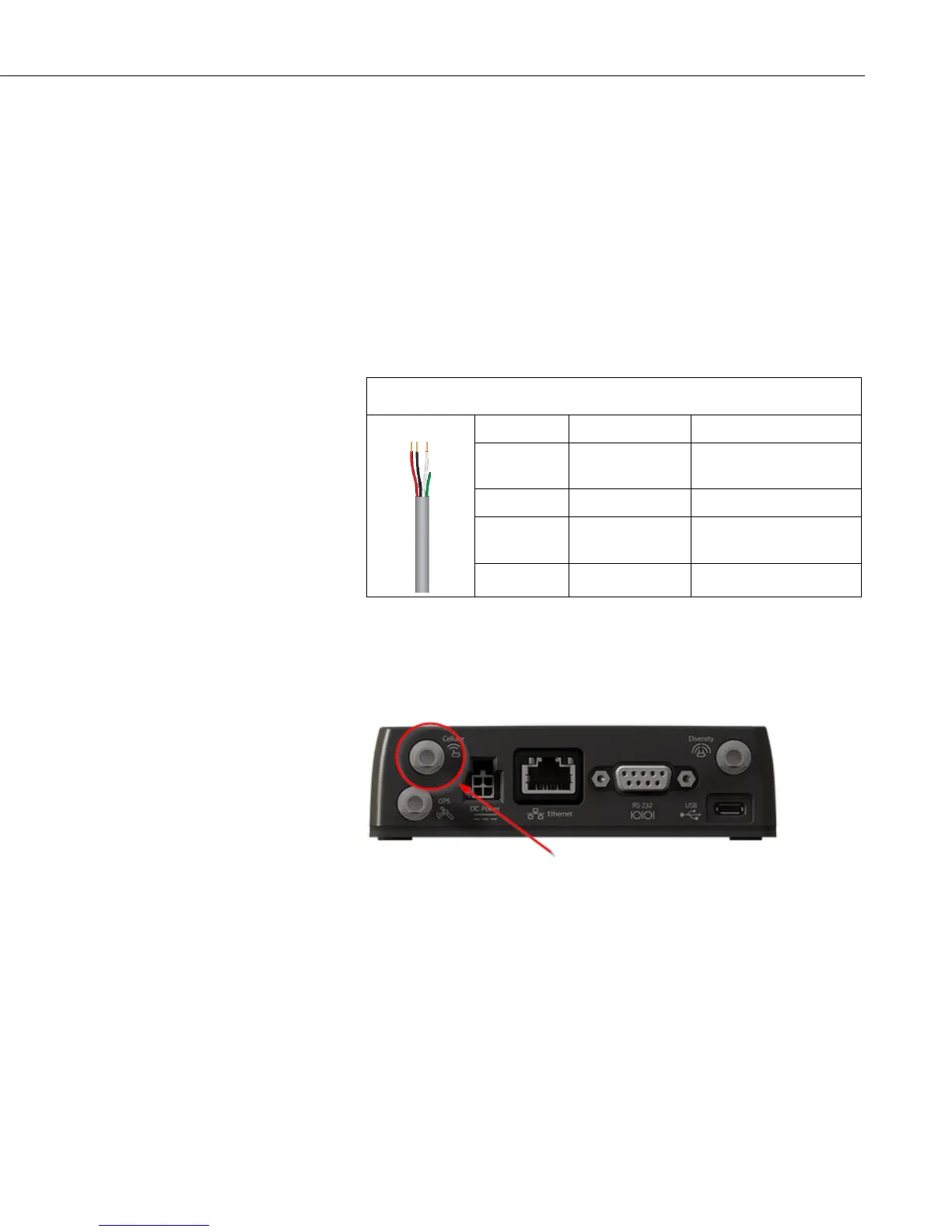
Connect the antenna to the Cellular SMA antenna connector as indicated in
FIGURE 7-9.
FIGURE 7-9. Antenna Connection
Use of the Diversity antenna can improve performance but is not required. If a
Diversity antenna is not used, use ACEmanager to disable WAN/Celluar |
Network Credentials | RX Diversity.
Antenna diversity, also called space diversity, is a scheme that uses two or
more antennas to improve the quality and reliability of a wireless link. Often,
especially in urban and indoor environments, there is no clear line of sight
between transmitter and receiver. Instead the signal is reflected along multiple
paths before finally being received. Each bounce can introduce phase shifts,
time delays, attenuations, and distortions that can destructively interfere with
one another at the aperture of the receiving antenna.


 To Next Page