26
15kgf-cm
Starter VR Repair :
SERVICE - 1 - 3
Please refer to SERVICE-1 Steering Cover Repair steps
as follows:
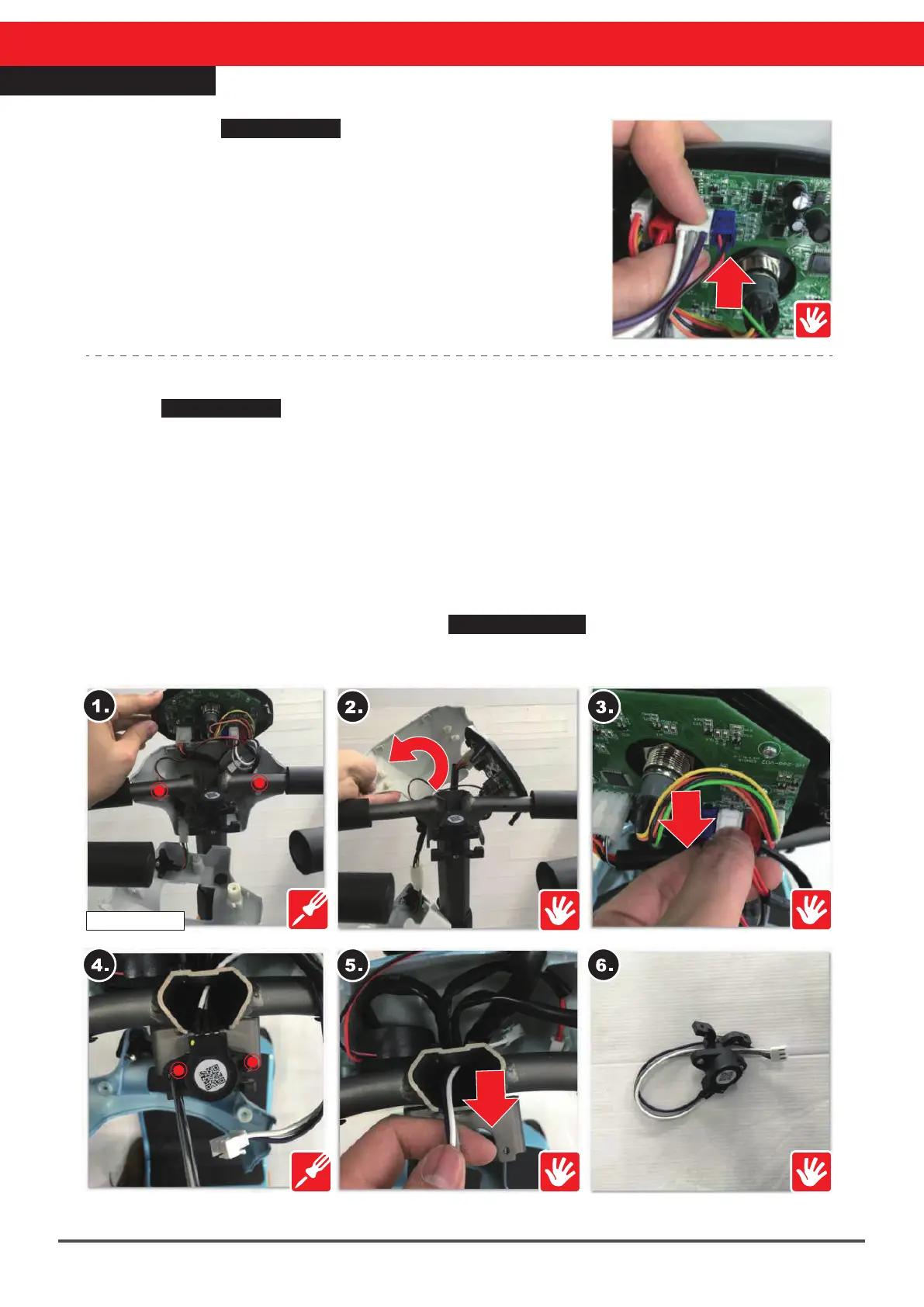
※Find the starter VR connector (figure on the right)
※Re-connect the starter VR (figure on the right)
※If function is not restored go to “Starter VR Replacement”
below.
Starter VR Replacement :
Refer to SERVICE-1 Steering Cover Repair steps as follows :
1.Remove the screws (16mm, 2pcs) on the handle and steering head front cover
2.Remove the steering head front cover and set it aside carefully
3.Remove the starter rod connector on the board
4.Remove the screws (12mm, 2pcs) of steering bar and starter VR
5.Take off the starter VR and connector
6.Take out the starter controller, and replace it with a new one
※After the replacement of parts or re-installation, please follow the exact reverse sequence
for reassembly
※If function has not been restored, go to SERVICE-1-1 Top Control Panel Repair.



 To Next Page