CDR-3250/80 TECHNICAL MANUAL
Issue 2.2 3-3
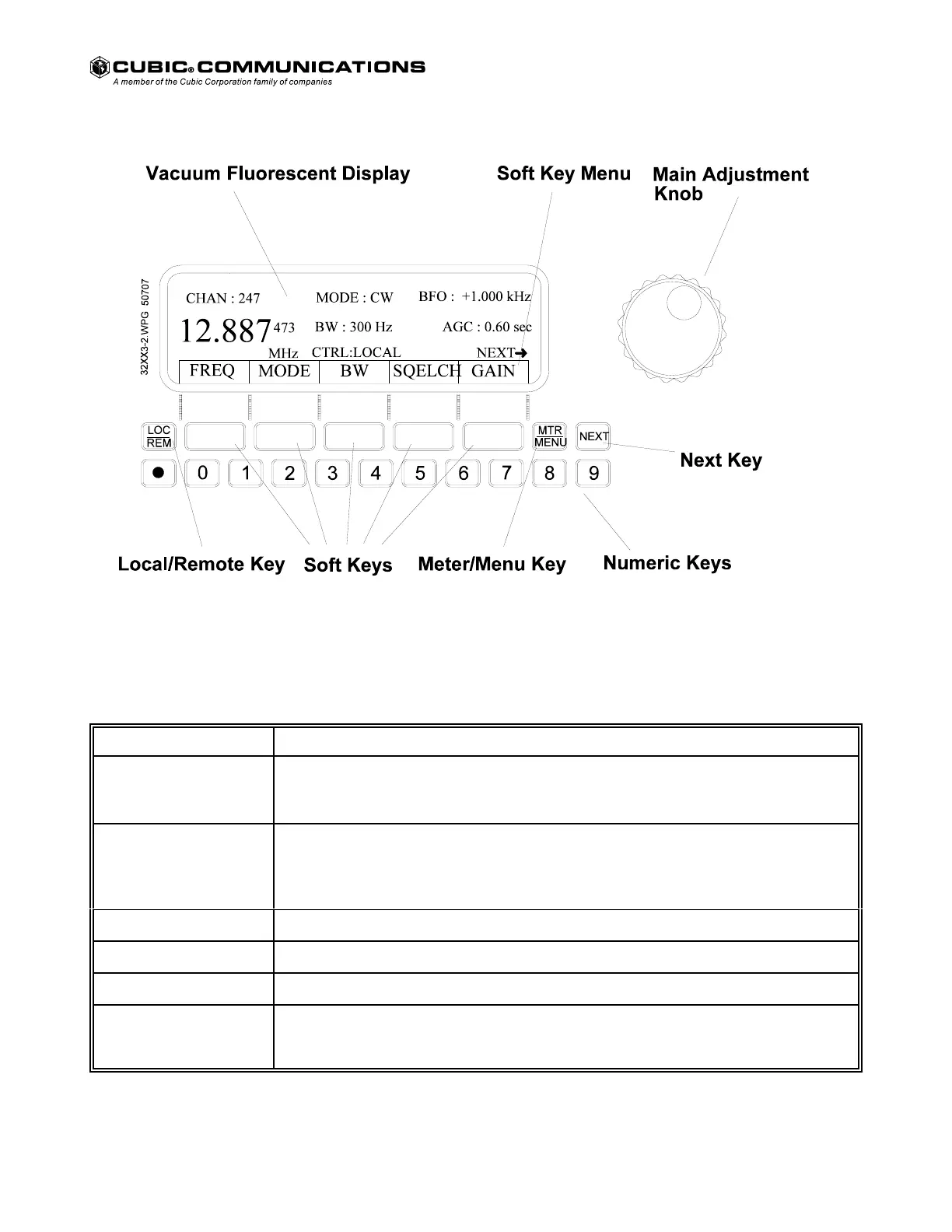
Figure 3-2 Parameter Entry Controls and Display.
Table 3-2 Parameter Entry Controls.
Control Function
LOC/REM Key Pressing the LOC/REM key selects either local (manual) or remote control of the receiver.
When the desired control mode is selected CTRL:LOCAL or CTRL:REMOTE is displayed
in the lower center of the vacuum fluorescent display.
Soft Keys Five soft keys (unlabeled) are provided below the soft key menu. Each key corresponds to
the menu selection immediately above the key. When a soft key is pressed, the function
above the key is selected for parameter entry. Pressing the NEXT key allows a different set
of soft keys to appear in the soft key menu.
MTR/MNU Key The MTR/MNU key selects either the soft key menu display or the meter display.
Numeric Keys The numeric keys are used to select numbers or decimal point for entry.
NEXT Key The NEXT key allows selection of the next soft key menu.
Main Adjustment Knob The main adjustment knob has a digital encoder on the knob's shaft that allows
incrementing and decrementing numeric entries without using the numeric keys. Using the
knob can save time in most cases by eliminating key presses.
Courtesy of http://BlackRadios.terryo.org



 To Next Page