GB
Connections
13
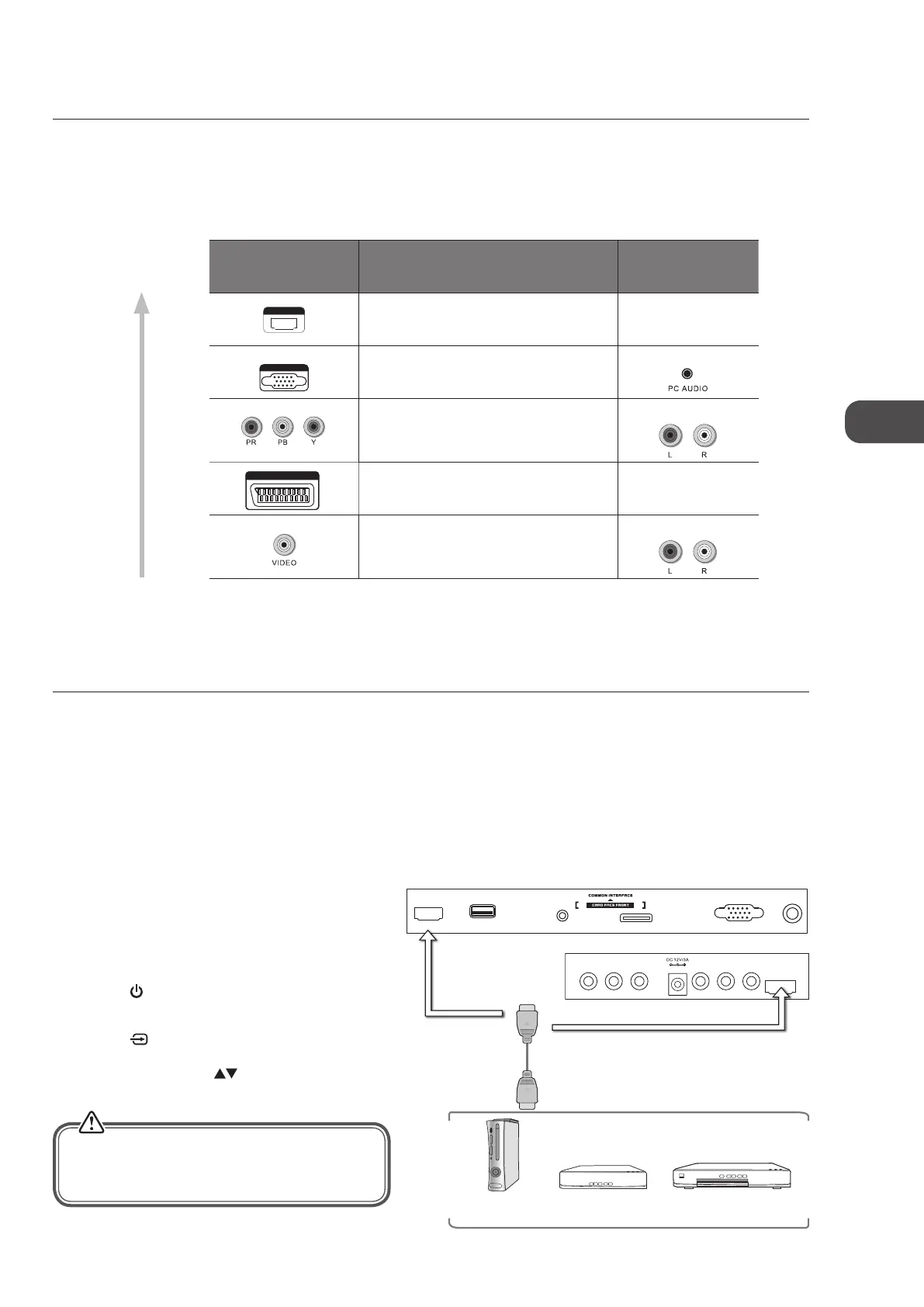
Connecting an AV Device Using an HDMI Cable
• This TV can accept High-Definition Multimedia Interface (HDMI) supports HDCP (High-Bandwidth Digital Content Protection)
Protocol.
• This TV has a total of 2 HDMI input sockets, please make sure the correct input source is selected and corresponds to your
connected HDMI input socket.
• When you connect to the output of an HD ready player (blu-ray disc player, game console, set-top box or computer) switch to
the HDMI function and the TV will automatically detect the resolution used by the HDMI source.
• To get the best picture quality, adjust the blu-ray disc player, game console or set-top box output resolution up to 1920 x
1080p.
1. Use an HDMI cable to connect the TV’s HDMI input
socket to the external AV device’s HDMI output socket.
2. Plug the connected devices into the mains socket
before switching on the TV.
3. Press the
button on the right side panel of the TV
or on the remote control to turn on your TV.
4. Press the
button on the right side panel of the TV
or the INPUT button on the remote control to display
the Source List. Use the
buttons to select HDMI1
/ HDMI2 and then press the OK button to confirm.
Making Video and Audio Connections
Not all AV devices have the ability to connect to a TV, please refer to the owner’s manual of your AV device for compatibility and
connection procedures.
When connecting any external AV device, do not connect the mains adapter to the mains socket until all other connections are
complete.
Best Video
Performance
Connections
*1080p: Although this TV is compatible with a 1080p input, the screen is not capable of
displaying this resolution and consequently the image will be scaled to suit the screen.
Signal Type
Separate Audio
Connection Required
HDMI
HDMI
(480i/480p/576i/576p/720p/1080i/1080p*)
No
PC IN
Yes
Component Video
(480i/480p/576i/576p/720p/1080i/1080p*)
Yes
SCART (RGB Input) No
Composite Video
Yes
HDMI1
USB
PC AUDIO
PC IN RF
SCART
VIDEO L R Y
Pb
Pr
HDMI2
Rear Right Side View of TV
Rear Right Bottom View of TV
HDMI Cable
(not included)
Blu-ray Player / DVD Player /
Recorder
Set-top BoxGame Console
Although this TV is able to connect to an HDMI
device, it is possible that some devices may not
operate correctly.
C16LDIB11_IB_Running Change_120816_Annie.indd 13 12年8月16日 下午1:57


 To Next Page