GB
Customising TV Settings
23
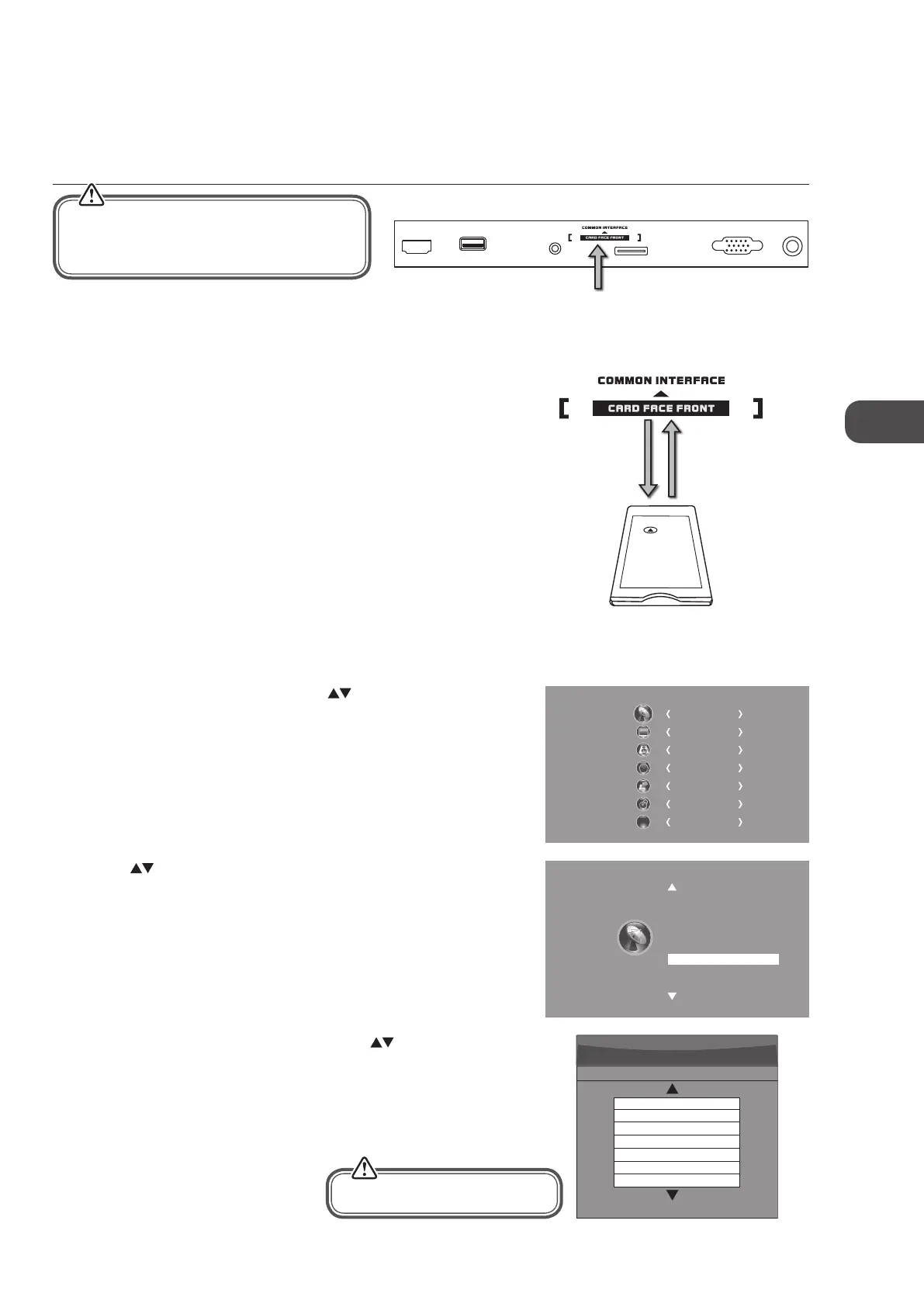
3. A CI Information Main menu will pop up. Press the
buttons to
display the module information, smart card information, language,
software download. Press the OK button to confirm.
4. Press the EXIT button to return to the previous menu. Press the EXIT
button again to exit the menu.
This feature is not available in all countries.
To insert the Common Access Module
1. Before you insert the Common Access Module, ensure that the TV is
switched off and the viewing card is inserted in accordance with the
Service Provider’s instructions.
2. Insert the Common Access Module into the slot. Flip the Common Access
Module to another side and try again if you feel resistance.
3. Switch the TV on.
To remove the Common Access Module
1. Before you remove the Common Access Module, ensure that the TV is
switched off.
2. Pull the Common Access Module from the slot.
3. Switch the TV on.
To view the module information
1. Press the MENU button and then press the buttons to select the
CHANNEL menu and then press the OK button.
2. Press the
buttons to select CI Information and then press the OK
button.
CI (Common Interface) (DTV Mode)
The common interface allows the use of a Common Access Module to enable you to view scrambled (pay to view) services. These
services are provided by TopUp TV (UK only) and others. The Common Access Module and viewing card can be obtained from the
service provider.
Common Access
Module
CHANNEL
PICTURE
SOUND
TIME
OPTION
LOCK
EXIT
EXIT
Auto Tuning
DTV Manual Tuning
ATV Manual Tuning
Signal Information
CI Information
Software Update(OAD)Off
Software Update(USB)
Channel Edit
Main menu
Press Ok to select,or Exit to quit
CI Information
Module information
Smart card information
Language
Software Download
Rear Right Side View of TV
CI (Common Interface)
Allows the Common Access Module to be inserted
and access the content that has been encrypted.
HDMI1
USB
PC AUDIO
PC IN RF
SCART
Do not repeatedly insert or remove the
Common Access Module as this may damage
the interface and cause a malfunction.
This screen is for illustration only.
C16LDIB11_IB_Running Change_120816_Annie.indd 23 12年8月16日 下午1:58


 To Next Page