GB
Initial Setup
18
Channel Selection
• Press the CH + / – buttons on the remote control repeatedly or the 0-9 buttons to select the channel.
Alternative
Press the LIST button to enter the Channel List. Then use the buttons to highlight and select the channel.
Press the OK button to view the selected channel.
• If a blocked channel is selected, the password screen will be displayed. Press the 0-9 buttons to enter the password, the
channel will then be unlocked (refer to page 36 for details on Block Channel).
• Press the FAV button to view the Favourite List. Then use the
buttons to highlight and select the channel. Press the OK
button to view the selected channel (refer to page 21-22 for details on Channel Edit).
• Press the
button to return to the previously viewed channel.
Display Channel Information
• Press the i button to view the current information.
Volume Adjustment
• Press the VOL + or – button on the side panel of the TV or on the remote control to adjust the volume.
• If you wish to switch the sound off, press the
MUTE button. Press the MUTE button again or the VOL + or – button to
resume audio listening.
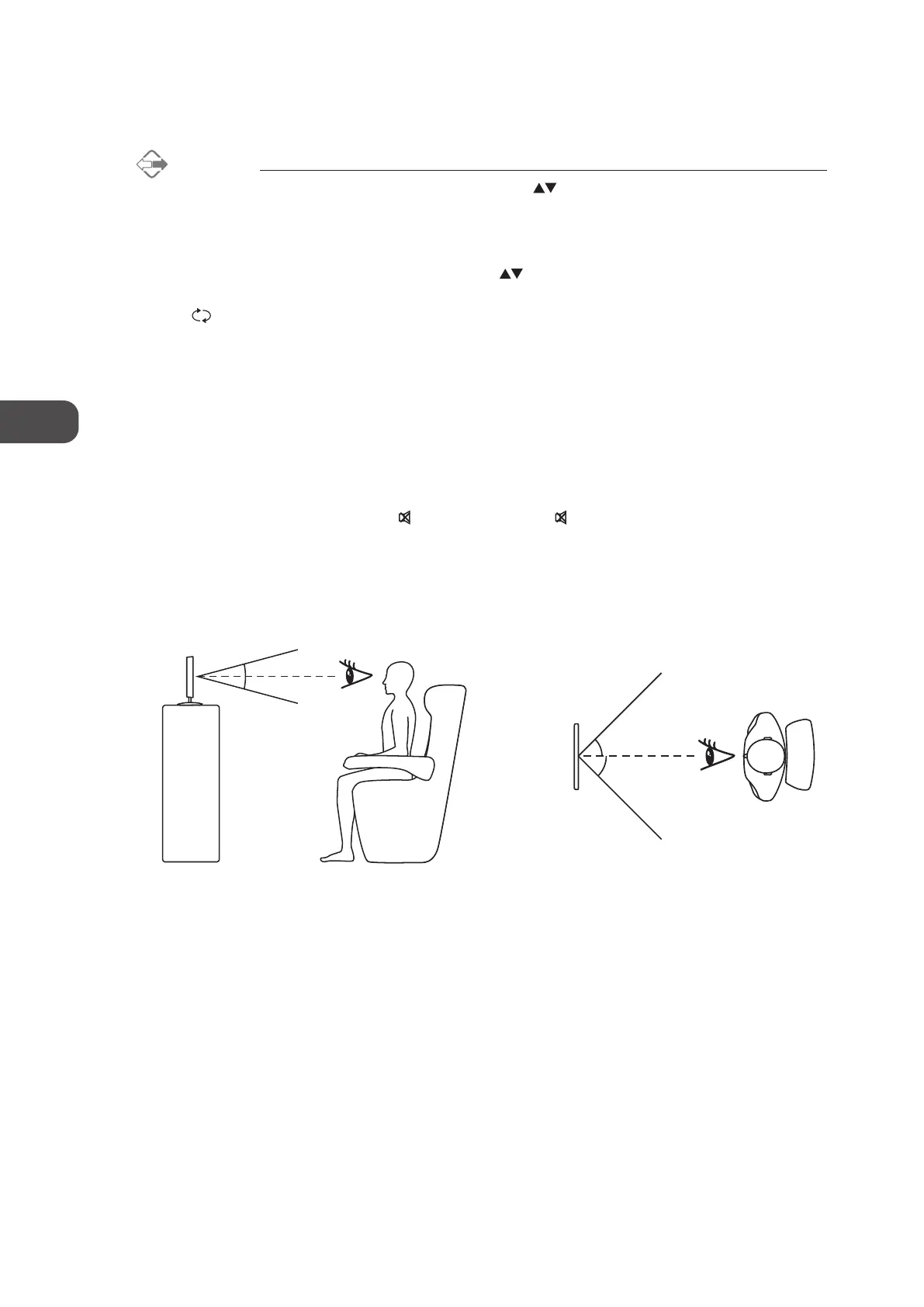
Optimum Viewing
The diagrams below demonstrate the optimum viewing angles for this TV.
Side View Top View
30°
30°
45°
45°
C16LDIB11_IB_Running Change_120816_Annie.indd 18 12年8月16日 下午1:58


 To Next Page