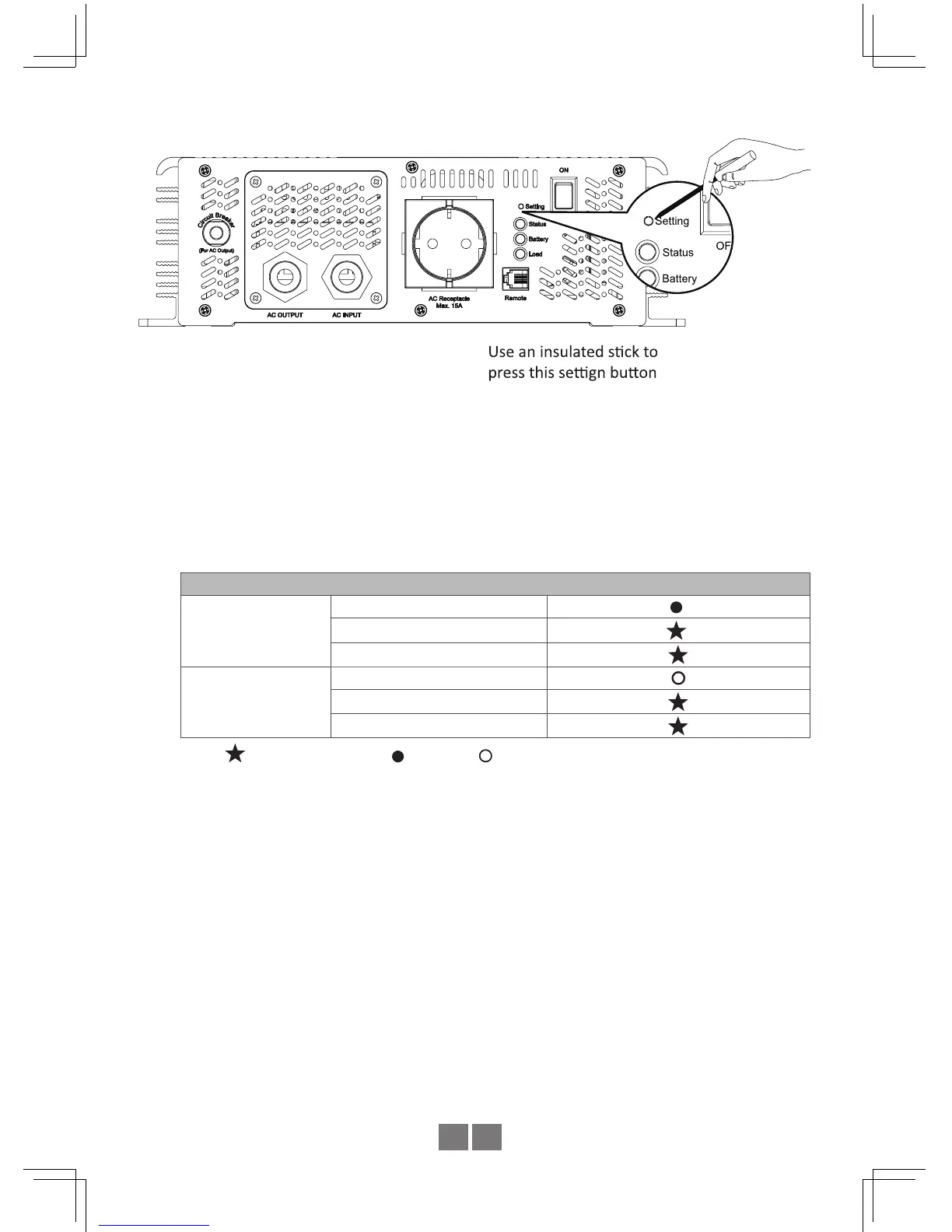
STEP 3 : Please refer to Table 4.1 and check whether the "SPF Mode" is set as required.
If yes, please jump to Step 5
STEP 4 : The LEDs will change state each when pressing the setting button for 1 second
and then release. Users can Enable or Disable the "SPF Mode" function through
this setting.
Table 4.1: LED Indication of SPF mode Selection
LED : Green (G), Orange (O)
SPF Mode
Enable
Status
(G)
Battery
(O)
Load
(O)
Disable
Status
Battery
(O)
Load
(O)
Note: Flash per second Light on
Light off
STEP 5 : After selecting the SPF Mode, press the setting button for 3~5 seconds and
the inverter will send out a "Beep" sound. The button can then be released and
inverter will go into setting section of "Output Voltage & Frequency ".
STEP 6 : Please refer to Table 4.2 and check whether the combination of output voltage
and frequency is correct. If yes, please jump to Step 8
STEP 7 : The LEDs will change state each time when pressing the setting button for
1 second and then release (refer to Figure 4.2). Please select the suitable
combination of output voltage and frequency you need.


 To Next Page