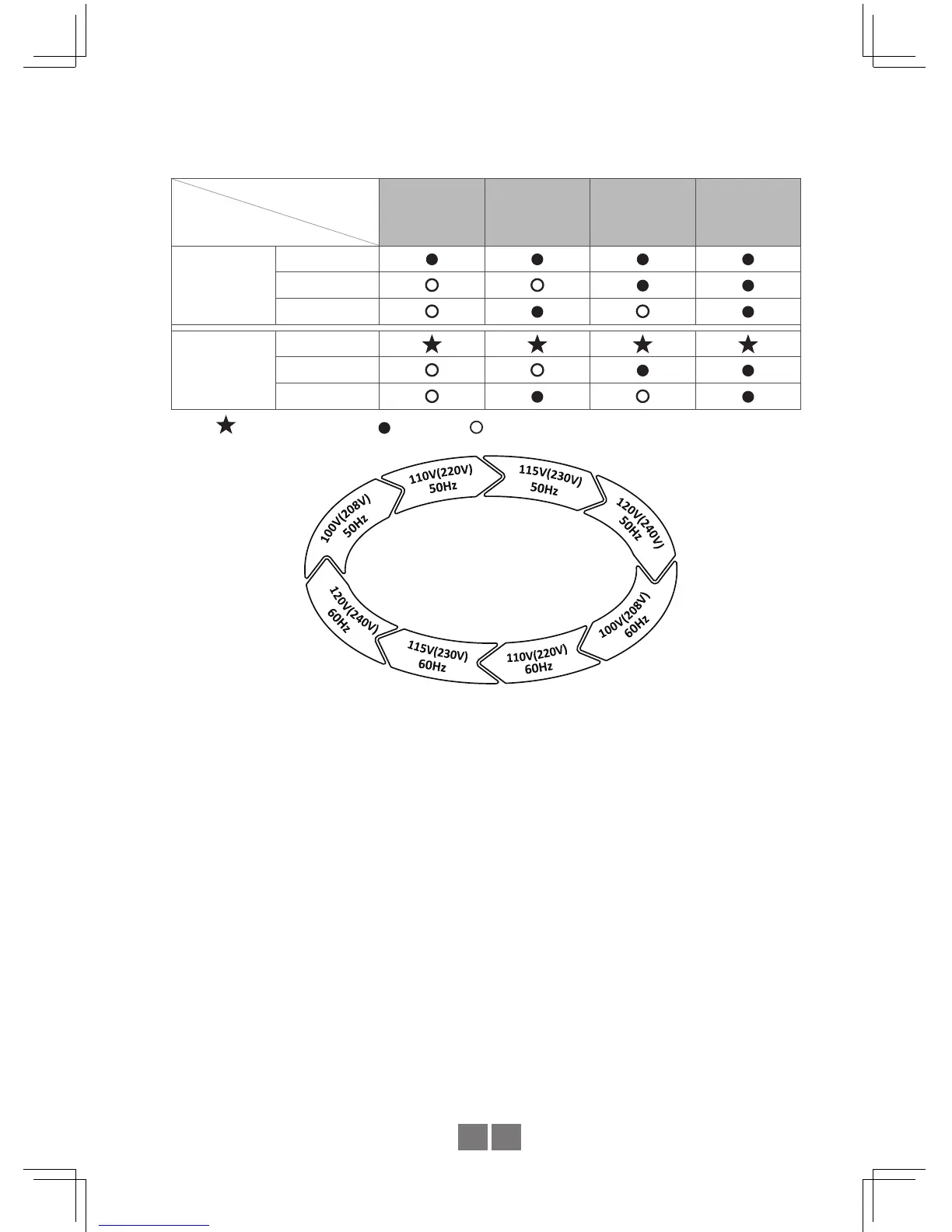
Table 4.2: LED Indication of Output Voltage / Frequency Combination
LED : Green
Output
Voltage
Frequency
100V
(208V)
110V
(220V)
115V
(230V)
120V
(240V)
50Hz
Status
Battery
Load
60Hz
Status
Battery
Load
Note: Flash per second. Light on.
Light off
Figure 4.2 : State Circulation Diagram of Output Voltage and Frequency
STEP 8 : After selecting the output voltage and frequency, press the setting button for 3~5
seconds and the inverter will send out a "Beep" sound. The button can then be
released and inverter will go into setting section of "Saving Mode".
STEP 9 : Please refer to Table 4.3 and check whether the "Saving Mode" is set as required.
If yes, please jump to Step 10.
STEP 10:The LEDs will change state each when pressing the setting button for 1 second
and then release. Users can activate or cancel the "Saving Mode" function
through this setting.
STEP 11:Once the "Saving Mode" is activated or cancelled, press the setting button for
around 5 seconds and the inverter will send out a "Beep" sound. The button can
then be released and all settings are nished. The inverter will automatically save
all settings and restart.


 To Next Page