©2020 Cyber Power Systems (USA), Inc. All rights reserved. All other trademarks are the property of their respective owners.
19
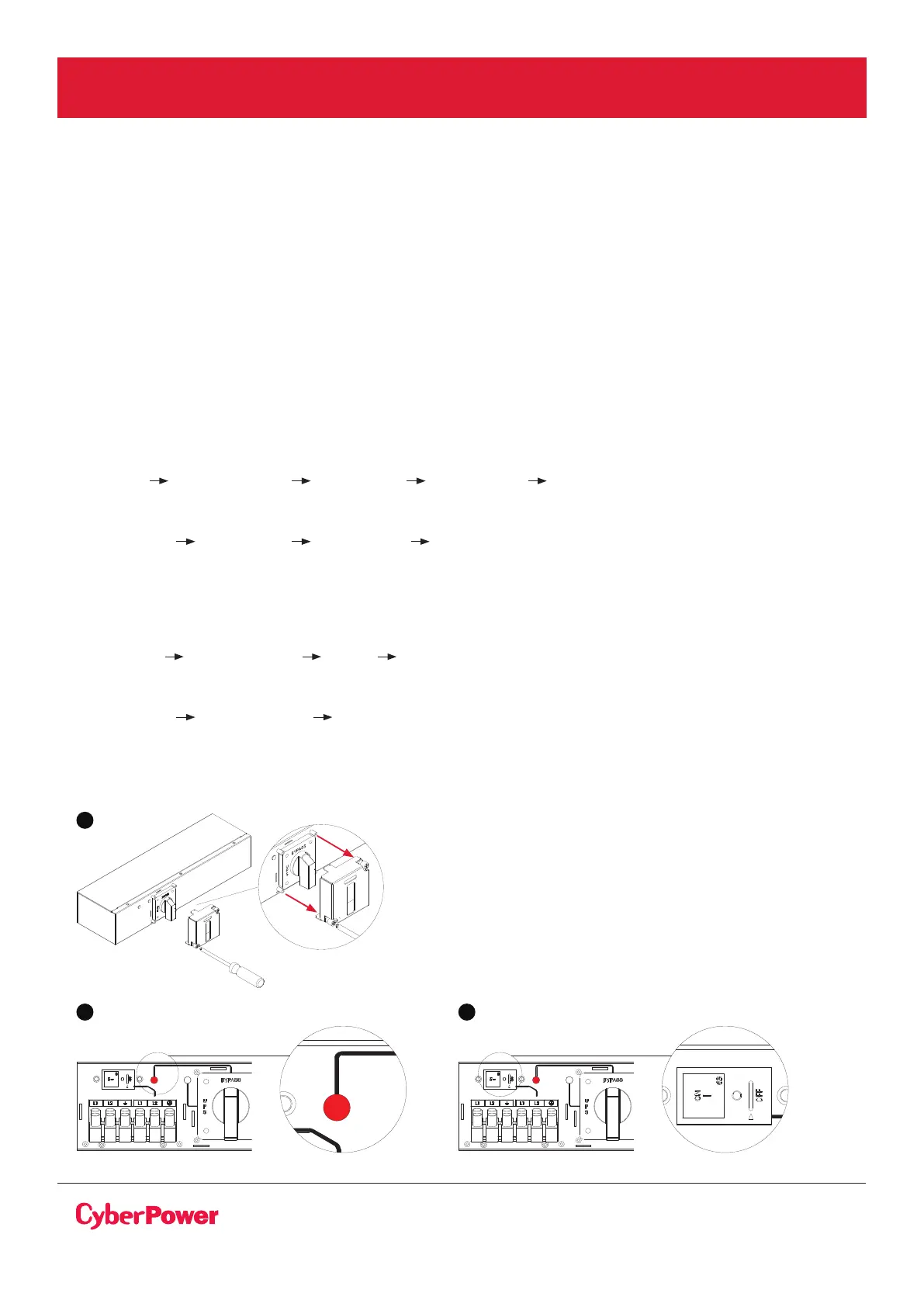
3. Release two screws by screw driver and open the Cover of MBP switch and Check that the MBP
manual Bypass switch is to the “Bypass” position.
4. Set the upstream circuit breaker (not provided) to the “I” on position to switch On the Normal AC
source (Utility) power.
5. Verify that the “Bypass” red light of the MBP goes On, indicating that the load is now powered by
the Normal AC source (Utility).
6. Set the UPS INPUT switch of the MBP to the “I” on position.
7. Verify that the UPS is correctly powered (UPS display panel illuminates)
8. Enable EPO or ROO function (refer to the UPS user manual as following)
(1)OL5KRTHD/OL6KRTHD models :
Set up communication Signal input EPO or ROO Save Change?
(2)OL6KRT/OL8KRT/OL10KRT/OL6KRTF/OL8KRTF/OL10KRTF models :
Configure Signal input EPO or ROO Save ?
9. Press the UPS “ON/OFF” power button for 3 seconds to start the UPS, UPS will be turning to line mode.
10. UPS should set to bypass mode from LCD Panel (refer to the UPS user manual as following)
(1) OL5KRTHD/OL6KRTHD models :
Controls Manual Bypass Enable Activate
(2) OL6KRT/OL8KRT/OL10KRT/OL6KRTF/OL8KRTF/OL10KRTF:
Configure Manual Bypass Enable
Important ! before setting the UPS to bypass mode, do not set the MBP manual Bypass switch to
the “UPS” position.
UPS will be damaged if this is not followed.
ELECTRICAL INSTALLATION CONT.
3
Bypass
Normal
FROM UPS OUTPUT
63A / 250V~
UPS INPUT SWITCH
TO UPS NORMAL AC SOURCE
UPS
OK
to switch
Bypass
63A / 250V~
UPS INPUT SWITCH
to switch
Bypass
Normal
FROM UPS OUTPUT
63A / 250V~
UPS INPUT SWITCH
TO UPS NORMAL AC SOURCE
UPS
OK
to switch
63A / 250V~
UPS INPUT SWITCH
TO UPS NORMAL AC SOURCE
5 6
UPS START-UP WITH MBP63A2 CONT.



 To Next Page