PowerPanel™ Business Edition
37
Configuration
In order for the Client to operate properly, the correct network address of UPS RMCARD, PDU or Agent
must be assigned for the outlet. The
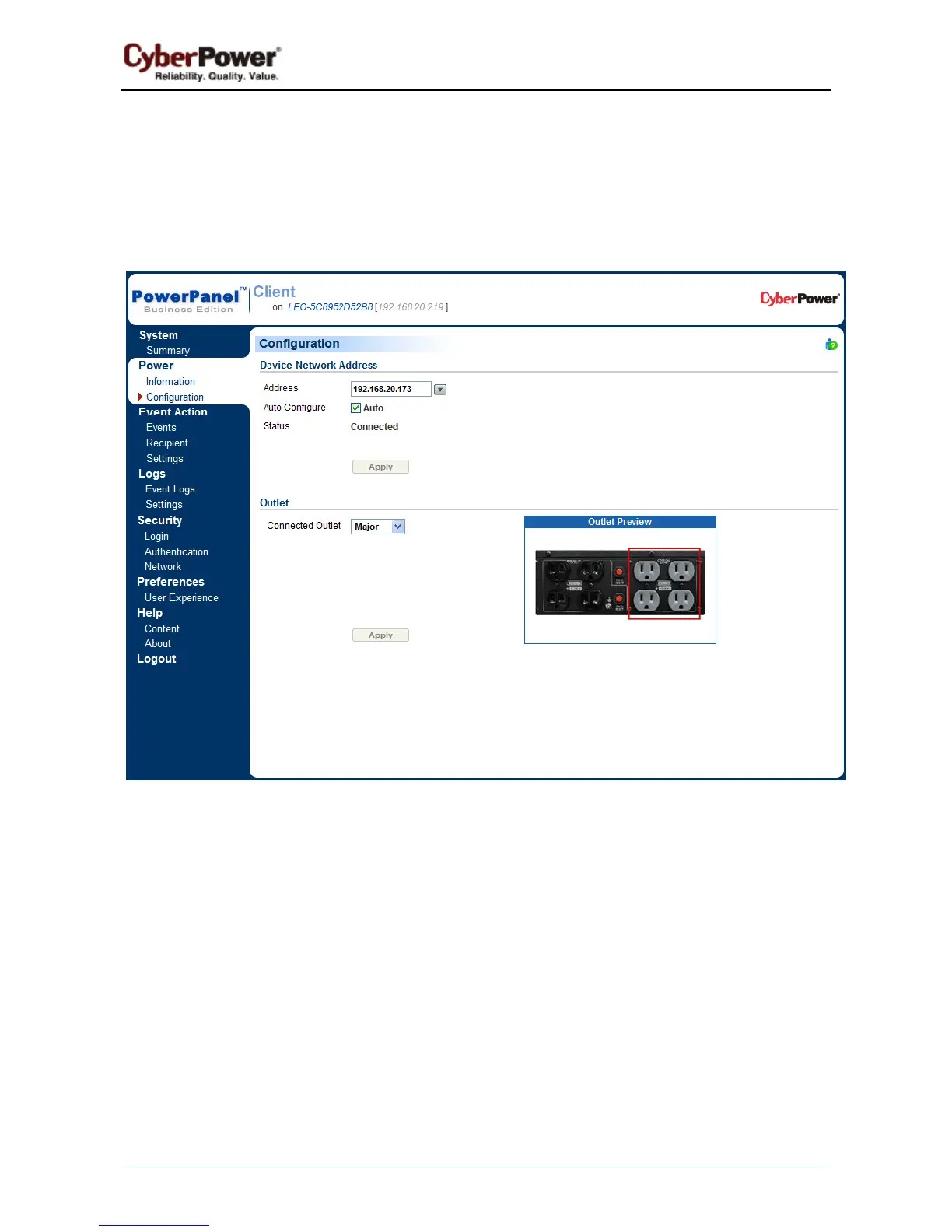
Power/Configuration page is used to configure the network address of
UPS RMCARD, PDU or Agent and outlet setup:
Power/Configuration page
Device Network Address
In order to establish communication between the Client and the UPS /PDU, the IP address of the UPS
RMCARD/PDU/Agent must be configured in the Client.
z Address: Assigns the network address of the UPS RMCARD/PDU/Agent. Enter the IP address or use
the pull down to show the device list and select a device address from the list. Clicking the refresh button
(the icon with the rotating arrow) forces the Client to search the local network for all UPS/PUD and
update the results in the device list. Click the Apply button to establish communication with the
UPS/PDU. The Client searches the device with the least uptime to be a default UPS/PDU after an
installation. Change to another device if the default one is not supplying power to the Client computer.



 To Next Page
 Loading...