49
CYGNUS
7 Other Features
The MR500 View includes some extra features that have not been mentioned yet in this User
Manual and some functions that need further explanation.
7.1 Totalling The Fare And Extras
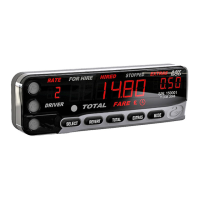
As mentioned in Section 1.9, the MR500 View can add the fare and extras together to display
a Total Fare.
To add the fare and extras together in Stopped mode, press the TOTAL button.
The MR500 View may do one of the following:
Ÿ When you release the TOTAL button, the fare and extras remain added together until the
movement of the vehicle causes the fare to be increased. At this point they automatically
separate.
Ÿ When you release the TOTAL button, the fare and extras remain added together until the
vehicle moves enough to generate 1 road pulse, or the timeout expires (settable in tariff),
whichever happens first.
Ÿ When you release the TOTAL button, the fare and extras separate immediately. Also, if the
vehicle moves while you are holding the button down, or the timeout expires (settable in
tariff), the figures separate automatically.
7.2 The Time Charging Symbol
In Hired mode, the legend illuminates on the MR500 View’s display to indicate that it is
charging for time only, i.e. The vehicle is travelling below the changeover speed between time
and distance charging.
There are several options for totalling the fare and extras. These are
set in the Tariff.


 To Next Page