5
CYGNUS
Contents
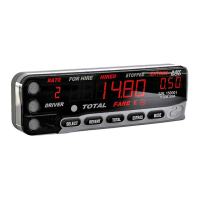
Introducing The MR500 View Taximeter.................................................................................8
Front Panel Features ................................................................................................................................................8
Rear Panel Features.................................................................................................................................................9
Display Features......................................................................................................................................................10
Applying Power To The Meter.................................................................................................................................10
The Internal Battery.................................................................................................................................................11
'On' And 'Off' Modes - When The Taxi Is Not For Hire............................................................................................11
FOR HIRE Mode - For When The Vehicle Is In For Hire........................................................................................12
HIRED Mode - For Charging For Time And/Or Distance........................................................................................13
STOPPED Mode - At The End Of The Journey......................................................................................................14
Flowchart Of The MR500 View's Basic Operations.................................................................................................15
Using The MR500 View With A Receipt Printer......................................................................................................16
Loading a Receipt Definition.............................................................................................................................16
Printing a Receipt..............................................................................................................................................16
Printing the Meter Totals...................................................................................................................................16
What Next?..............................................................................................................................................................17
Tariffs And Optional Features................................................................................................18
Tariffs.......................................................................................................................................................................18
Tariff Code Number.................................................................................................................................................18
What Does All Of This Mean?................................................................................................................................18
PIN Numbers............................................................................................................................19
How Are PIN Numbers Formed...............................................................................................................................19
The MR500 View’s Built-In PIN Numbers................................................................................................................19
The ‘Disable’ PIN..............................................................................................................................................19
The ‘Totals’ PIN.................................................................................................................................................19
The ‘Clock Set’ PIN..........................................................................................................................................19
The ‘User’ PINs.......................................................................................................................................................20
Entering A PIN.........................................................................................................................................................20
Setting A New PIN...................................................................................................................................................20


 To Next Page