Cyrus ONE User Instrucons
8
First me use/acvang the remote control
There’s a transparent acvaon tab ed to the remote
control.
Pull out the acvaon tab to connect the baery and •
start using the remote control.
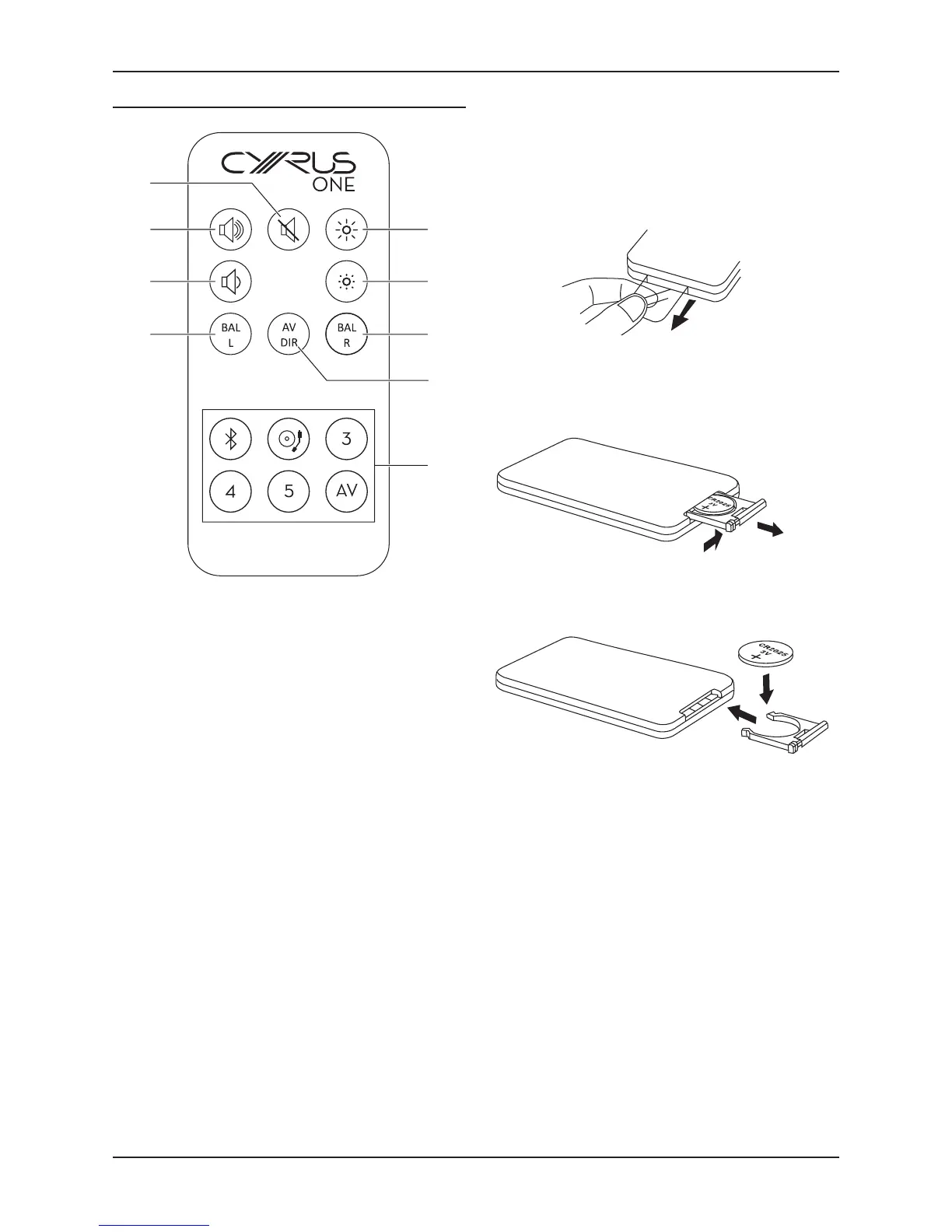
Remote control
Increase indicator brightness1.
Decrease indicator brightness2.
Move balance right3.
AV Direct mode setup4.
Direct select source buons5.
Move balance le6.
Volume down7.
Volume up8.
Mute9.
Replacing the remote control baery
Press the catch across.•
While holding the catch, open the baery door.•
Fit the baery with the + marking upwards. When •
replacing the baery, use only the same CR2025 type.
Baery disposal
Dispose of used baeries with regard to the recycling
regulaons in your area. Do NOT short circuit baeries or
throw them into water, the general rubbish or in a re.



 To Next Page