Cyrus ONE User Instrucons
12
Diagnosc system
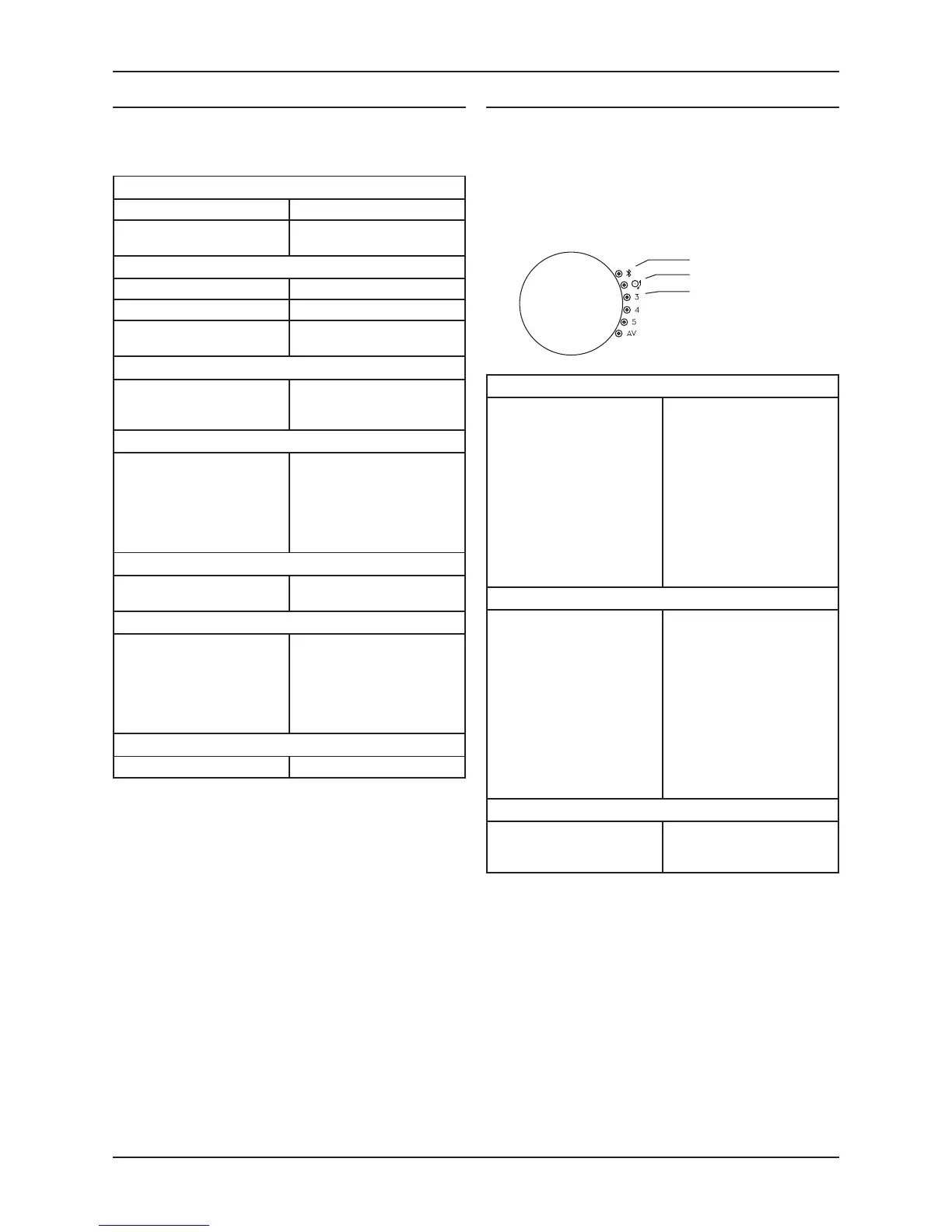
Your amplier has a unique diagnosc system to help you
to diagnose problems. There are three error messages that
may be displayed – PSU, Output and Over-temperature.
These are displayed by light paerns on the source indicators.
When an error is detected all the source indicators will light
except one that ashes to indicate the type of error.
The drawing shows the ashing indicator.
TROUBLESHOOTING GUIDE
If your amplier is not operang properly, disconnect the
power and check carefully all connecons.
If you are in any doubt, consult your retailer.
No sound
Mute is on. Deselect Mute
The source is not working
(e.g. CD not playing or paused).
Check the source.
No sound from one loudspeaker
BAL control at extreme limit. Centralise Balance.
Does your speaker have fuses? Check speaker, replace fuses.
Speaker cables / interconnects
faulty.
Check connecons, cables -
replace if needed.
Low volume when playing vinyl
May be the wrong type of
pickup cartridge.
Check that the pickup cartridge
is a Moving Magnet type (not
Moving Coil).
Hum when playing vinyl
May be a turntable grounding
problem.
Check that the turntable ground
wire is securely connected to
the grounding terminal on the
back panel.
Check that the pickup cartridge
is correctly connected.
Spurious noises from speakers
Interconnects or connecons
faulty.
Check, replace where necessary.
A Bluetooth source fails to pair
Bluetooth connecvity may not
be enabled at the source.
Check that Bluetooth
connecvity is enabled at the
source.
If the problem persists, switch
o the power and switch back
on, then re-try pairing.
Remote control not working
Remote control not operang. Check baery.
PSU error
This error will be displayed if
the internal power supply is out
of range.
This may be a temporary
condion when playing
excessive levels of deep bass or
could be a fault condion in the
power supply.
The amplier will mute when
the error is detected. If the
error clears the amplier will
connue to play normally. If
the error remains, the amplier
should be returned to your
retailer.
Output error
The amplier output has
been overloaded or may have
overheated. This is usually due
to the volume being set too
high for prolonged listening or
inadequate venlaon for the
amplier.
It could also be due to a short-
circuit at the loudspeaker
terminals.
The amplier will mute unl
it has cooled down. If this
happens regularly, try improving
the venlaon around the case.
If the problem connues, then
the impedance of your speakers
may be too low.
If this error remains, switch
o the amplier and check
that there are no short circuits
at either end of the speaker
wiring.
Over-temperature error
The amplier has over-heated
internally.
Check that the venlaon
slots on the amplier are not
obstructed.
If a fault condion sll remains, return the amplier to your
Cyrus appointed retailer or an authorised Service Centre.
PSU
Output
Over-temperature



 To Next Page