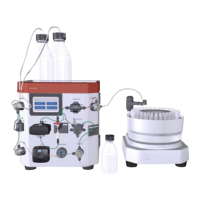
The ÄKTA start™ system is a liquid chromatography system designed for preparative purification of proteins at laboratory scale. It is intended for research use only and should not be used for clinical or diagnostic purposes. The system comprises the ÄKTA start instrument and the UNICORN™ start software, which can be installed on a computer. The instrument can be operated and controlled via its Instrument Display, while the UNICORN™ start software offers additional features for controlling the ÄKTA start and analyzing chromatography run data.
Function Description:
The ÄKTA start instrument is a compact, one-step purification solution for quick and reliable protein purification. It automates the protein purification workflow with features such as automated sample injection, fraction collection, and real-time monitoring. Method templates are available for common chromatography techniques like Affinity Chromatography, Ion Exchange Chromatography, Gel Filtration, and Desalting. Quick start methods are also provided for purifying several common proteins, and predefined system methods are available for cleaning the flow path.
The instrument's "wet side" includes several interconnected modules:
- Buffer valve: A 3-port valve used as a switching valve for gradient formation with two buffers (A and B). It allows the inlet of either buffer A or buffer B, or a mixture of both.
- Mixer: A static mixer used for mixing buffers A and B.
- Sample valve: A 3-port valve that allows either buffer or sample to enter the flow path, enabling direct application of the sample onto the column using the pump.
- Pump: A peristaltic pump that delivers buffer or sample to the flow path with a flow rate of up to 5 mL/min. For cleaning procedures, it can flush the flow path at 10 mL/min.
- Pressure sensor: Reads the pressure in the flow path and detects overpressure.
- Wash valve: A 3-port valve used to divert the flow path to waste. It switches automatically during predefined cleaning procedures (e.g., Pump wash) or can be manually set in a run.
- Injection valve: A 6-port manually operated valve for transferring loaded sample from the sample loop onto the column. It has "Load sample" and "Inject to column" positions.
- UV Monitor: Continuously measures the absorbance of the liquid in the UV flow cell at a fixed wavelength of 280 nm. The UV flow cell has a path length of 2 mm.
- Conductivity Monitor: Continuously reads the conductivity of the liquid in the Conductivity flow cell. The conductivity is calculated by multiplying measured conductance by the factory-calibrated cell constant. The Conductivity flow cell includes a temperature sensor.
- Outlet valve: A 3-port valve used to direct the flow to either the Fraction collector or to Waste.
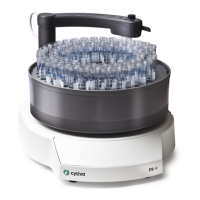
The optional Frac30 Fraction collector is offered with the ÄKTA start system, allowing collection of fractions in four different tube sizes (12 mm and 17 mm diameter tubes of different lengths). It includes a dispenser arm assembly, tubing holder, collection tubes, bowl assembly, base unit, and an LED power indicator. The drive sleeve turns the bowl assembly during fraction collection.
Important Technical Specifications:
- UV Monitor: Fixed wavelength of 280 nm, UV flow cell path length of 2 mm.
- Conductivity Monitor: Conductivity range of 0 to 300 mS/cm.
- Pump: Flow rate up to 5 mL/min (10 mL/min for cleaning).
- Pressure sensor: Displays current pressure in MPa.
- System Temperature Range: Instrument temperature is out of range if below +4°C or above 35°C.
- USB Port: For connecting a USB memory stick (at least 10 MB free space) for storage of results and transfer of files. USB hard drives are not supported.
- Fuses: Specific type and rating required for replacement to ensure continued protection from fire hazard.
Usage Features:
- Touch Screen Operation: The ÄKTA start instrument is operated using a touch screen display.
- UNICORN™ start Software: Provides system control, real-time monitoring, method editing, evaluation, and administration modules when connected to a computer.
- Automated Sample Injection: Streamlines the sample loading process.
- Automated Fraction Collection: Facilitates the collection of purified proteins into tubes.
- Real-time Monitoring: Allows users to observe purification progress in real-time.
- Method Templates: Pre-configured methods for various chromatography techniques.
- Quick Start Methods: Expedite purification of common proteins.
- Predefined System Methods: Simplify cleaning of the flow path.
- Delay Volume Setting: Allows users to set the delay volume (volume of liquid in the flow path between the UV Monitor outlet and collection tubes).
- Switch Valve Timing: Can be optimized to address wavy gradients or fluctuations in step gradients during system performance tests or chromatography runs.
- System Report Export: Users can export system details (UV, Pump, pump tubing, solenoid valves, error messages, firmware/FPGA versions) to a USB memory stick for troubleshooting.
Maintenance Features:
Regular maintenance is crucial for reliable function and performance.
- Daily Maintenance:
- Visual inspection for leakages in the flow path and pump.
- Ensure pump tubing is not left inside the pump when not in use.
- Keep waste and sample tubing ends higher than bottles to prevent siphoning.
- Clean the column and system flow path after use, leaving the system filled with DM water.
- Clean valves (at least with DM water) after every run or at the end of the day to prevent salt crystal formation. For thorough cleaning, 1 M NaOH can be used, followed by DM water rinse.
- Weekly Maintenance:
- Calibrate the Pump.
- Visually inspect and clean inlet filters if necessary.
- Monthly Maintenance:
- Clean the system flow path with 1 M NaOH and rinse with DM water (frequency depends on use).
- Visually inspect the drive sleeve on the Fraction collector; replace if worn out.
- Other Maintenance (as required):
- External cleaning of the instrument and Fraction collector.
- Perform System cleaning.
- Clean the UV flow cell and Conductivity cell.
- Calibrate the touch screen.
- Calibrate the UV flow cell (UV LED calibration).
- Calibrate the Conductivity cell.
- Perform Pressure sensor zero offset.
- Replace tubing and connectors.
- Replace inlet filters.
- Module Access for Maintenance: Maintenance and service of modules are managed from the Instrument Display via the Settings and service screen.
- Instrument Display Maintenance:
- Touch screen calibration: Instructions provided for calibrating the touch screen.
- Color test: Allows testing the colors of the touch screen.
- Diagnostics: Includes backlight brightness adjustment.
- Log book: Displays the number of hours the Instrument Display has been used and can be reset when the display is replaced (by a Cytiva Service Engineer).
- UV Monitor Maintenance:
- UV LED calibration: Calibrates UV LED intensity for desired photo detector response. Requires UV flow cell to be assembled tightly, tubing connected securely, and no stray light exposure.
- Diagnostics: Performs Dark current test (checks electrical noise, UV LED off, signal < 50 mV for Pass) and Stray light test (checks absorbance with 15% acetone, Abs > 2000 mAU for Pass).
- Flow cell path length test: Derives actual path length of UV flow cell, performed when UV Monitor or flow cell is replaced.
- Configuration: Resets UV run hours when UV Monitor is replaced, and allows turning UV off. C drft and C amb values should only be set by a Cytiva Service Engineer.
- Pump Maintenance:
- Calibration: Calibrates the pump flow rate.
- Diagnostics: Checks pump flow rate and displays pump run hours.
- Pump tubing log: Indicates pump tubing usage hours and allows resetting the counter when tubing is replaced.
- Valve Maintenance: Functional checks for Buffer valve, Sample valve, Wash valve, and Outlet valve are described, including checking valve switching and flow. Counters for valve switches can be reset upon replacement.
- Pressure Sensor Maintenance: Zero offset calibration is performed when the sensor is exposed to atmospheric pressure, typically by a Cytiva Service Engineer when the sensor is replaced.
- Frac30 Maintenance:
- Enable or disable Frac30: Allows activating or deactivating the fraction collector.
- Diagnostics: Performs Feed tube test (checks bowl assembly rotation and tube shifting) and Home test (checks rotation to home position).
- Run Log: Displays drive sleeve usage hours and allows resetting the counter when the drive sleeve is replaced.
- System Maintenance:
- Firmware update: Instructions for updating instrument firmware and FPGA definitions via USB. Requires stable power source (UPS).
- Export system report to USB: Exports diagnostic data for troubleshooting by Cytiva Service Engineers.
- Delay volume setting: Allows setting the delay volume.
- Switch valve timing: For optimizing valve timing to prevent gradient fluctuations.
- Replacement Procedures: Detailed instructions are provided for replacing 3-Port valves, Mixer, UV Monitor, UV flow cell, Pump, pump tubing, Conductivity Monitor, Injection valve, Injection valve kit, Frac30 Bowl assembly (including drive sleeve and tubing holder), Fuse, and inlet filters.
- Safety Precautions: Emphasizes disconnecting power, using approved spare parts, avoiding spillage, wearing PPE when handling hazardous chemicals, and switching off power before replacing UV flow cell due to hazardous UV light. Internal modules (Main board, Display Sub assembly, Power supply, Pressure sensor) must be replaced by a Cytiva Service Engineer.

 Need help?
 General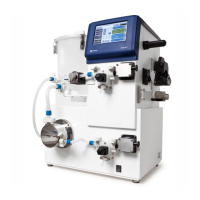








 To Next Page