25D-Link DCS-936L User Manual
Section 3 - Conguration
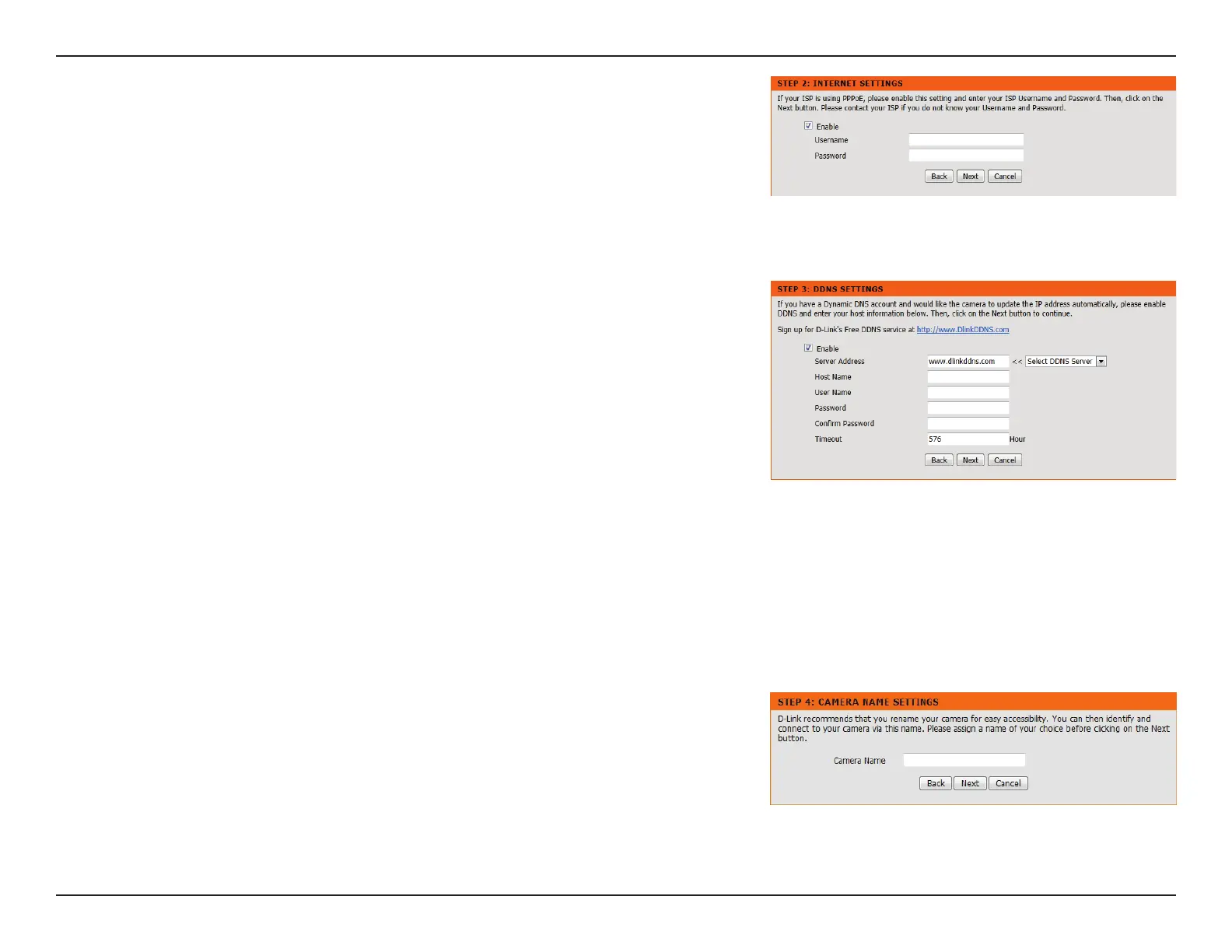
If you are required to connect using PPPoE, select Enabled and enter the Username and
Password for your PPPoE connection.
A Dynamic DNS account allows you to access your camera over the Internet when you
have an IP address that changes each time you connect to the Internet. If you have a
Dynamic DNS account, click Enable and enter the following details:
Select your Dynamic DNS Server from the pull down menu.
Enter the host name of the DDNS server.
Enter your username or e-mail address used to connect to the DDNS.
Enter your password used to connect to the DDNS server.
You can setup how often the camera noties the DDNS server of its
current global IP address by entering a whole number in hours.
Click Next to continue.
Server Address:
Host Name:
User Name:
Password:
Timeout:
Enter a name for your camera. Click Next to continue.








 To Next Page