36D-Link DCS-936L User Manual
Section 3 - Conguration
Audio and Video
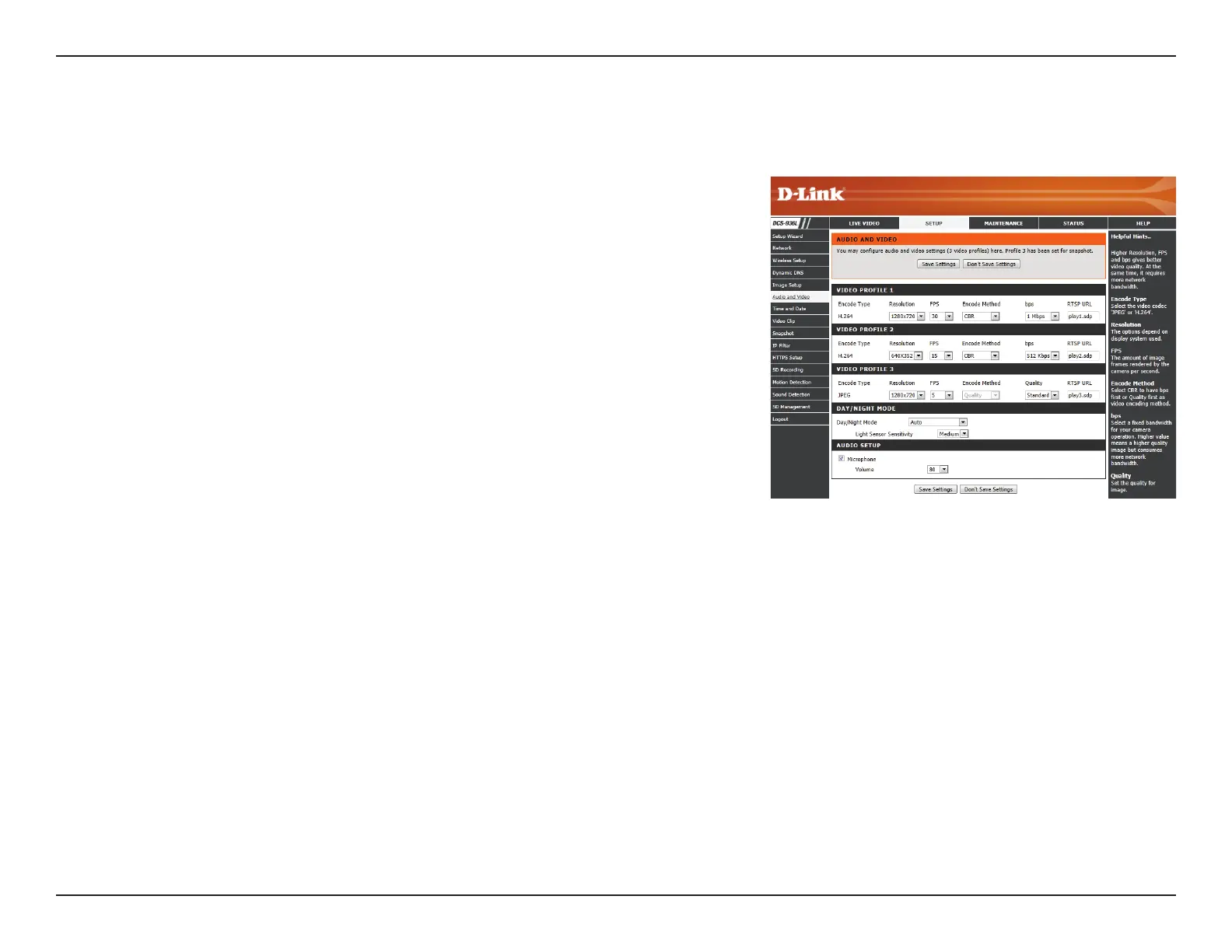
This section allows you to congure the audio and video settings for your camera.
Video Prole:
Encode Type:
Resolution:
FPS:
Encode
Method:
bps:
Quality:
There are three individual proles that can be congured. Prole 2 is used
for snapshots, and Prole 3 is used for mobile devices.
This is the video encoding the prole uses. These are xed for each prole.
Select the desired video resolution for the video prole:
1280 x 720, 640 x 352, or 320 x 176. Higher resolutions will provide a higher
quality image, but will require more network bandwidth and create larger
saved les.
Set the desired FPS for the video prole. A higher FPS will result in
smoother video playback, but will require more network bandwidth and
create larger saved les.
This is the encode method the prole uses. These are xed for each prole.
Select the bit rate to assign the video. The bps setting is used as a maximum
limit for the amount of data the camera will use. Higher settings will
provide a higher quality image, but will require more network bandwidth
and create larger saved les.
One of ve levels of image quality can be set for the snapshot feature:
Highest, High, Medium, Low, and Lowest. This setting is for Prole 2 only.










 To Next Page