39D-Link DCS-936L User Manual
Section 3 - Conguration
Video Clip
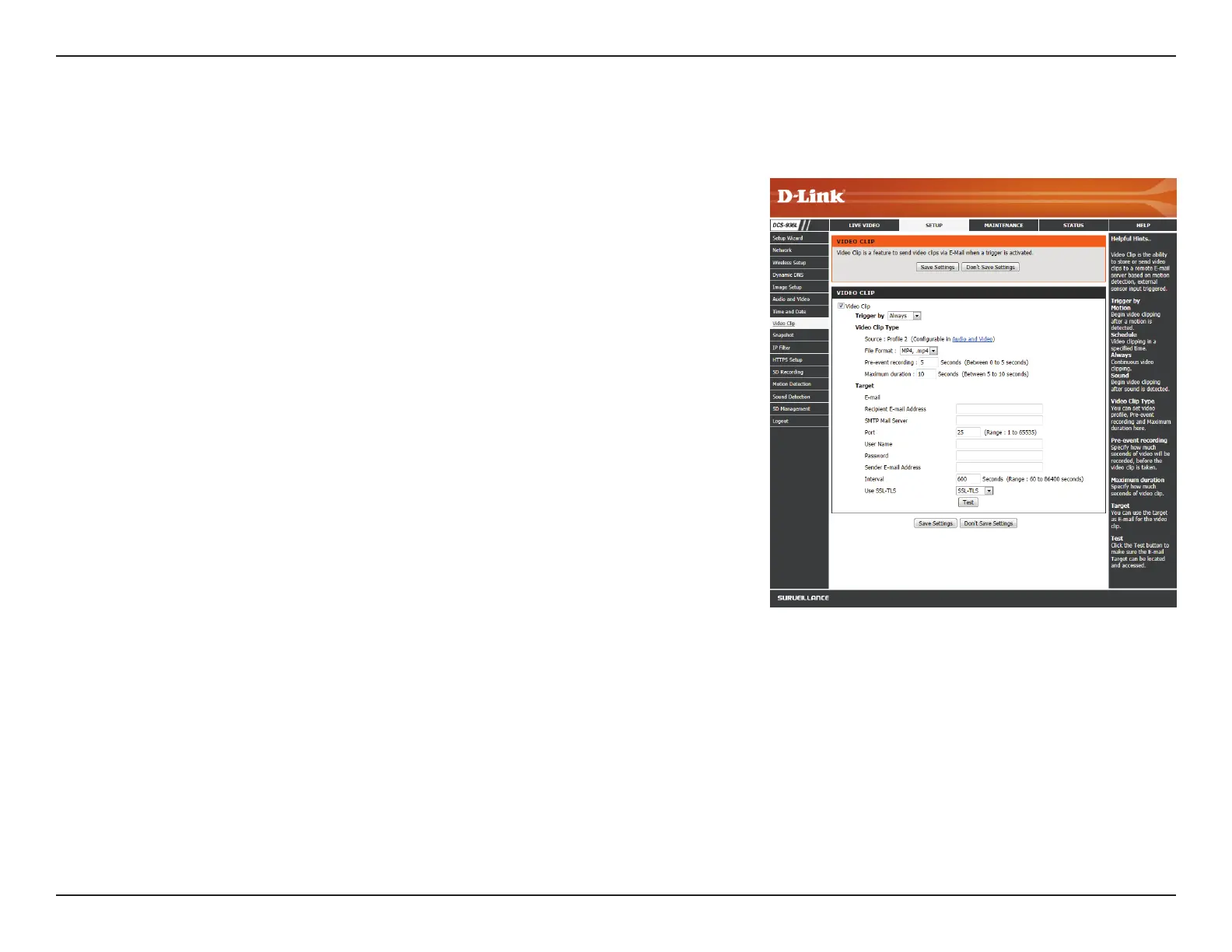
Video Clip allows you to send video clips via e-mail when a trigger is activated.
Video Clip:
Trigger By:
Video Clip
Type:
Target:
Check this box to enable the Video Clip function.
Select whether to record a video clip when triggered by Motion or Sound,
according to a Schedule, or Always record.
• Motion: Enables recording when motion is detected. You can limit
motion-triggered recording to a specic schedule by selection Only
during and entering the times you want motion-triggered recording
to be enabled.
• Schedule: Enables recording according to a schedule. Enter the times
you want the camera to record.
• Always: This will enable continuous recording.
• Sound: Enables recording when sound is detected. You can limit
sound-triggered recording to a specic schedule by selection Only
during and entering the times you want sound-triggered recording
to be enabled.
You may choose Video Prole 1 or 3 and select the le format and
recording length. For more on video prole options, refer to Audio and
Video on page 36.
Select where you want the video clip to be sent. Enter the settings for
your e-mail account.
Click Save Settings to save your changes.








 To Next Page