19D-Link DAP-1330 User Manual
Section 3 - Conguration
Web-based Setup
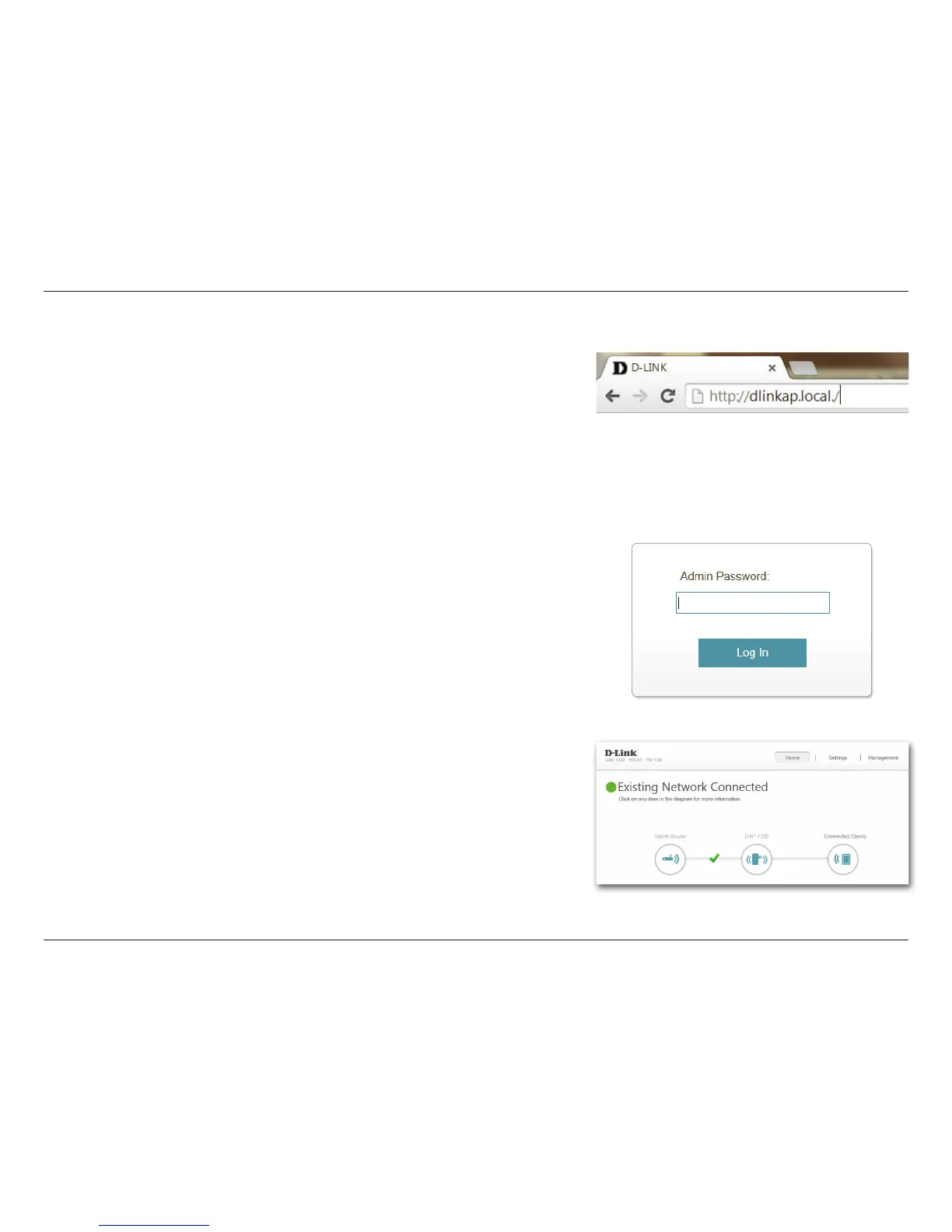
Enter your password. By default, Admin is the username and cannot be changed,
and by default, the password is blank.
To access the setup utility for the DAP-1330 N300 Wi-Fi Range Extender on your
PC, rst connect to the DAP-1330 wirelessly using the Wi-Fi name (SSID) and
password located on your Wi-Fi Conguration Card. Then open a web browser
and enter http://dlinkap.local./ in your browser’s URL eld. You may also enter
the IP address* of the DAP-1330.
* The default IP address is 192.168.0.50. Once your DAP-1330 connects to the host network,
it will be assigned a new IP address based on your network’s DHCP settings. You will need
to log in to your router to see what IP address is assigned to your DAP-1330.
For multiple DAP-1330s, go to http://xxxx.local./ as shown on the included Wi-Fi
Conguration Card, with “xxxx” being the last four digits of the DAP-1330’s MAC address.
The conguration interface will open, and you can congure the various settings
for the DAP-1330. If you have not yet congured an uplink network, the home
screen will show that there is no connection between the DAP-1330 and the
uplink router.



 To Next Page