Need help?
Do you have a question about the D-Link DCS-2132L and is the answer not in the manual?
Details revisions made to the manual.
Lists trademarks and copyright information.
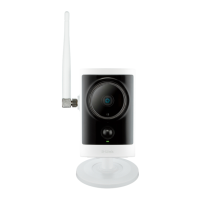
Introduces the DCS-2132L HD Wireless N Cube Network Camera.
Lists all items included in the camera's package.
Provides an overview of the camera's features and benefits for home/office security.
Lists the necessary hardware and software to use the camera.
Details the key features of the DCS-2132L camera, including connectivity and functionalities.
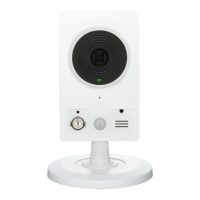
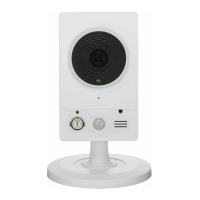
Identifies and describes the components on the front of the camera.
Identifies and describes the components on the rear of the camera.
Identifies and describes the components on the sides of the camera.
Provides guidelines for optimizing wireless network range and performance for the camera.
Explains the zero configuration process for setting up the camera with a D-Link Cloud Router.
Describes how to connect the camera to a wireless network using the WPS button.
Guides users on how to check and add their camera to a mydlink account.
Confirms the zero configuration setup is complete and guides on next steps.
Explains how to start the camera installation wizard from the CD-ROM.
Details selecting language and connecting the Ethernet cable during the setup wizard.
Covers connecting the other end of the Ethernet cable to the router and attaching the power supply.
Explains confirming network connection via LED status and selecting the camera in the wizard.
Guides on setting a password for camera security during installation.
Allows selection between wired or wireless connection methods for the camera.
Details how to register or log in to a mydlink account during setup.
Confirms camera login details and IP address before finalizing setup.
Provides steps for manual hardware installation without the setup wizard.
Describes the WPS push button method for wireless connection.
Explains how to access the camera remotely via the mydlink website after registration.
Describes how to check the online status of the camera on the mydlink portal.
Details viewing the live video feed of the camera through the mydlink interface.
Explains how to review pre-recorded footage from the microSD card.
Introduces the various settings available within the mydlink interface for camera control.
Configures motion detection settings for recording video clips.
Sets up scheduled recording based on time and day.
Provides access to advanced configuration options for the camera.
Manages event notifications and actions based on camera triggers.
Guides on accessing and logging into the camera's web configuration utility.
Explains the controls available for viewing live video and camera operation.
Describes additional live video features like profiles, snapshots, and preset lists.
Introduces the setup wizards for internet connection and motion detection.
Guides through setting up LAN settings using the Internet Connection Setup Wizard.
Covers DDNS setup and naming the IP camera within the wizard.
Details time zone setup and final completion of the internet connection wizard.
Guides through setting motion detection areas and schedules.
Covers setting up alerts and completing the motion detection wizard.
Details configuring LAN settings for the camera, including DHCP and Static IP.
Explains network protocols like UPnP, PPPoE, HTTP, HTTPS, and RTSP.
Covers Quality of Service, IPv6, and multicast streaming settings.
Details how to configure the camera's wireless network connection.
Explains how to set up Dynamic DNS for remote access.
Configures image settings like privacy masks, anti-flicker, and image orientation.
Adjusts exposure, denoising, brightness, contrast, saturation, and sharpness settings.
Configures audio and video profiles, including aspect ratio, mode, and frame size.
Details video parameters like frame rate, quality, bit rate, and audio settings.
Allows setting up preset points for ePTZ camera movement and sequences.
Manages preset sequences, including rearranging and updating dwell times.
Configures motion detection sensitivity, percentage, and drawing motion areas.
Sets the camera's time zone, daylight saving, and synchronizes time.
Introduces the concept of event setup and triggers for actions.
Details the sections within Event Setup: Event, Server, Media, and Recording.
Configures servers for saving snapshots and video, including email and FTP.
Sets up media types for snapshots, including pre/post-event images.
Configures media types for video clips and system logs.
Creates and schedules events, defining triggers, priority, and delay.
Further details on event time, trigger options, and server destination.
Configures recording schedules and settings, including destination and cycling size.
Specifies file separation based on size or time, and file name prefix.
Manages recorded files on the SD card, including formatting and viewing.
Controls digital input/output devices and their behavior with camera events.
Configures the IR Cut Filter and IR light control for day/night vision.
Enables and configures HTTPS for secure camera access and certificate management.
Sets access permissions for users via allow and deny IP address lists.
Manages administrator passwords, user accounts, and On-Screen Display settings.
Manages camera configuration backup, restore, and reboot functions.
Details how to upgrade the camera's firmware to the latest version.
Displays detailed information about the camera's device and network connection status.
Provides access to view and download camera system logs for troubleshooting.
Provides access to helpful information and guides for camera operation.
Details the specifications and pinouts for Digital Input/Output ports.
Lists detailed technical specifications for the camera hardware and image features.
Covers system requirements, management, software functions, and general specs.
Provides the physical dimensions of the camera with diagrams.
Details CE and FCC compliance statements and warnings for radio interference.
Covers FCC and Industry Canada radiation exposure statements and antenna regulations.
 General
| Maximum resolution | 1280 x 800 pixels |
|---|---|
| Supported video modes | 720p |
| Video formats supported | H.264, M-JPEG, MPEG4 |
| Supported graphics resolutions | 176 x 144, 320 x 240, 1024 x 768 (XGA), 1280 x 720 (HD 720), 1280 x 800 (WXGA), 640 x 480 (VGA), 800 x 600 (SVGA) |
| Minimum illumination | 0 lx |
| Field of view (FOV) angle | 66 ° |
| Sensor type | CMOS |
| Optical sensor size | 1/4 \ |
| Digital zoom | 10 x |
| Optical zoom | - x |
| Focus adjustment | 2.0 |
| Fixed focal length | 3.45 mm |
| Active tampering alarm | No |
| Video motion detection | Yes |
| Compatible memory cards | microSD (TransFlash), microSDHC |
| LED type | IR |
| Night vision distance | 5 m |
| Type | IP security camera |
| Certification | CE, CE LVD, FCC, C-Tick |
| Placement supported | Indoor |
| Connectivity technology | Wired & Wireless |
| Form factor | Box |
| Product color | White |
| Interface | RJ-45 |
| Ethernet LAN (RJ-45) ports | 1 |
| Wi-Fi standards | Wi-Fi 4 (802.11n) |
| Cabling technology | 10/100Base-T(X) |
| Supported network protocols | HTTP, FTP, TCP/IP, SMTP, DHCP, PPPoE, DDNS, UPnP, RTP / RTSP/ RTCP, QoS, CoS, IGMP |
| AC input voltage | 100-240 V |
| DC output current | 1.2 A |
| DC output voltage | +5V |
| AC input frequency | 50 - 60 Hz |
| Power consumption (typical) | 3.65 W |
| Storage temperature (T-T) | -20 - 70 °C |
| Operating temperature (T-T) | 0 - 40 °C |
| Storage relative humidity (H-H) | 5 - 95 % |
| Operating relative humidity (H-H) | 20 - 80 % |
| Pallet width | 1200 mm |
| Pallet length | 1100 mm |
| Pallet height (air) | 1329 mm |
| Pallet height (sea) | 1926 mm |
| Pallet gross weight (air) | 255856 g |
| Pallet gross weight (sea) | 372784 g |
| Quantity per pallet (air) | 420 pc(s) |
| Quantity per pallet (sea) | 630 pc(s) |
| Shipping (inner) case width | 324 mm |
| Shipping (inner) case height | 199 mm |
| Shipping (inner) case length | 538 mm |
| Shipping (inner) case weight | 5568 g |
| Shipping (inner) case net weight | 4818 g |
| Number of cartons per pallet (air) | 42 pc(s) |
| Number of cartons per pallet (sea) | 63 pc(s) |
| Quantity per shipping (inner) case | 10 pc(s) |
 Weight and Dimensions
| Depth | 58 mm |
|---|---|
| Width | 89 mm |
| Height | 127 mm |
| Weight | 116 g |
| Package depth | 160 mm |
| Package width | 152 mm |
| Package height | 102 mm |
| Package weight | 481.8 g |

 To Next Page