DIR-842 AC1200 Wave 2 MU-MIMO Wi-Fi EasyMesh Gigabit
Router
User Manual
Configuring via Web-based Interface
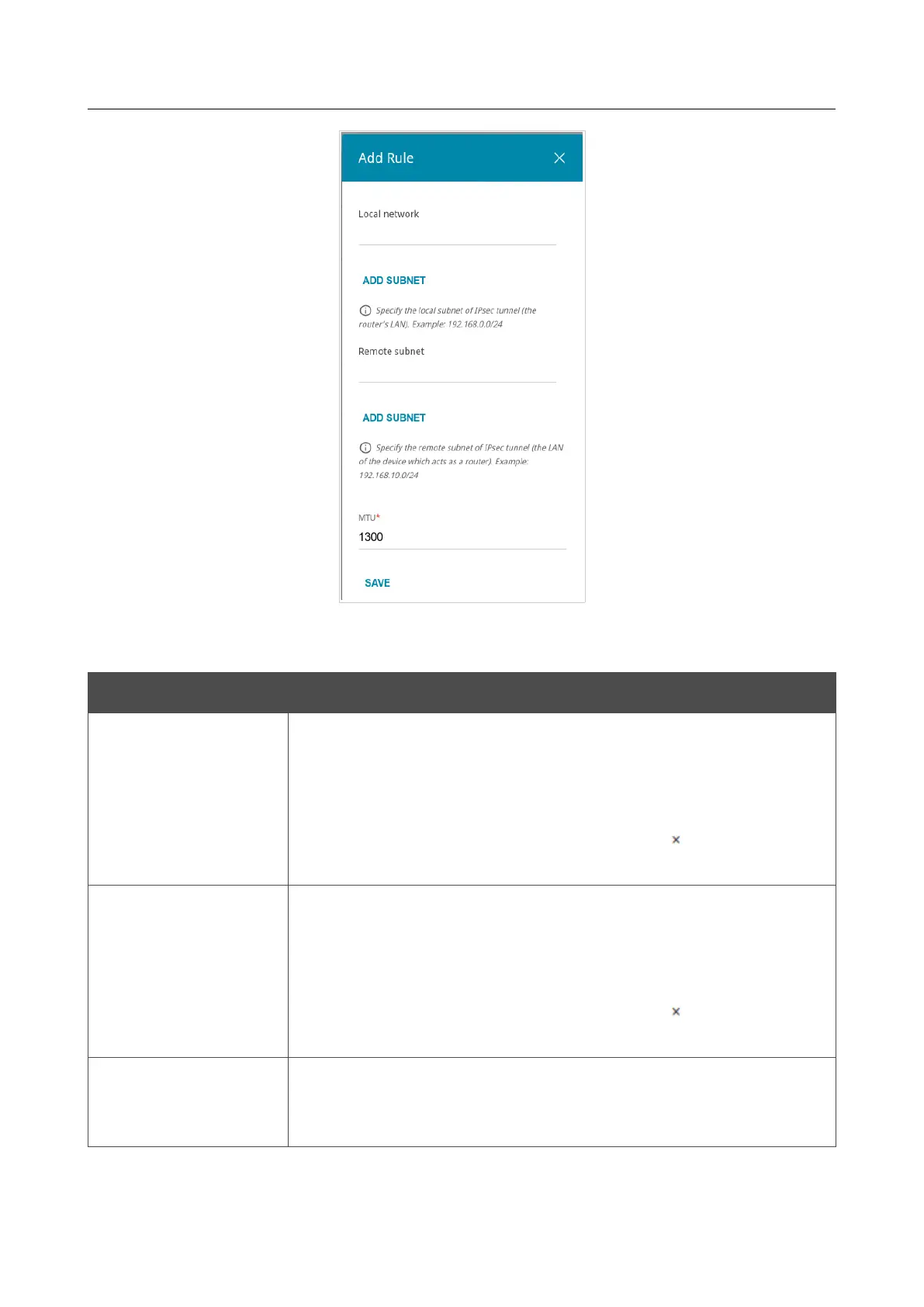
Figure 135. The page for adding an IPsec tunnel. The window for adding a tunneled network.
In the opened window, you can specify the following parameters:
Parameter Description
Local network
A local subnet IP address and mask.
To add one more subnet, click the ADD SUBNET button and enter
the subnet address in the displayed line (available if 2 is selected from
the IKE version list in the The First Phase section).
To remove the subnet, click the Delete icon ( ) in the line of the
subnet address.
Remote subnet
A remote subnet IP address and mask.
To add one more subnet, click the ADD SUBNET button and enter
the subnet address in the displayed line (available if 2 is selected from
the IKE version list in the The First Phase section).
To remove the subnet, click the Delete icon ( ) in the line of the
subnet address.
MTU
The maximum size (in bytes) of a non-fragmented packet. The field is
displayed when the Manual value is selected from the TCP MSS
drop-down list in the General Settings section.
Page 172 of 233



 To Next Page