44D-Link DIR-865L User Manual
Section 3 - Conguration
To congure your DIR-865L router to bridge mode, follow the steps
below:
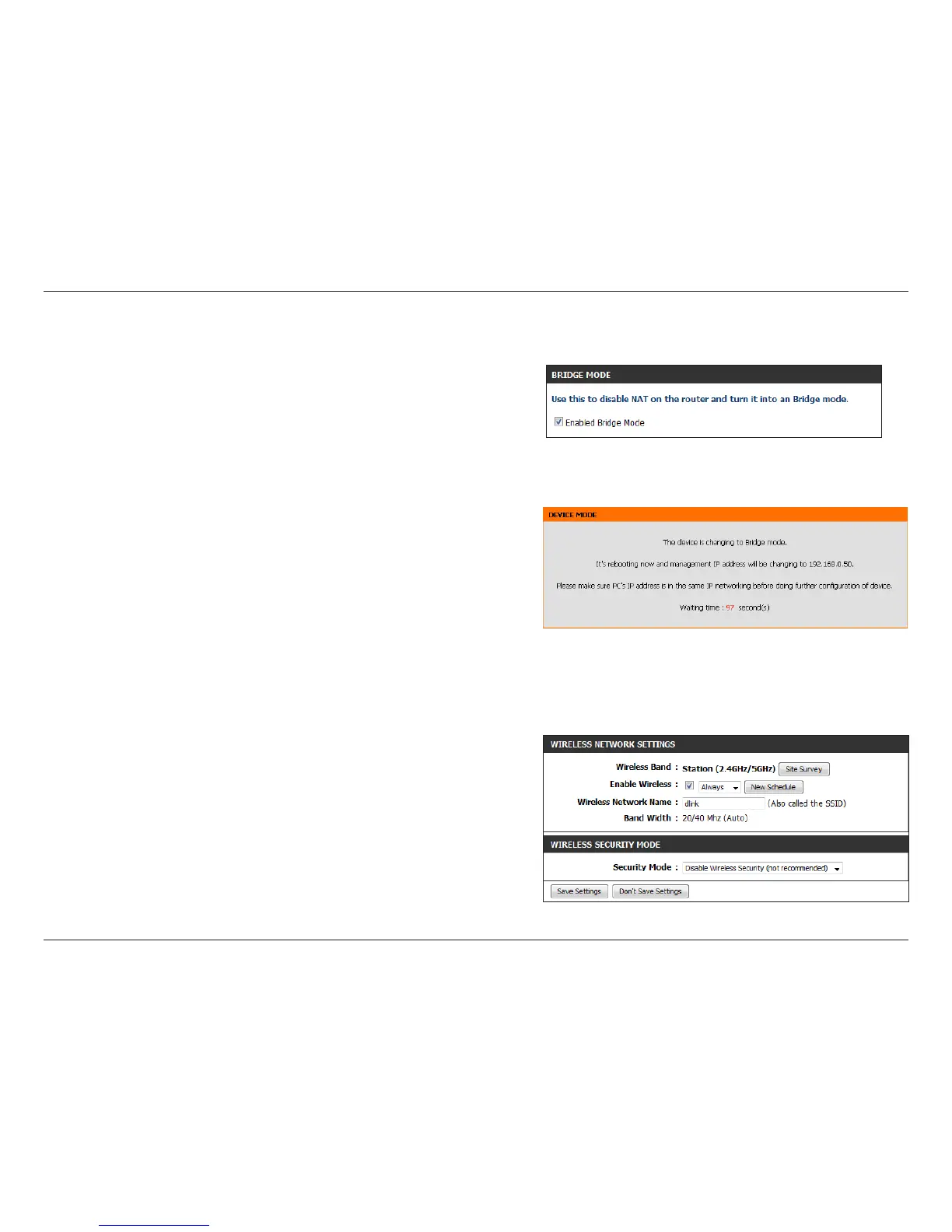
Step 1 - From the Setup > Internet page, click Manual Internet
Connection Setup and then check the Enable Wireless Bridge box.
Click Save Settings and then click OK to the pop-up message.
Note: When you enable Bridge mode, the DIR-865L’s default IP address will
change to 192.168.0.50.
Step 2 - The following message will appear. The router will automatically
reboot.
Step 3 - Once the router reboots, you may get a “connect display page”
error on your web browser. This is because the IP address of the router
changed. In your web browser, enter http://192.168.0.50 to access
the web interface.
Step 4 - At the login screen, enter admin for the User Name and enter
your password (leave blank by default).
Step 5 - From the Setup > Wireless Settings page, click the Site Survey
button. This will display a list of wireless networks in your area.
You may also manually enter the wireless network name you want
to connect to (SSID) and any security/encryption settings (from the
Security Mode drop-down menu). Enter your wireless network
information, click Save Settings, and then skip to step 7.



 To Next Page