DSL-2750U Wireless ADSL2+ Router with 3G/LTE/Ethernet WAN Support
and USB Port
User Manual
Configuring via Web-based Interface
WAN Reservation
On the Connections Setup / WAN Reservation page, you can enable the WAN backup
function, which provides you with uninterrupted access to the Internet. When your main connection
breaks down, the router activates the backup connection; and when the main channel is recovered,
the router switches to it and disconnects the reserve one.
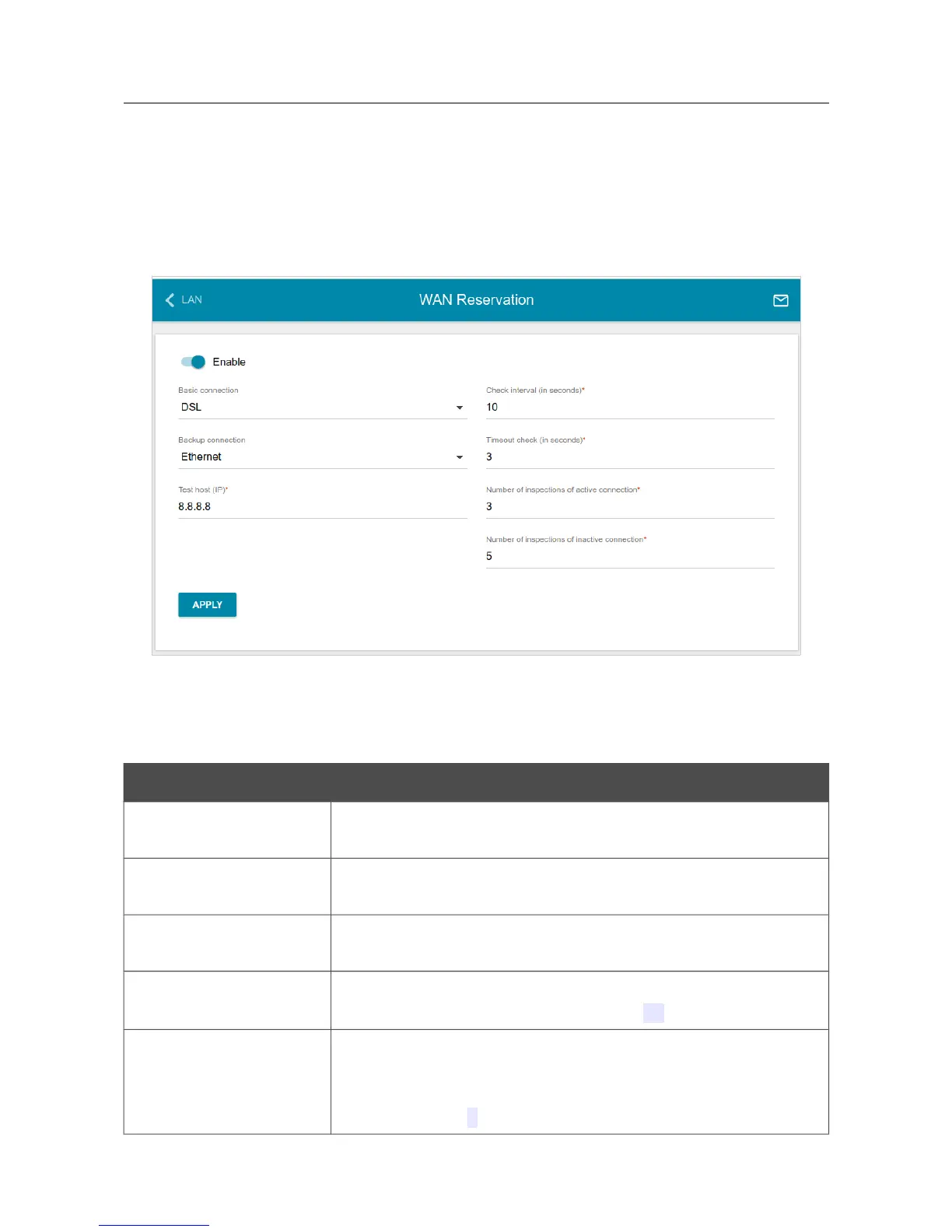
Figure 92. The Connections Setup / WAN Reservation page.
To activate the backup function, create the main and the reserve WAN connections. After that go to
the Connections Setup / WAN Reservation page, move the Enable switch to the right, and
specify the needed values in the fields displayed on the page.
Parameter Description
Basic connection
From the drop-down list, select a WAN connection which will be
used as the main one.
Backup connection
From the drop-down list, select a WAN connection which will be
used as the reserve one.
Test host
An IP address that the router will check for availability via ICMP
ping mechanism.
Check interval
A time period (in seconds) between attempts to check the status of
the main connection. By default, the value 10 is specified.
Timeout check
A time period (in seconds) for an attempt to check the status of the
main connection. At the end of this period the router's internal
system makes a decision to enable/disable the reserve channel. By
default, the value 3 is specified.
Page 115 of 210



 To Next Page
 Loading...













